PDFxlsx
PDFxlsx: A focused PDF-to-spreadsheet converter with OCR, table mapping, and batch workflows. Ranked #17 of 46 in PDF Converter Software by our editors (7.4/10); pricing: Paid; best for PDF-to-Excel table extraction workflows.
At a glance
- Editor score7.4 / 10
- PricingPaid
- Best forPDF-to-Excel table extraction workflows
- OCR conversionYes
- Facts checked19 Sep 2026
Where it wins
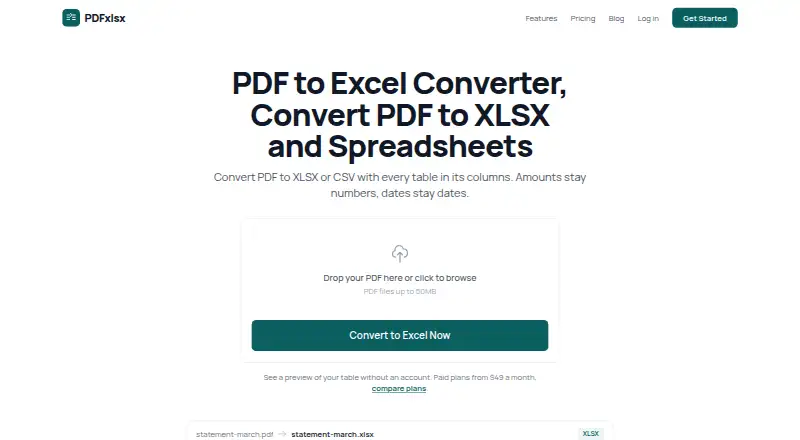
- Detects tables and aligns columns, including in scanned PDFs with OCR.
- Preserves numeric and date types in XLSX or CSV exports.
- Supports batch conversion, custom mapping templates, and a REST API.
Where it doesn't
- Exports focus on XLSX, XLS, CSV, and Google Sheets rather than broad file conversion.
- The 50 MB maximum file size applies across listed plans.
- Batch conversion and API access are limited to higher-tier plans.
Our verdict on PDFxlsx
PDFxlsx converts digital and scanned PDFs into spreadsheet-ready data for accountants, bookkeepers, finance teams, and other business users. It detects tables, aligns columns, and uses OCR for scanned documents, then exports to XLSX or CSV. PDF-to-Excel table extraction is its clearest fit: people handling reports or records in tabular form can use its type preservation, multi-sheet output, and column mapping to prepare data for spreadsheet work. It is a narrower choice for buyers who need conversion across many unrelated document formats.
The feature set is centered on extraction quality and repeatable workflows. Numeric and date type preservation helps keep values structured for spreadsheet use, while custom column mapping templates can support recurring layouts. Multi-page documents are supported, and batch conversion is available on eligible plans. Excel and Google Sheets are listed integrations; the service also offers a REST API with bearer-token authentication for automated conversion workflows. Automatic document deletion after processing is a stated feature. Platforms listed are web, Windows, macOS, and iOS.
The published plans show Starter with up to 50 conversions per month and one team member; Plus raises the allowance to 500 and adds up to five team members, batch conversion, and custom column mapping. Pro lists unlimited conversions, unlimited team members, batch conversion, mapping, and API access at $39 per month. The listed 50 MB maximum file size applies to these plans. Enterprise is oriented toward organizational requirements with custom integrations, an on-premise deployment option, custom data retention, and a dedicated support engineer. PDFxlsx suits teams whose main job is turning tabular PDFs into spreadsheet data; buyers seeking broad conversion targets or a more general-purpose PDF suite should look elsewhere.
Your product? Our editors can test PDFxlsx in depth and publish a review, labelled as paid · from $149/mo →
PDFxlsx pricing
All 4 PDFxlsx plans and prices →
PDFxlsx fact sheet
| Free plan | Not verified |
|---|---|
| Paid from | Not verified |
| Conversion targets | PDF to XLSX; PDF to XLS; PDF to CSV; PDF to Google Sheets |
| OCR conversion | Yes |
| Batch conversion | Yes |
| Maximum file size | 50 MB |
| Supported platforms | web, Windows, macOS, iOS |
| API access | Yes |
| Deployment | Cloud, Desktop, Mobile |
| Platforms | Web, Windows, macOS, iOS |
| Integrations | 2 integrations: Excel, Google Sheets |
| Pricing | Paid (source) |
| Website | pdfxlsx.com |
| Facts checked | 19 Sep 2026 |
PDFxlsx integrations
PDFxlsx lists 2 integrations on its own site.
- Excel
- Google Sheets
Alternatives to PDFxlsx
- Wondershare PDFelementA full PDF workbench with conversion, OCR, forms, security, signatures, and AI tools.9.3
- Adobe PDF Services APIA broad PDF automation API with a useful free tier and quote-based paid scaling.9.1
- ConvertioA broad cloud converter for documents, media, images, and automated workflows.9.0



See all PDFxlsx alternatives →
Used PDFxlsx? Be the first to review it
The editor score above is our own research. What this page doesn't have yet is a reader's view — what you used PDFxlsx for, what worked and what didn't. No stars are seeded and no review is paid for; an editor reads every one before it appears.
Write a reviewTwo minutes · verified accounts only · read by an editor before it appears
Featured on iTechGuides

PDFxlsx is listed in our PDF Converter Software directory. Add the badge to your site — it links back to this page.
<a href="https://www.itechguides.com/products/pdfxlsx/"><img src="https://www.itechguides.com/best/badge/pdfxlsx.svg" alt="Featured on iTechGuides" width="230" height="46"></a>
Reviewed by iTechGuides Editors · Editorial team · Updated Oct 2026
Advertiser disclosure: iTechGuides is reader-supported. Vendors can pay for top positions in our rankings and for a place on other products' pages, and we may earn a commission when you click some links. Bought places stand at the number bought; this page and our disclosure say so. Paying vendors may get a fuller, more detailed review from our editors, and that review can change their score. How we rank.
Last updated · How we research and update