
PDFToQuiz
PDFToQuiz: A multilingual quiz generator with broad inputs, editing, grading, and progress tracking. Ranked #18 of 29 in AI Quiz Generators by our editors (7.5/10); pricing: Free plan; best for users creating multilingual document quizzes.
At a glance
- Editor score7.5 / 10
- PricingFree plan
- Best forUsers creating multilingual document quizzes
- Free planYes
- Input sourcesDocument
- Facts checked20 Sep 2026
Where it wins
- Accepts PDFs, DOCX, PPTX, URLs, plain text, and scanned PDFs
- Supports mixed question types, explanations, editing, grading, and sharing
- Generates quizzes in 40+ languages with progress tracking
Where it doesn't
- The Free plan allows only 3 quizzes and 5-page documents
- Quiz exports in PDF, CSV, and XLSX require the Pro plan
- Available on the web rather than as a native desktop or mobile app
Our verdict on PDFToQuiz
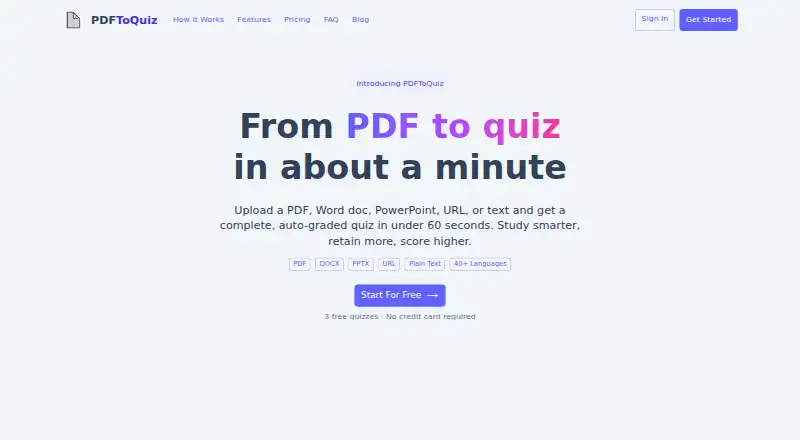
PDFToQuiz is a web-based AI quiz generator for students, teachers, lecturers, training teams, and self-learners. It turns PDFs, DOCX files, PPTX presentations, URLs, plain text, and scanned PDFs into interactive quizzes. OCR support helps process scanned documents, while supported question formats include multiple-choice, true/false, fill-in-the-blank, and long-form questions. The tool also generates answer explanations, supports more than 40 languages, and lets users edit questions before use or sharing.
The main strength is breadth across the quiz workflow. Users can create quizzes from several document and web inputs, review and edit generated questions, share them through links, and use auto-grading with instant results. Progress tracking adds a way to follow quiz activity over time. This combination suits educators and training teams working from varied learning materials, as well as self-learners who want interactive review rather than static documents. OCR and multilingual generation are particularly relevant when source material is scanned or learners work across languages.
The Free plan provides 3 free quizzes, a 1 GB maximum upload size, a 5-page document limit, and 10 AI chat assistant messages. Pro adds unlimited quiz creations, a 5 GB maximum upload size, a 100-page document limit, unlimited AI chat assistant messages, AI feedback on quiz results, and quiz downloads. Pro exports include PDF, CSV, and XLSX. PDFToQuiz is a practical choice for users who need flexible document inputs, mixed question formats, and multilingual output. Users who need native apps or export access without Pro should consider alternatives with those priorities.
Your product? Our editors can test PDFToQuiz in depth and publish a review, labelled as paid · from $149/mo →
PDFToQuiz pricing
All 2 PDFToQuiz plans and prices →
PDFToQuiz fact sheet
| Free plan | Yes |
|---|---|
| Paid from | Not verified |
| Input sources | Document |
| Question types | Mixed |
| Questions per quiz | Not verified |
| Quiz export formats | |
| Answer explanations | Yes |
| Question bank | Not verified |
| Deployment | Cloud |
| Platforms | Web |
| Support | |
| Built for | Solo, Small business, Mid-market (editorial estimate) |
| Pricing | Free plan (source) |
| Website | pdftoquiz.com |
| Facts checked | 20 Sep 2026 |
Alternatives to PDFToQuiz
- PrepAIA flexible web quiz generator with strong assessment, export, LMS, and API coverage.9.4
- QuizgeckoA broad AI study platform for turning learning material into editable assessments.9.2
- QuizbotA broad AI quiz generator for interactive learning, study support, and classroom exports.9.0


See all PDFToQuiz alternatives →
Used PDFToQuiz? Be the first to review it
The editor score above is our own research. What this page doesn't have yet is a reader's view — what you used PDFToQuiz for, what worked and what didn't. No stars are seeded and no review is paid for; an editor reads every one before it appears.
Write a reviewTwo minutes · verified accounts only · read by an editor before it appears
Featured on iTechGuides

PDFToQuiz is listed in our AI Quiz Generators directory. Add the badge to your site — it links back to this page.
<a href="https://www.itechguides.com/products/pdftoquiz/"><img src="https://www.itechguides.com/best/badge/pdftoquiz.svg" alt="Featured on iTechGuides" width="230" height="46"></a>
Reviewed by iTechGuides Editors · Editorial team · Updated Oct 2026
Advertiser disclosure: iTechGuides is reader-supported. Vendors can pay for top positions in our rankings and for a place on other products' pages, and we may earn a commission when you click some links. Bought places stand at the number bought; this page and our disclosure say so. Paying vendors may get a fuller, more detailed review from our editors, and that review can change their score. How we rank.
Last updated · How we research and update