PDFNoob
PDFNoob: A free PDF-based quiz tool with mixed question formats, grading, and exports. Ranked #12 of 29 in AI Quiz Generators by our editors (8.1/10); pricing: Free plan; best for learners wanting a simple free PDF quiz tool.
At a glance
- Editor score8.1 / 10
- PricingFree plan
- Best forLearners wanting a simple free PDF quiz tool
- Free planYes
- Paid fromNone
- Input sourcesDocument
- Facts checked20 Sep 2026
Where it wins
- Fully free quiz generation with no sign-up required
- Supports quizzes, flashcards, grading, insights, and explanations
- Exports worksheets and answer keys in TXT, DOCX, or PDF
Where it doesn't
- Accepts PDF documents as the input source
- Does not provide integrations with other services
- Answer explanations and question editing require a free account
Our verdict on PDFNoob
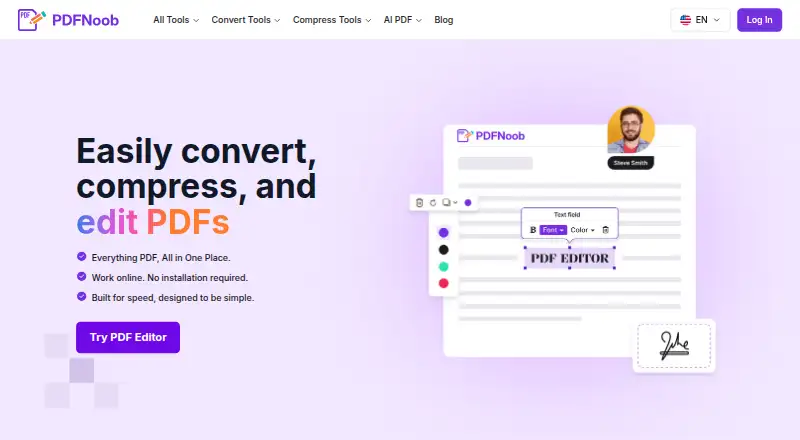
PDFNoob is a browser-based PDF toolkit with an AI question generator for students and teachers. It turns uploaded PDF documents into multiple-choice, true/false, open-ended, or flashcard activities. Users can choose 5, 10, or 15 questions per generation pass, then take the quiz with instant grading and scores. The product is suited to learners who want a straightforward way to convert study documents into practice material, as well as teachers preparing worksheets and answer keys.
The pricing model is simple: PDFNoob provides free quiz generation without requiring sign-up. Signed-in users receive additional capabilities, including AI answer explanations after repeated misses and the ability to edit generated questions. The published feature set also includes AI study insights and exports in TXT, DOCX, or PDF, which gives users options for both digital review and printable materials. Its support for several question formats makes it more flexible than a tool limited to one quiz style, while the 5-, 10-, and 15-question options allow users to control the size of each generation pass.
PDFNoob works across the web, Windows, macOS, iOS, and Android, offering broad device coverage for studying or preparing materials. It is focused on document-based workflows: uploaded PDFs are the starting point, and the product does not provide integrations with other services. PDFNoob says uploaded files are deleted within one hour, a useful part of its handling of uploaded study material. Choose it if you want a free PDF quiz generator with grading, explanations, editing, and export options. Consider another tool if you need non-document input sources or connected integrations.
PDFNoob pricing
PDFNoob fact sheet
| Free plan | Yes |
|---|---|
| Paid from | None |
| Input sources | Document |
| Question types | Mixed |
| Questions per quiz | 15 questions |
| Quiz export formats | |
| Answer explanations | Yes |
| Question bank | Not verified |
| Deployment | Cloud, Browser extension |
| Platforms | Web, Windows, macOS, iOS, Android |
| Support | |
| Built for | Solo, Small business (editorial estimate) |
| Pricing | Free plan |
| Website | pdfnoob.com |
| Facts checked | 20 Sep 2026 |
Alternatives to PDFNoob
- PrepAIA flexible web quiz generator with strong assessment, export, LMS, and API coverage.9.4
- QuizgeckoA broad AI study platform for turning learning material into editable assessments.9.2
- QuizbotA broad AI quiz generator for interactive learning, study support, and classroom exports.9.0


See all PDFNoob alternatives →
Used PDFNoob? Be the first to review it
The editor score above is our own research. What this page doesn't have yet is a reader's view — what you used PDFNoob for, what worked and what didn't. No stars are seeded and no review is paid for; an editor reads every one before it appears.
Write a reviewTwo minutes · verified accounts only · read by an editor before it appears
Featured on iTechGuides

PDFNoob is listed in our AI Quiz Generators directory. Add the badge to your site — it links back to this page.
<a href="https://www.itechguides.com/products/pdfnoob/"><img src="https://www.itechguides.com/best/badge/pdfnoob.svg" alt="Featured on iTechGuides" width="230" height="46"></a>
Reviewed by iTechGuides Editors · Editorial team · Updated Oct 2026
Advertiser disclosure: iTechGuides is reader-supported. Vendors can pay for top positions in our rankings and for a place on other products' pages, and we may earn a commission when you click some links. How we rank.
Last updated · How we research and update