
PDF-XChange Editor
PDF-XChange Editor: A capable Windows PDF editor with broad free access and a one-time paid upgrade. Ranked #11 of 102 in PDF Editors by our editors (8.4/10); pricing: Free plan; best for windows users wanting a capable free editor.
At a glance
- Editor score8.4 / 10
- PricingFree plan
- Best forWindows users wanting a capable free editor
- Free planYes
- Paid from$62/user one-time
- OCRYes
- Founded1997
- Facts checked21 Sep 2026
Where it wins
- More than 70% of features are available without a license
- Includes OCR, PDF conversion, annotations and digital signatures
- AI Assistant integrations include OpenAI, Anthropic and Google
Where it doesn't
- Supports Windows 10 and later only
- Base Editor does not include fillable-form creation
- Unlicensed licensed features add watermarks when used
Our verdict on PDF-XChange Editor
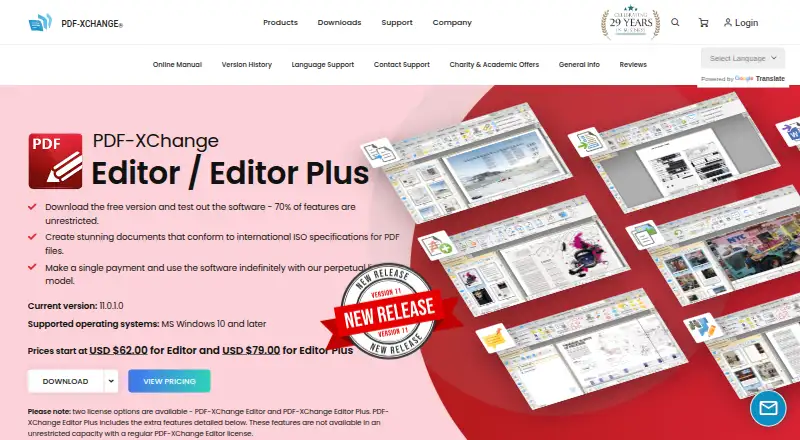
PDF-XChange Editor is a Windows desktop application for creating, viewing, editing, annotating, OCR-processing and digitally signing PDF files. It is aimed at Windows users who need more than basic viewing, including editing existing PDF text, marking up documents, converting files and combining documents into new PDFs. The published feature set also includes conversion between PDF and Microsoft Word, Excel, PowerPoint, plain text, PDF/A, PDF/X, image, CSV, RTF and XPS formats. Support for Windows 10 and later makes it a focused desktop choice rather than a cross-platform PDF editor.
Pricing is straightforward. The Free version is unlimited, and more than 70% of features do not require a license. Licensed features used without a license add watermarks. The paid PDF-XChange Editor plan costs $62 USD as a one-time purchase for a single-user perpetual license, with one year of maintenance included. That maintenance covers licensed features and updates during the maintenance period. This structure suits buyers who prefer a desktop license over recurring per-user/month pricing, while the free tier provides a broad way to work with PDFs before committing.
Its strongest fit is document-heavy work that benefits from OCR, conversion and detailed markup. Users can add highlights, strikeouts, underlines, sticky notes, stamps, shapes and freehand annotations, then digitally sign PDF files. The AI Assistant supports analysis and interaction with PDF documents, with integrations listed for OpenAI, Anthropic and Google. The base Editor product does not include fillable-form creation, which makes it less suitable for workflows centered on building PDF forms. Choose PDF-XChange Editor for capable Windows-based PDF editing with extensive free access; choose an alternative if cross-platform support or form creation is central.
Your product? Our editors can test PDF-XChange Editor in depth and publish a review, labelled as paid · from $149/mo →
PDF-XChange Editor pricing
All 2 PDF-XChange Editor plans and prices →
PDF-XChange Editor fact sheet
| Free plan | Yes |
|---|---|
| Paid from | $62/user one-time |
| Text editing | Yes |
| Annotation tools | Yes |
| OCR | Yes |
| PDF conversion | Yes |
| Form creation | Yes |
| Supported platforms | windows |
| Deployment | Desktop |
| Platforms | Windows |
| Support | Email, Community, Docs |
| Built for | Solo, Small business, Mid-market, Enterprise (editorial estimate) |
| Integrations | 5 integrations: SharePoint, OneDrive, Google Drive, Dropbox, Box.com |
| Pricing | Free plan (source) |
| Website | pdf-xchange.com |
| Facts checked | 21 Sep 2026 |
PDF-XChange Editor integrations
PDF-XChange Editor lists 5 integrations on its own site.
- SharePoint
- OneDrive
- Google Drive
- Dropbox
- Box.com
Alternatives to PDF-XChange Editor
- Foxit PDF EditorA mature PDF workspace with deep editing, OCR, forms, security, and integrations.9.3
- iLovePDFA broad PDF toolkit with free access, offline desktop processing, and cross-device apps.9.2
- SmallpdfA broad PDF toolkit for simple editing across web, Windows, mobile, and Chrome.9.1



See all PDF-XChange Editor alternatives →
Also Ranked In
PDF-XChange Editor is ranked in 4 of our directories.
Used PDF-XChange Editor? Be the first to review it
The editor score above is our own research. What this page doesn't have yet is a reader's view — what you used PDF-XChange Editor for, what worked and what didn't. No stars are seeded and no review is paid for; an editor reads every one before it appears.
Write a reviewTwo minutes · verified accounts only · read by an editor before it appears
Featured on iTechGuides

PDF-XChange Editor is listed in our PDF Editors directory. Add the badge to your site — it links back to this page.
<a href="https://www.itechguides.com/products/pdf-xchange-editor/"><img src="https://www.itechguides.com/best/badge/pdf-xchange-editor.svg" alt="Featured on iTechGuides" width="230" height="46"></a>
Reviewed by iTechGuides Editors · Editorial team · Updated Oct 2026
Advertiser disclosure: iTechGuides is reader-supported. Vendors can pay for top positions in our rankings and for a place on other products' pages, and we may earn a commission when you click some links. Bought places stand at the number bought; this page and our disclosure say so. Paying vendors may get a fuller, more detailed review from our editors, and that review can change their score. How we rank.
Last updated · How we research and update