
PDF Mage
PDF Mage: A focused choice for quick web-page capture, with useful API controls but limited ecosystem depth. Ranked #26 of 45 in PDF Creation Software by our editors (6.6/10); pricing: Free plan; best for quick web-page PDF capture.
At a glance
- Editor score6.6 / 10
- PricingFree plan
- Best forQuick web-page PDF capture
- Free planYes
- Facts checked22 Sep 2026
Where it wins
- Captures full pages or selected portions from a browser
- REST API converts HTML markup or URLs into PDFs
- Controls page layout, passwords, and PDF permissions
Where it doesn't
- Free version restrictions apply
- Integrations are limited beyond web, extensions, and API access
- No AI features or broader document-creation tools
Our verdict on PDF Mage
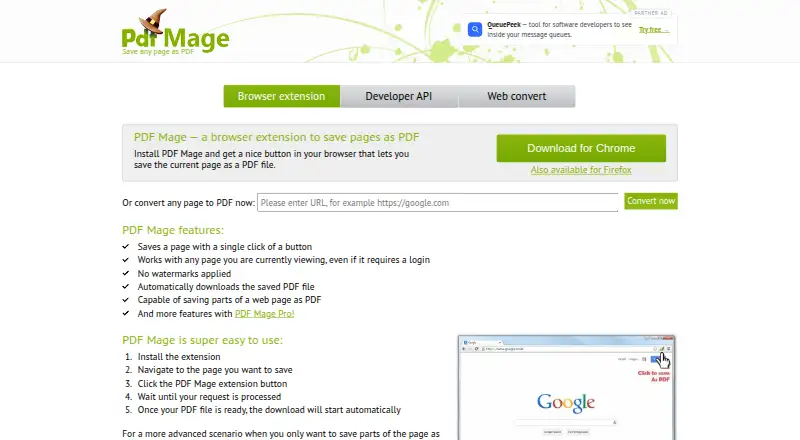
PDF Mage is a web-based PDF creation tool for people who need to turn web content into downloadable PDFs quickly. Its browser extension saves the current page or selected portions of a page, while its REST API supports HTML markup and URL conversion. This makes it a focused fit for individuals capturing online content and developers adding web-to-PDF generation to an application or workflow. Chrome and Firefox extension support broadens its browser coverage, while the service processes page content on PDF Mage servers.
The plan structure is straightforward. The Free plan includes browser extension access, with free-version restrictions. PDF Mage Pro adds no printing restrictions, removes the conversions-per-minute limit, and introduces customizable page size and PDF password protection. Across the product, users can adjust page size, orientation, and margins, automatically download generated PDFs, and set permissions for printing, copying, and editing. These controls give Pro a clearer fit for recurring conversion work or documents that need tighter distribution settings.
PDF Mage’s main strength is its narrow focus: it combines browser capture with API-based conversion and layout controls rather than trying to cover a wider document-authoring workflow. Developers can work with HTML or URLs, and browser users can capture a whole page or a selection. The trade-off is a limited platform and integration footprint, with no AI features or broader ecosystem capabilities described. Choose PDF Mage when fast web-page capture and programmable conversion are the priority; choose an alternative when you need extensive integrations, richer document editing, or a broader PDF workspace.
Your product? Our editors can test PDF Mage in depth and publish a review, labelled as paid · from $149/mo →
PDF Mage pricing
All 2 PDF Mage plans and prices →
PDF Mage fact sheet
| Free plan | Yes |
|---|---|
| Paid from | Not verified |
| Data merge | Not verified |
| Bulk PDF generation | Not verified |
| API access | Yes |
| Maximum pages | Not verified |
| Input sources | HTML, URL |
| Fillable form creation | Not verified |
| Deployment | Web |
| Money-back guarantee | 30 days |
| Deployment | Cloud, Browser extension |
| Platforms | Web, Chrome extension |
| Compliance & security | GDPR |
| Built for | Solo, Small business (editorial estimate) |
| Pricing | Free plan (source) |
| Website | pdfmage.org |
| Facts checked | 22 Sep 2026 |
Alternatives to PDF Mage
- Wondershare PDFelementA broad PDF toolkit covering editing, OCR, forms, conversion, signatures, and AI workflows.9.3
- Adobe PDF Services APIA broad PDF automation API for enterprise document workflows and integrations.9.2
- PDFCreatorA Windows-focused PDF converter for batch processing, automation, and controlled output.9.1



See all PDF Mage alternatives →
Used PDF Mage? Be the first to review it
The editor score above is our own research. What this page doesn't have yet is a reader's view — what you used PDF Mage for, what worked and what didn't. No stars are seeded and no review is paid for; an editor reads every one before it appears.
Write a reviewTwo minutes · verified accounts only · read by an editor before it appears
Featured on iTechGuides

PDF Mage is listed in our PDF Creation Software directory. Add the badge to your site — it links back to this page.
<a href="https://www.itechguides.com/products/pdf-mage/"><img src="https://www.itechguides.com/best/badge/pdf-mage.svg" alt="Featured on iTechGuides" width="230" height="46"></a>
Reviewed by iTechGuides Editors · Editorial team · Updated Oct 2026
Advertiser disclosure: iTechGuides is reader-supported. Vendors can pay for top positions in our rankings and for a place on other products' pages, and we may earn a commission when you click some links. Bought places stand at the number bought; this page and our disclosure say so. Paying vendors may get a fuller, more detailed review from our editors, and that review can change their score. How we rank.
Last updated · How we research and update