PDF Expert
PDF Expert: A capable Apple-focused PDF editor with OCR, conversion, signatures, and document tools. Ranked #39 of 102 in PDF Editors by our editors (5.5/10); pricing: Free plan; best for apple-focused PDF editing.
At a glance
- Editor score5.5 / 10
- PricingFree plan
- Best forApple-focused PDF editing
- Free planYes
- OCRYes
- Founded2007
- Facts checked20 Sep 2026
Where it wins
- Edits PDF text, images, links, pages, and annotations
- Includes OCR, PDF conversion, form filling, and electronic signatures
- Redacts confidential information and compresses PDF files
Where it doesn't
- Core app support is limited to iOS and macOS
- Form creation is not a listed capability
- PDF Copilot is offered separately on the web
Our verdict on PDF Expert
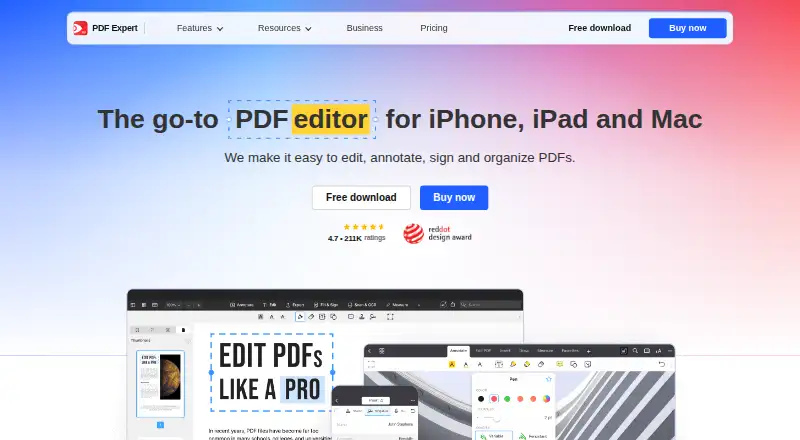
PDF Expert is Readdle’s PDF reader and editor for iPhone, iPad, and Mac. It is aimed at professionals such as architects, construction workers, and educators who need to edit existing PDFs, annotate documents, fill forms, sign files, organize pages, and handle scanned paperwork. Its toolset covers text, images, links, highlights, comments, stamps, drawings, notes, redaction, compression, and electronic signatures. It also supports conversion between PDF and Word, Excel, PowerPoint, text, JPG, and PNG files.
Pricing is structured around free access, a 7-day premium-feature trial, and three paid plans. The Weekly plan costs CHF 5.00 and includes iPhone, iPad, and Mac versions, PDF Copilot, PDF translation, conversion to Word, Excel, and PPT, OCR, and document signing. The Yearly plan costs CHF 80.00 billed annually and includes the same listed features. The Lifetime plan costs CHF 140.00 and includes the Mac version, PDF Copilot, PDF translation, conversion, OCR, and document signing. The main difference is device coverage: the lifetime option is Mac-only, while Weekly and Yearly cover iPhone, iPad, and Mac.
OCR and conversion give PDF Expert useful coverage for scanned documents and office-file workflows. Users can recognize text in scanned PDFs, convert documents to and from common office and image formats, and continue with editing or signing in the same product. The platform fit is narrower than a cross-platform PDF editor: the core app supports iOS and macOS, while Windows is not supported, and PDF Copilot is offered separately on the web. PDF Expert suits Apple users who want broad document editing and signing tools; teams needing Windows support or PDF form creation should choose an alternative.
Your product? Our editors can test PDF Expert in depth and publish a review, labelled as paid · from $149/mo →
PDF Expert pricing
All 3 PDF Expert plans and prices →
PDF Expert fact sheet
| Free plan | Yes |
|---|---|
| Paid from | Not verified |
| Text editing | Yes |
| Annotation tools | Yes |
| OCR | Yes |
| PDF conversion | Yes |
| Form creation | Not verified |
| Supported platforms | iPhone, iPad, Mac |
| Money-back guarantee | 30 days |
| Deployment | Desktop, Mobile |
| Platforms | macOS, iOS |
| Support | Docs |
| Built for | Solo, Small business, Mid-market, Enterprise (editorial estimate) |
| Pricing | Free plan (source) |
| Website | pdfexpert.com |
| Facts checked | 20 Sep 2026 |
Alternatives to PDF Expert
- Foxit PDF EditorA mature PDF workspace with deep editing, OCR, forms, security, and integrations.9.3
- iLovePDFA broad PDF toolkit with free access, offline desktop processing, and cross-device apps.9.2
- SmallpdfA broad PDF toolkit for simple editing across web, Windows, mobile, and Chrome.9.1


See all PDF Expert alternatives →
Also Ranked In
PDF Expert is ranked in 2 of our directories.
Used PDF Expert? Be the first to review it
The editor score above is our own research. What this page doesn't have yet is a reader's view — what you used PDF Expert for, what worked and what didn't. No stars are seeded and no review is paid for; an editor reads every one before it appears.
Write a reviewTwo minutes · verified accounts only · read by an editor before it appears
Featured on iTechGuides

PDF Expert is listed in our PDF Editors directory. Add the badge to your site — it links back to this page.
<a href="https://www.itechguides.com/products/pdf-expert/"><img src="https://www.itechguides.com/best/badge/pdf-expert.svg" alt="Featured on iTechGuides" width="230" height="46"></a>
Reviewed by iTechGuides Editors · Editorial team · Updated Oct 2026
Advertiser disclosure: iTechGuides is reader-supported. Vendors can pay for top positions in our rankings and for a place on other products' pages, and we may earn a commission when you click some links. Bought places stand at the number bought; this page and our disclosure say so. Paying vendors may get a fuller, more detailed review from our editors, and that review can change their score. How we rank.
Last updated · How we research and update