
PayForm
PayForm: A focused way to add payment collection, emails, and tracking to Google Forms. Ranked #37 of 39 in Online Form Builders by our editors (5.8/10); pricing: Free plan; best for adding payments to Google Forms.
At a glance
- Editor score5.8 / 10
- PricingFree plan
- Best forAdding payments to Google Forms
- Free planYes
- Paid from$0.30/unit usage-based
- Founded2021 · Boulder, Colorado, United States
- Facts checked21 Sep 2026
Where it wins
- Connects Google Forms with PayPal and Stripe
- Includes payment dashboards, emails, and exportable history
- Supports sandbox and live payment modes
Where it doesn't
- Focused on Google Forms rather than general form building
- Usage-based fees apply to paid transactions
- Web-only platform with three listed integrations
Our verdict on PayForm
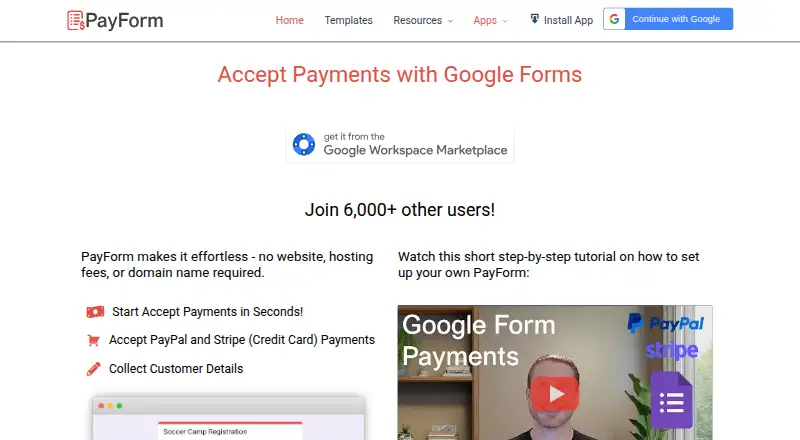
PayForm is a web-based payment form service built around Google Forms. It is designed for individuals, freelancers, small businesses, event organizers, educational institutions, and nonprofits that need to collect payments through a form without building a separate website. Users create a Google Form, install the PayForm Google Workspace app, connect PayPal or Stripe, and share a PayForm link with respondents. Form responses without a payment are free, while paid transactions use usage-based pricing: a fixed fee applies to some transactions and a percentage fee applies to others, in addition to payment-provider fees.
Its strongest fit is the Google ecosystem. PayForm connects Google Forms, PayPal, and Stripe, and adds payment and response dashboards, automated emails for form owners and customers, payment history exports, and shareable links. Sandbox and live payment modes give teams a way to separate payment environments. This combination makes PayForm more specialized than a general-purpose form builder: its value is concentrated in turning an existing Google Form into a payment-enabled workflow. Choose it when Google Forms is already central to the process and payment collection is the main requirement.
The trade-off is scope. PayForm is primarily a Google Forms payment add-on, not a standalone form-building platform with a broad integration ecosystem. Its transaction-based model may suit occasional or variable payment activity better than a subscription, but paid transactions also add fees alongside those charged by PayPal or Stripe. Organizations seeking broad form design capabilities, many native integrations, or a platform independent of Google Forms should consider a broader alternative. For straightforward payment forms tied to Google Forms, PayForm keeps the workflow focused and adds useful payment administration around it.
Your product? Our editors can test PayForm in depth and publish a review, labelled as paid · from $149/mo →
PayForm pricing
All 3 PayForm plans and prices →
PayForm fact sheet
| Free plan | Yes |
|---|---|
| Paid from | $0.30/unit usage-based |
| Form limit | Not verified |
| Quiz support | Not verified |
| Payment collection | Yes |
| Embed options | Not verified |
| Native integrations | 3 integrations |
| File uploads | Not verified |
| Deployment | Cloud |
| Platforms | Web |
| Support | Email, Docs |
| Built for | Solo, Small business (editorial estimate) |
| Integrations | 3 integrations: Google Forms, PayPal, Stripe |
| Pricing | Free plan (source) |
| Website | payform.net |
| Facts checked | 21 Sep 2026 |
PayForm integrations
PayForm lists 3 integrations on its own site.
- Google Forms
- PayPal
- Stripe
Alternatives to PayForm
- JotformA template-rich form builder with payments, offline mobile collection, and broad integrations.9.4
- Zoho FormsA broad form platform with payments, workflows, analytics, and mobile collection.9.2
- TypeformA polished form builder with branching, quizzes, payments, embeds, and API access.9.1



See all PayForm alternatives →
Used PayForm? Be the first to review it
The editor score above is our own research. What this page doesn't have yet is a reader's view — what you used PayForm for, what worked and what didn't. No stars are seeded and no review is paid for; an editor reads every one before it appears.
Write a reviewTwo minutes · verified accounts only · read by an editor before it appears
Featured on iTechGuides

PayForm is listed in our Online Form Builders directory. Add the badge to your site — it links back to this page.
<a href="https://www.itechguides.com/products/payform/"><img src="https://www.itechguides.com/best/badge/payform.svg" alt="Featured on iTechGuides" width="230" height="46"></a>
Reviewed by iTechGuides Editors · Editorial team · Updated Oct 2026
Advertiser disclosure: iTechGuides is reader-supported. Vendors can pay for top positions in our rankings and for a place on other products' pages, and we may earn a commission when you click some links. Bought places stand at the number bought; this page and our disclosure say so. Paying vendors may get a fuller, more detailed review from our editors, and that review can change their score. How we rank.
Last updated · How we research and update