Parlatype
Parlatype: A free Linux player with transcription aids, but no built-in speech recognition. Ranked #39 of 46 in Transcription Software by our editors (5.1/10); pricing: Free plan; best for linux users transcribing manually with playback aids.
At a glance
- Editor score5.1 / 10
- PricingFree plan
- Best forLinux users transcribing manually with playback aids
- Free planYes
- Paid fromFree
- Facts checked23 Sep 2026
Where it wins
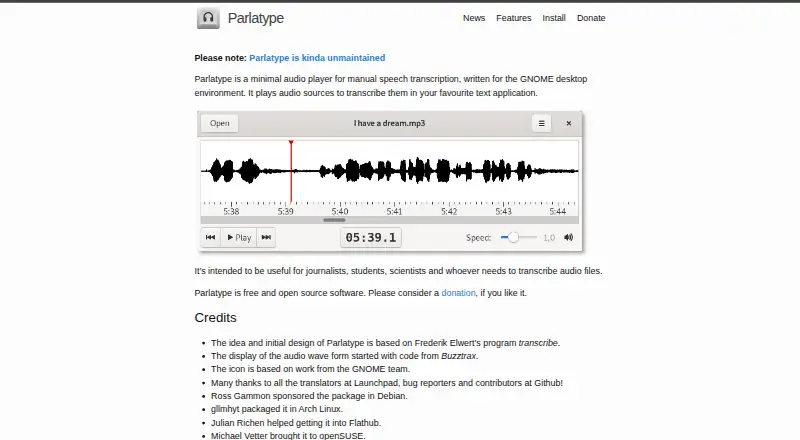
- Waveform navigation helps locate audio and spot silences.
- Adjustable-speed playback, pause rewind, and foot-pedal controls aid transcription.
- Timestamp insertion and a LibreOffice extension link audio to documents.
Where it doesn't
- Automatic speech recognition requires separately obtained language-model data.
- Streaming media is not supported.
- The project describes itself as “kinda unmaintained.”
Our verdict on Parlatype
Parlatype is a Linux desktop audio player for people transcribing or annotating recorded speech in a separate text editor. Its intended audience includes journalists, students, scientists, and others who need to work through audio manually. The workflow centers on controlling playback while writing elsewhere: waveform navigation helps locate sections and silences, playback speed can change without changing pitch, and pausing can trigger a configurable rewind. It is a focused aid for individual transcription rather than an all-in-one transcription service.
Playback controls are the main reason to consider Parlatype. Users can adjust playback speed, skip intervals, and rewind behavior, operate it with multimedia keys or foot pedals, and create timestamps for insertion into a transcript. A LibreOffice extension connects media files with documents and supports jumping to timestamps, making it a practical fit for people who already work in LibreOffice. Parlatype supports audio files through GStreamer, but not streaming media; buyers whose recordings are primarily stream-based should look elsewhere.
Parlatype is open source and free, with Linux as its listed platform. Its optional automatic speech recognition is hidden by default and requires separately obtained language-model data; the project cautions that results may be limited. That makes it unsuitable as a straightforward choice for someone seeking built-in, ready-to-use automated transcription. The project also describes itself as “kinda unmaintained,” a relevant consideration for users who prioritize active maintenance. Choose Parlatype for manual audio review and playback control on Linux; consider an alternative if you need streaming support, built-in recognition, or a project with clearer maintenance signals.
Your product? Our editors can test Parlatype in depth and publish a review, labelled as paid · from $149/mo →
Parlatype pricing
Parlatype fact sheet
| Free plan | Yes |
|---|---|
| Paid from | Free |
| Languages supported | Not verified |
| Included minutes | Not verified |
| Speaker identification | No |
| Timestamp support | Yes |
| Export formats | Not verified |
| API access | No |
| Deployment | Desktop |
| Platforms | Linux |
| Support | Docs |
| Built for | Solo, Small business (editorial estimate) |
| Integrations | 1 integrations: LibreOffice |
| Pricing | Free plan |
| Website | parlatype.xyz |
| Facts checked | 23 Sep 2026 |
Parlatype integrations
Parlatype lists 1 integrations on its own site.
- LibreOffice
Alternatives to Parlatype
- Amazon TranscribeA low-cost AWS transcription service with broad workflow and analytics features.9.3
- Google Cloud Speech-to-TextA flexible speech API with strong transcription features and usage-based pricing.9.2
- WhisperA flexible free transcription engine for developers who can work with code.9.1


See all Parlatype alternatives →
Used Parlatype? Be the first to review it
The editor score above is our own research. What this page doesn't have yet is a reader's view — what you used Parlatype for, what worked and what didn't. No stars are seeded and no review is paid for; an editor reads every one before it appears.
Write a reviewTwo minutes · verified accounts only · read by an editor before it appears
Featured on iTechGuides

Parlatype is listed in our Transcription Software directory. Add the badge to your site — it links back to this page.
<a href="https://www.itechguides.com/products/parlatype/"><img src="https://www.itechguides.com/best/badge/parlatype.svg" alt="Featured on iTechGuides" width="230" height="46"></a>
Reviewed by iTechGuides Editors · Editorial team · Updated Oct 2026
Advertiser disclosure: iTechGuides is reader-supported. Vendors can pay for top positions in our rankings and for a place on other products' pages, and we may earn a commission when you click some links. Bought places stand at the number bought; this page and our disclosure say so. Paying vendors may get a fuller, more detailed review from our editors, and that review can change their score. How we rank.
Last updated · How we research and update