
Paperwork
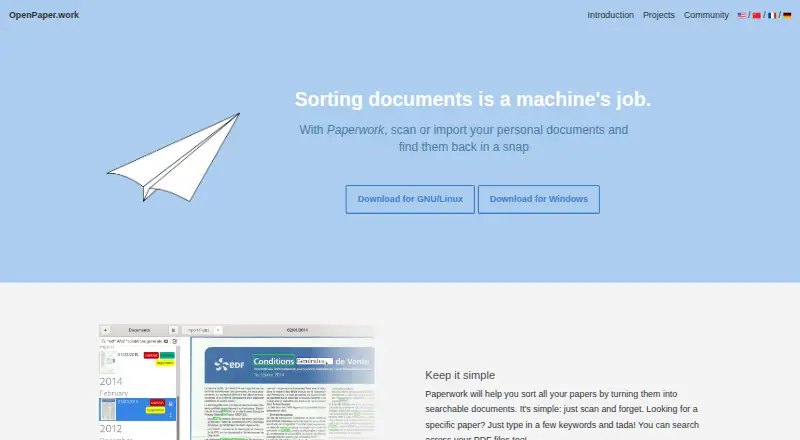
Paperwork: A free, open-source desktop document manager for digitizing and finding personal files. Ranked #57 of 65 in Document Management Software by our editors (3.7/10); pricing: Free plan; best for individuals digitizing and searching scanned documents.
At a glance
- Editor score3.7 / 10
- PricingFree plan
- Best forIndividuals digitizing and searching scanned documents
- Free planYes
- Paid fromFree
- Facts checked23 Sep 2026
Where it wins
- OCR makes scanned documents and imported PDFs searchable.
- Labels, suggested keywords, and automatic label guesses aid retrieval.
- A single-directory store supports backup and synchronization with other tools.
Where it doesn't
- Its desktop focus and solo fit make it a narrow choice for teams.
- The GitHub repository was archived in March 2026.
- No verified access controls, versioning, or workflow features are described.
Our verdict on Paperwork
Paperwork is a free, open-source desktop document manager for individuals who want to digitize and search personal paperwork. It supports scanners and PDF imports, then uses OCR to make documents searchable. Labels provide a way to organize files, while keyword suggestions and automatic label guesses can help users find and categorize new documents. It is available for Linux and Windows, with a focus on solo use rather than shared document operations across a team.
Its retrieval and filing features are the main draw. Users can search imported PDFs and scanned documents, edit scans, and rely on automatic page-orientation detection. Paperwork can suggest keywords in search and learn label patterns to guess labels for new documents. These functions address the common path from paper capture to later lookup without turning the product into a broader workflow system. Individuals with a personal archive to maintain are the clearest fit; organizations that need controlled team processes should look at a different type of DMS.
Storage and project status are worth weighing together. Documents live in a single directory in common formats, which the vendor says can support backup and synchronization; listed options include Nextcloud, Syncthing, SparkleShare, and shared folders. That makes the storage approach relevant for people who want files kept in a location they can back up or sync with other tools. The tradeoff is the product's narrow desktop and solo orientation: the described feature set does not establish access controls, versioning, or workflows. The GitHub repository was archived in March 2026 and points to GNOME GitLab, while the listed Flathub version is 2.2.5, shown as released about two years ago. Pick Paperwork for personal scanning and search, not for team document governance.
Your product? Our editors can test Paperwork in depth and publish a review, labelled as paid · from $149/mo →
Paperwork pricing
Paperwork fact sheet
| Free plan | Yes |
|---|---|
| Paid from | Free |
| Version history | Not verified |
| Access control level | Not verified |
| OCR | Yes |
| Audit logs | Not verified |
| Storage limit | Not verified |
| Mobile apps | Not verified |
| Deployment | Desktop |
| Platforms | Linux, Windows |
| Built for | Solo (editorial estimate) |
| Integrations | 4 integrations: Nextcloud, Syncthing, SparkleShare, shared folders |
| Pricing | Free plan |
| Website | openpaper.work |
| Facts checked | 23 Sep 2026 |
Paperwork integrations
Paperwork lists 4 integrations on its own site.
- Nextcloud
- Syncthing
- SparkleShare
- shared folders
Alternatives to Paperwork
- Microsoft SharePointA Microsoft-integrated document management platform with granular control and workflow automation.9.3
- BoxA wide cloud content workspace for teams that need storage, workflows, and administration.9.1
- OpenText Documentum Content ManagementA governed repository for large enterprises managing complex, regulated content.9.0

See all Paperwork alternatives →
Used Paperwork? Be the first to review it
The editor score above is our own research. What this page doesn't have yet is a reader's view — what you used Paperwork for, what worked and what didn't. No stars are seeded and no review is paid for; an editor reads every one before it appears.
Write a reviewTwo minutes · verified accounts only · read by an editor before it appears
Featured on iTechGuides

Paperwork is listed in our Document Management Software directory. Add the badge to your site — it links back to this page.
<a href="https://www.itechguides.com/products/paperwork/"><img src="https://www.itechguides.com/best/badge/paperwork.svg" alt="Featured on iTechGuides" width="230" height="46"></a>
Reviewed by iTechGuides Editors · Editorial team · Updated Oct 2026
Advertiser disclosure: iTechGuides is reader-supported. Vendors can pay for top positions in our rankings and for a place on other products' pages, and we may earn a commission when you click some links. Bought places stand at the number bought; this page and our disclosure say so. Paying vendors may get a fuller, more detailed review from our editors, and that review can change their score. How we rank.
Last updated · How we research and update