
Paperkin
Paperkin: A flexible web coloring generator with photo input, personalization, and KDP-ready exports. Ranked #14 of 37 in AI Coloring Page Generators by our editors (6.7/10); pricing: Free plan; best for parents and small KDP projects.
At a glance
- Editor score6.7 / 10
- PricingFree plan
- Best forParents and small KDP projects
- Free planYes
- Paid from$39/yr
- Input modesBoth
- Facts checked20 Sep 2026
Where it wins
- Text and photo inputs with age-calibrated detail levels
- 16-language name personalization and 300 DPI line art
- Mini-books, word searches, PNGs, and KDP-ready PDF exports
Where it doesn't
- Web-only access may not suit desktop or mobile app workflows
- Free plan is limited to 3 pages and 1 photo conversion monthly
- Commercial resale rights require the Commercial plan
Our verdict on Paperkin
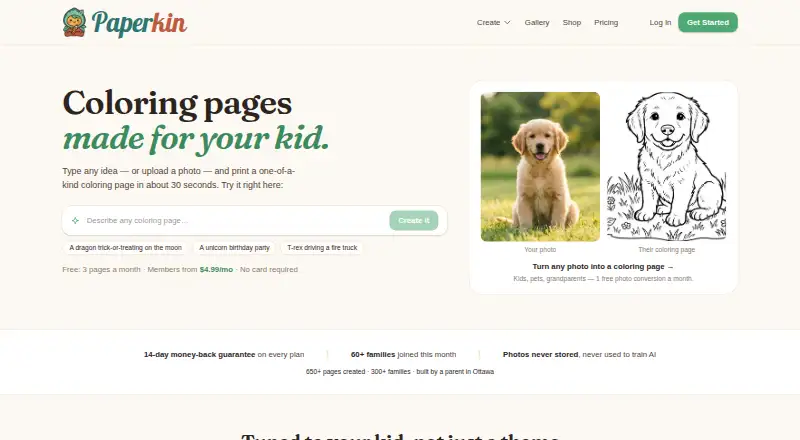
Paperkin is a web app for creating personalized coloring pages and books for children. It supports text prompts and photo uploads, with adjustable detail for different age groups, child-name personalization in 16 languages, and black-and-white line art at 300 DPI. Pages can be downloaded as PNG files, while multi-page books can be exported as PDFs using KDP-oriented trim sizes. That makes it a fit for parents, educators, and small publishing projects that need printable children’s content without limiting creation to text prompts alone.
Pricing is structured around a free plan, annual memberships, and one-time credit packs. Free includes 3 pages each month, 1 photo-to-coloring page monthly, and browser printing. Personal costs $39 per year and adds 40 pages monthly, all 7 themes plus custom themes, personalized names, and no watermark. Creator costs $71 per year and adds 100 pages monthly, a mini-book builder, 6–10 page books, and full-color covers. Commercial costs $179 per year and adds 300 credits monthly, a commercial and resale license, and everything in Creator. One-time packs provide 25 pages for $5.99, 100 for $17.99, or 500 for $69.99, with credits that do not expire.
Paperkin’s strongest distinction is the combination of personalization, print preparation, and book creation in one focused tool. The 6–10 page mini-book builder, word-search generation, PNG downloads, and KDP-ready PDFs extend it beyond single-page coloring prompts. Its main constraint is platform scope: it is web-based, so it may be less suitable for buyers seeking a dedicated desktop or mobile application. The free tier is also intended for light use, while resale projects need the Commercial plan. Choose Paperkin for personalized printables and small coloring-book workflows; choose an alternative if app-based access or broader production tooling matters more.
Your product? Our editors can test Paperkin in depth and publish a review, labelled as paid · from $149/mo →
Paperkin pricing
All 7 Paperkin plans and prices →
Paperkin fact sheet
| Free plan | Yes |
|---|---|
| Paid from | $39/yr |
| Input modes | Both |
| Output formats | Multiple |
| Commercial use | Yes |
| Print-ready files | Yes |
| Monthly generation limit | 40 images/mo |
| Paper size options | Multiple sizes |
| Money-back guarantee | 14 days |
| Deployment | Cloud |
| Platforms | Web |
| Compliance & security | GDPR |
| Support | |
| Built for | Solo, Small business (editorial estimate) |
| Integrations | 3 integrations: Google Gemini, Stripe, Google Firebase |
| Pricing | Free plan (source) |
| Website | paperkin.app |
| Facts checked | 20 Sep 2026 |
Paperkin integrations
Paperkin lists 3 integrations on its own site.
- Google Gemini
- Stripe
- Google Firebase
Alternatives to Paperkin
- Mimi PandaTurns text prompts and photos into printable coloring pages, with a paint-by-numbers generator alongside.8.7
- ColorBlissA broad web tool for creating, editing, and packaging print-ready coloring pages.7.9
- ColoringMeA flexible coloring-page generator with broad device coverage and creator-focused paid plans.7.8


See all Paperkin alternatives →
Used Paperkin? Be the first to review it
The editor score above is our own research. What this page doesn't have yet is a reader's view — what you used Paperkin for, what worked and what didn't. No stars are seeded and no review is paid for; an editor reads every one before it appears.
Write a reviewTwo minutes · verified accounts only · read by an editor before it appears
Featured on iTechGuides

Paperkin is listed in our AI Coloring Page Generators directory. Add the badge to your site — it links back to this page.
<a href="https://www.itechguides.com/products/paperkin/"><img src="https://www.itechguides.com/best/badge/paperkin.svg" alt="Featured on iTechGuides" width="230" height="46"></a>
Reviewed by iTechGuides Editors · Editorial team · Updated Oct 2026
Advertiser disclosure: iTechGuides is reader-supported. Vendors can pay for top positions in our rankings and for a place on other products' pages, and we may earn a commission when you click some links. Bought places stand at the number bought; this page and our disclosure say so. Paying vendors may get a fuller, more detailed review from our editors, and that review can change their score. How we rank.
Last updated · How we research and update