Paletto Studio
Paletto Studio: A focused free tool for extracting, checking, and applying colors to pattern artwork. Ranked #18 of 34 in Color Palette Generators by our editors (6.4/10); pricing: Free plan; best for pattern and textile designers working from images.
At a glance
- Editor score6.4 / 10
- PricingFree plan
- Best forPattern and textile designers working from images
- Free planYes
- Paid fromFree
- Palette methodsExtract
- Facts checked20 Sep 2026
Where it wins
- Extracts colors from artwork and reference photos
- Recolors patterns with region detection and colorway previews
- Checks harmony and contrast, then exports palettes to creative tools
Where it doesn't
- Available through the web browser rather than a desktop app
- Its workflow is specialized around artwork and pattern recoloring
- Free access does not offer tiered paid plans or expanded editions
Our verdict on Paletto Studio
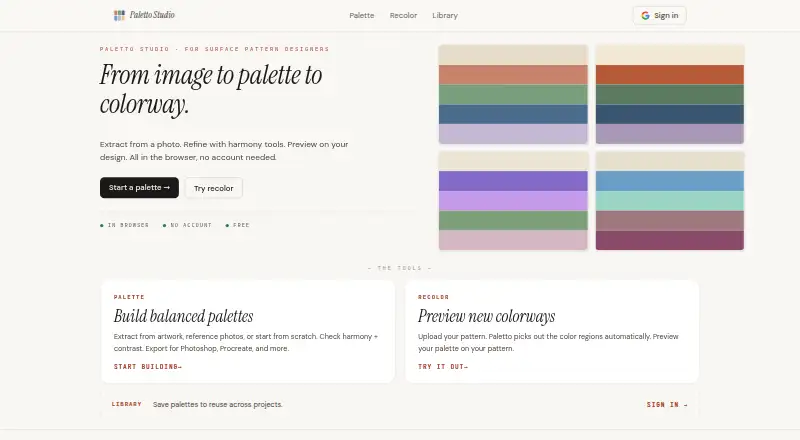
Paletto Studio is a browser-based color tool for surface pattern designers who need to develop palettes from existing visual work. It can extract colors from uploaded artwork or reference photos, create palettes from pasted hex codes, and apply those palettes to uploaded patterns. The product also supports harmony and contrast checks, automatic color-region identification, recoloring, colorway previews, saved palettes, and collections. Core palette and recoloring tools do not require account creation, and image processing occurs locally in the browser.
The pricing model is straightforward: Paletto Studio is free. There are no tiered plans to compare, so the product suits designers looking for a focused palette and recoloring workspace without a paid subscription structure. The browser-based format keeps access centered on the web, while the workflow is tailored to surface pattern and textile design rather than serving as a broad color-management system. Designers who want to work from reference imagery and evaluate how colors behave across a pattern will find the feature set closely aligned with that process.
Its standout capability is the connection between image extraction and pattern recoloring. A designer can derive colors from artwork or a photo, check harmony and contrast, identify regions automatically, and preview different colorways on an uploaded design. Palettes can be organized into collections and exported for Photoshop, Procreate, and other tools, supporting movement into a wider creative workflow. Choose Paletto Studio for image-led palette development and pattern exploration. Consider another option if you need a desktop application, a broader integration ecosystem, or tiered paid plans.
Your product? Our editors can test Paletto Studio in depth and publish a review, labelled as paid · from $149/mo →
Paletto Studio pricing
Paletto Studio fact sheet
| Free plan | Yes |
|---|---|
| Paid from | Free |
| Palette methods | Extract |
| Image extraction | Yes |
| Accessibility checks | Yes |
| Export formats | Not verified |
| Saved palettes | Yes |
| Brand color library | Not verified |
| Print color support | Not verified |
| Deployment | Cloud |
| Platforms | Web |
| Support | |
| Built for | Solo, Small business (editorial estimate) |
| Pricing | Free plan |
| Website | palettostudio.com |
| Facts checked | 20 Sep 2026 |
Alternatives to Paletto Studio
- CoolorsA broad palette toolkit with useful free features and a $3 monthly Pro plan.9.4
- Pantone Connect Palette GeneratorA strong Pantone workflow for print-focused designers who need conversion and Adobe support.9.0
- Fluent UI Theme DesignerA focused web tool for building accessible Fluent UI semantic themes.8.7


See all Paletto Studio alternatives →
Used Paletto Studio? Be the first to review it
The editor score above is our own research. What this page doesn't have yet is a reader's view — what you used Paletto Studio for, what worked and what didn't. No stars are seeded and no review is paid for; an editor reads every one before it appears.
Write a reviewTwo minutes · verified accounts only · read by an editor before it appears
Featured on iTechGuides

Paletto Studio is listed in our Color Palette Generators directory. Add the badge to your site — it links back to this page.
<a href="https://www.itechguides.com/products/paletto-studio/"><img src="https://www.itechguides.com/best/badge/paletto-studio.svg" alt="Featured on iTechGuides" width="230" height="46"></a>
Reviewed by iTechGuides Editors · Editorial team · Updated Oct 2026
Advertiser disclosure: iTechGuides is reader-supported. Vendors can pay for top positions in our rankings and for a place on other products' pages, and we may earn a commission when you click some links. Bought places stand at the number bought; this page and our disclosure say so. Paying vendors may get a fuller, more detailed review from our editors, and that review can change their score. How we rank.
Last updated · How we research and update