
Owly
Owly: A focused Android option for filtering, screen-time controls, location tools and SOS alerts. Ranked #52 of 106 in Parental Control Apps by our editors (4.0/10); pricing: Free plan · 14-day trial; best for android families wanting AI filtering and SOS tools.
At a glance
- Editor score4.0 / 10
- PricingFree plan · 14-day trial
- Best forAndroid families wanting AI filtering and SOS tools
- Free planYes
- Paid from€4.99/mo
- Content filteringYes
- Facts checked22 Sep 2026
Where it wins
- AI filtering covers unknown websites and video titles
- Combines screen-time, app blocking, safe zones and SOS alerts
- Free plan includes essential features with no time limit
Where it doesn't
- Currently available on Android only
- AI filtering and reports are reserved for Premium
- The app is still being published and is coming soon on Google Play
Our verdict on Owly
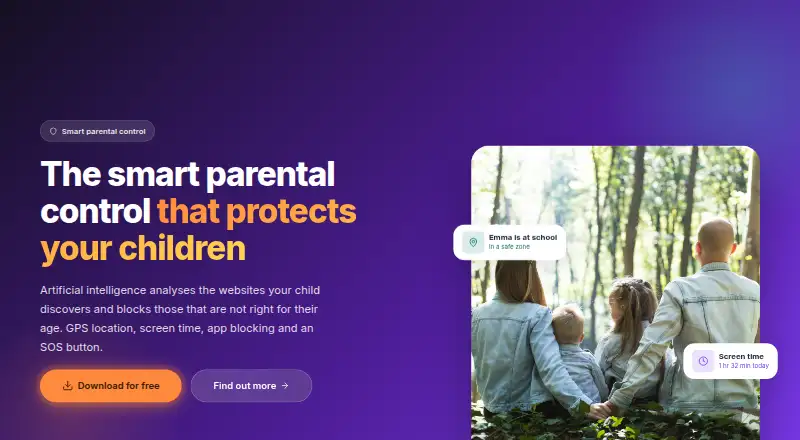
Owly is a mobile parental control app for Android families. Parents install a parent app and a child app to manage screen-time allowances, recurring time slots, app restrictions, website filtering, GPS location, safe zones, activity statistics and SOS alerts. It suits families that want a focused set of supervision tools rather than a cross-platform product. The app is developed and hosted in France by Sphère Télécom, with family data stored on servers in France.
Pricing follows a freemium structure. The Free plan includes essential features and continues without a time limit after a trial or subscription cancellation. Essential costs €4.99 per month and adds website filtering by categories and lists plus parental control features. Premium costs €9.99 per month and adds AI-powered filtering for unknown websites, browsing and search history, weekly reports, maximum protection against uninstallation and priority support. Essential and Premium also have yearly billing options. A 14-day free trial and a 14-day refund period are available, with no card required for the trial.
The standout breadth is the combination of content controls and family safety tools. Owly supports individual and category-based app blocking, remote internet cut-off, journey history, safe zones with entry and exit alerts, and SOS alerts with the child’s GPS position. Support is available through chat, email and phone, and the product lists GDPR compliance. Its main boundary is platform coverage: it is currently available on Android, while the application is still being published and is coming soon on Google Play. Android families that want AI filtering, location history and SOS features should consider Owly; households needing iOS coverage should choose an alternative.
Your product? Our editors can test Owly in depth and publish a review, labelled as paid · from $149/mo →
Owly pricing
Owly fact sheet
| Free plan | Yes |
|---|---|
| Paid from | €4.99/mo |
| Device platforms | Android |
| Content filtering | Yes |
| Screen-time schedules | Yes |
| App blocking | Yes |
| Activity reports | Yes |
| Location tracking | Yes |
| Device limit | Not verified |
| Free trial | 14 days · no card needed |
| Money-back guarantee | 14 days |
| Deployment | Mobile |
| Platforms | Android |
| Compliance & security | GDPR |
| Support | Live chat, Email, Phone |
| Built for | Solo, Small business (editorial estimate) |
| Pricing | Free plan · 14-day trial (source) |
| Website | owly.website |
| Facts checked | 22 Sep 2026 |
Alternatives to Owly
- BarkA broad cross-platform monitor with schedules, blocking, alerts, and location tools.9.2
- QustodioA broad parental-control suite with AI safety alerts and five-platform coverage.9.0
- OurPactA broad parental-control toolkit for families managing up to 20 child devices.8.9



Used Owly? Be the first to review it
The editor score above is our own research. What this page doesn't have yet is a reader's view — what you used Owly for, what worked and what didn't. No stars are seeded and no review is paid for; an editor reads every one before it appears.
Write a reviewTwo minutes · verified accounts only · read by an editor before it appears
Featured on iTechGuides

Owly is listed in our Parental Control Apps directory. Add the badge to your site — it links back to this page.
<a href="https://www.itechguides.com/products/owly/"><img src="https://www.itechguides.com/best/badge/owly.svg" alt="Featured on iTechGuides" width="230" height="46"></a>
Reviewed by iTechGuides Editors · Editorial team · Updated Oct 2026
Advertiser disclosure: iTechGuides is reader-supported. Vendors can pay for top positions in our rankings and for a place on other products' pages, and we may earn a commission when you click some links. Bought places stand at the number bought; this page and our disclosure say so. Paying vendors may get a fuller, more detailed review from our editors, and that review can change their score. How we rank.
Last updated · How we research and update