
OwlCal
OwlCal: A family organizer that adds planning tools and AI event creation to shared calendars. Ranked #121 of 193 in Calendar Apps by our editors (3.0/10); pricing: Free plan · 30-day trial; best for families wanting an AI-assisted shared calendar.
At a glance
- Editor score3.0 / 10
- PricingFree plan · 30-day trial
- Best forFamilies wanting an AI-assisted shared calendar
- Free planYes
- Facts checked22 Sep 2026
Where it wins
- Combines calendars, lists, meals, chat, trips, and RSVPs
- Creates events from photos, flyers, tickets, PDFs, or plain English
- Connects Google, Outlook, Apple calendars, and ICS feeds
Where it doesn't
- Available through iOS and Android apps
- AI tools are limited to the Pro AI plan
- The focus is household coordination rather than general-purpose scheduling
Our verdict on OwlCal
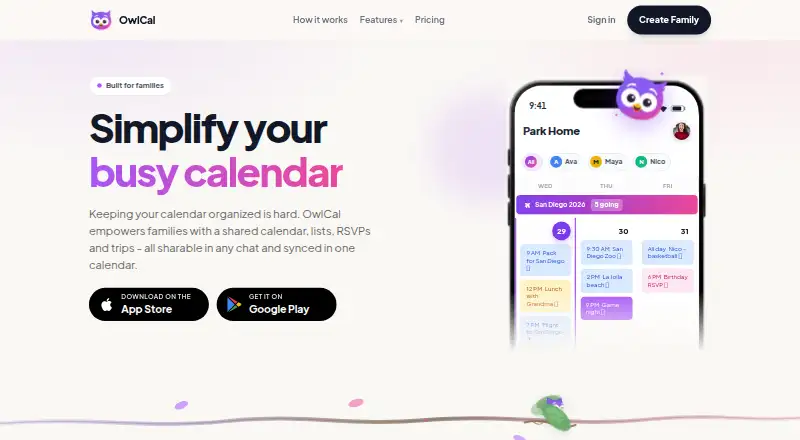
OwlCal is a family organizer for households coordinating schedules, activities, errands, meals, trips, and invitations. Its shared color-coded calendar supports month, week, day, and list views, while shopping and to-do lists add assignments and real-time check-offs. Families can also plan meals by person, use chat and trip threads, collect RSVP replies, and build multi-day itineraries. Mobile apps are available for iOS and Android, and calendar connections support Google, Outlook, Apple, and ICS feeds.
The freemium structure separates core family coordination from its AI features. The free plan includes a family calendar, while free RSVP invitations, trips, and related chats are available forever. The Regular plan includes the shared calendar, lists, meals, chat, RSVPs, and Google Calendar and ICS feed connections. Paid features include a 30-day trial. Pro AI includes everything in Regular, then adds event creation from photos, flyers, tickets, and PDFs, plain-English event creation, and Smart Alarm. Google Gemini is listed among the integrations.
OwlCal’s main distinction is the breadth of household planning in one mobile service. It is suited to families that want schedules connected with errands, meals, conversations, travel plans, and invitations rather than a calendar alone. The AI workflow is particularly relevant for turning event information in documents or images into calendar entries. Families seeking a shared mobile organizer should find the feature set well aligned; people who need a desktop-first experience or a narrower standalone calendar may prefer a different type of app.
Questions about OwlCal
Is there a free trial of OwlCal? Yes: a 30-day free trial; no card is needed.
What does OwlCal run on? iOS and Android. It runs in the cloud and as a mobile app.
What does OwlCal integrate with? 5 integrations: Google Calendar, Outlook Calendar, Apple Calendar, ICS feeds and Google Gemini.
Who is OwlCal built for? Solo users and small businesses (our editorial estimate).
Your product? Our editors can test OwlCal in depth and publish a review, labelled as paid · from $149/mo →
OwlCal pricing
All 2 OwlCal plans and prices →
OwlCal fact sheet
| Free plan | Yes |
|---|---|
| Paid from | Not verified |
| Shared calendars | Yes |
| Time blocking | Not verified |
| Scheduling links | Not verified |
| Calendar sync | Two_way |
| Mobile apps | Ios and android |
| Video meeting support | Not verified |
| Free trial | 30 days · no card needed |
| Deployment | Cloud, Mobile |
| Platforms | iOS, Android |
| Support | |
| Built for | Solo, Small business (editorial estimate) |
| Integrations | 5 integrations: Google Calendar, Outlook Calendar, Apple Calendar, ICS feeds, Google Gemini |
| Pricing | Free plan · 30-day trial (source) |
| Website | owlcal.com |
| Facts checked | 22 Sep 2026 |
OwlCal integrations
OwlCal lists 5 integrations on its own site.
- Google Calendar
- Outlook Calendar
- Apple Calendar
- ICS feeds
- Google Gemini
Alternatives to OwlCal
- Google CalendarA versatile calendar for personal schedules and Google Workspace collaboration.9.4
- Microsoft OutlookA flexible calendar choice for people and teams already working in Microsoft’s ecosystem.9.2
- Zoho CalendarA low-cost calendar with booking, sync, room reservations, and broad integrations.9.1


Used OwlCal? Be the first to review it
The editor score above is our own research. What this page doesn't have yet is a reader's view — what you used OwlCal for, what worked and what didn't. No stars are seeded and no review is paid for; an editor reads every one before it appears.
Write a reviewTwo minutes · verified accounts only · read by an editor before it appears
Featured on iTechGuides

OwlCal is listed in our Calendar Apps directory. Add the badge to your site — it links back to this page.
<a href="https://www.itechguides.com/products/owlcal/"><img src="https://www.itechguides.com/best/badge/owlcal.svg" alt="Featured on iTechGuides" width="230" height="46"></a>
Reviewed by iTechGuides Editors · Editorial team · Updated Nov 2026
Advertiser disclosure: iTechGuides is reader-supported. Vendors can pay for top positions in our rankings and for a place on other products' pages, and we may earn a commission when you click some links. Bought places stand at the number bought; this page and our disclosure say so. Paying vendors may get a fuller, more detailed review from our editors, and that review can change their score. How we rank.
Last updated · How we research and update