
OTPeer Authenticator
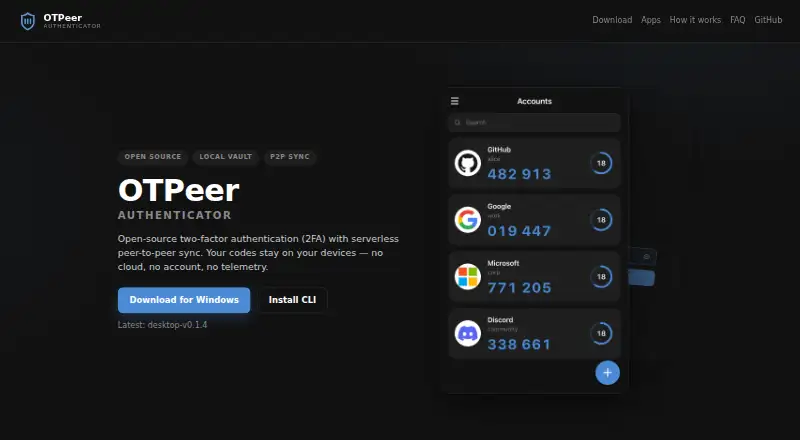
OTPeer Authenticator: A free desktop authenticator with encrypted local storage, migration imports, and peer sync. Ranked #69 of 111 in Authenticator Apps by our editors (3.0/10); pricing: Free plan; best for desktop users wanting local peer synchronization.
At a glance
- Editor score3.0 / 10
- PricingFree plan
- Best forDesktop users wanting local peer synchronization
- Free planYes
- Paid fromFree
- Facts checked21 Sep 2026
Where it wins
- Supports both TOTP and HOTP codes
- Encrypted vaults, exports, and restores protect account data
- Imports from major authenticator apps and backup formats
Where it doesn't
- Currently focused on macOS, Windows, Linux, and terminal access
- Peer synchronization works over a local network
- Mobile apps are planned rather than available
Our verdict on OTPeer Authenticator
OTPeer Authenticator is a free, open-source two-factor authentication app for macOS, Windows, Linux, and the terminal. It generates both TOTP and HOTP codes, stores accounts in an encrypted local vault, and supports account migration from Google Authenticator, Microsoft Authenticator, Facebook Authenticator, Aegis, 2FAS, and andOTP. It suits desktop users who want local control of authenticator data and a terminal-access option through its Node.js CLI.
Its standout feature is peer-to-peer vault synchronization over a local network. QR-code device pairing connects devices directly, while encrypted account export and restore provide a separate migration path. This combination is useful for users who want several desktop devices to share authenticator accounts without relying on a hosted synchronization service. The import coverage also makes it more practical for moving from several established authenticator apps and backup formats.
The platform fit is deliberately desktop-oriented: builds are available for macOS, Windows, and Linux, with terminal access through the CLI. Mobile apps are planned, so OTPeer Authenticator is a stronger match for a desktop-centered workflow than for users who need phone-based access today. Choose it for free, open-source authentication with encrypted local storage, local-network synchronization, and broad migration support; choose another option if mobile apps are central to your authentication routine.
Your product? Our editors can test OTPeer Authenticator in depth and publish a review, labelled as paid · from $149/mo →
OTPeer Authenticator pricing
OTPeer Authenticator fact sheet
| Free plan | Yes |
|---|---|
| Paid from | Free |
| Code type | Totp and hotp |
| Push approvals | Not verified |
| Encrypted backup | Yes |
| Multi-device sync | Yes |
| Team administration | Not verified |
| Supported platforms | macOS, Windows, Linux, terminal |
| Deployment | Desktop |
| Platforms | Windows, macOS, Linux |
| Support | Docs |
| Built for | Solo, Small business (editorial estimate) |
| Pricing | Free plan |
| Website | otpeer.com |
| Facts checked | 21 Sep 2026 |
Alternatives to OTPeer Authenticator
- Proton AuthenticatorA mature free option for secure 2FA codes across mobile and desktop platforms.9.4
- Google AuthenticatorA free, straightforward authenticator with offline codes, sync, and QR transfers.9.2
- AuthyA focused free authenticator for mobile users who need synced TOTP tokens.9.1


See all OTPeer Authenticator alternatives →
Used OTPeer Authenticator? Be the first to review it
The editor score above is our own research. What this page doesn't have yet is a reader's view — what you used OTPeer Authenticator for, what worked and what didn't. No stars are seeded and no review is paid for; an editor reads every one before it appears.
Write a reviewTwo minutes · verified accounts only · read by an editor before it appears
Featured on iTechGuides

OTPeer Authenticator is listed in our Authenticator Apps directory. Add the badge to your site — it links back to this page.
<a href="https://www.itechguides.com/products/otpeer-authenticator/"><img src="https://www.itechguides.com/best/badge/otpeer-authenticator.svg" alt="Featured on iTechGuides" width="230" height="46"></a>
Reviewed by iTechGuides Editors · Editorial team · Updated Oct 2026
Advertiser disclosure: iTechGuides is reader-supported. Vendors can pay for top positions in our rankings and for a place on other products' pages, and we may earn a commission when you click some links. Bought places stand at the number bought; this page and our disclosure say so. Paying vendors may get a fuller, more detailed review from our editors, and that review can change their score. How we rank.
Last updated · How we research and update