
Orca-Flashforge
Orca-Flashforge: A free, open-source FDM slicer with Flashforge connectivity and remote printer control. Ranked #22 of 27 in 3D Slicer Software by our editors (6.7/10); pricing: Free plan; best for flashforge owners wanting open-source FDM control.
At a glance
- Editor score6.7 / 10
- PricingFree plan
- Best forFlashforge owners wanting open-source FDM control
- Free planYes
- Paid fromFree
- Facts checked21 Sep 2026
Where it wins
- Free and open source across Windows, macOS, and Ubuntu
- Remote printing, monitoring, camera viewing, and temperature control
- Supports Flashforge multi-color workflows and multi-printer management
Where it doesn't
- Focused on FDM rather than resin slicing
- Hardware-focused workflows may limit use with other printer brands
- Support-generation details are not part of its published scope
Our verdict on Orca-Flashforge
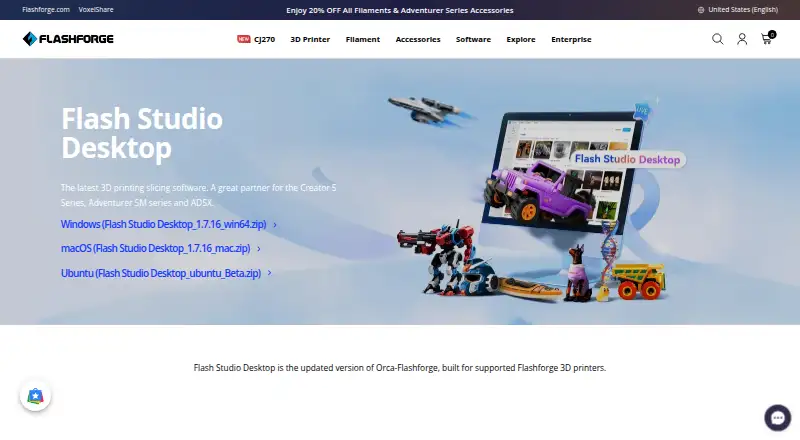
Orca-Flashforge is Flashforge’s desktop slicing software for FDM 3D printers, based on OrcaSlicer. It combines Flashforge-optimized printer profiles with basic and advanced print-parameter controls, USB export, and printer connectivity. Flashforge distributes the updated version as Flash Studio Desktop for Windows, macOS, and Ubuntu, while its documentation continues to describe Orca-Flashforge as the slicer for supported Flashforge printers. It is aimed primarily at Flashforge owners who want direct control over FDM preparation and printing workflows.
The software is free and open source, so there is no paid plan structure to compare. Its ecosystem fit is centered on Flashforge 3D printers and Flash Studio Mobile. Users can connect through WAN cloud or a LAN-only workflow, submit prints remotely, monitor printers, view live camera feeds for compatible printers, and adjust extruder and bed temperatures in real time. Flash Studio Mobile integration and multi-printer management extend those controls beyond a single desktop slicing session.
Its strongest focus is hardware-aware FDM control rather than broad process coverage. The published feature set includes multi-color printing for supported Flashforge hardware, along with .3mf and .gcode output. That makes Orca-Flashforge a practical choice for Flashforge users who value open-source software, printer-specific profiles, and remote oversight. It is less suitable for resin workflows or users seeking a slicer centered on a wider range of printer brands and materials. Choose it when Flashforge compatibility and connected FDM operation matter more than a broader, less hardware-specific scope.
Your product? Our editors can test Orca-Flashforge in depth and publish a review, labelled as paid · from $149/mo →
Orca-Flashforge pricing
Orca-Flashforge fact sheet
| Free plan | Yes |
|---|---|
| Paid from | Free |
| Support generation | Not verified |
| Resin slicing | No |
| Multi-material printing | Yes |
| Variable layer height | Not verified |
| Supported platforms | Windows, macOS, Ubuntu |
| Input file formats | Not verified |
| Output file formats | .3mf, .gcode |
| Deployment | Cloud, Desktop |
| Platforms | Windows, macOS, Linux |
| Support | Docs |
| Built for | Solo, Small business, Mid-market (editorial estimate) |
| Integrations | 2 integrations: Flash Studio Mobile, Flashforge 3D printers |
| Pricing | Free plan |
| Website | flashforge.com |
| Facts checked | 21 Sep 2026 |
Orca-Flashforge integrations
Orca-Flashforge lists 2 integrations on its own site.
- Flash Studio Mobile
- Flashforge 3D printers
Alternatives to Orca-Flashforge
- Formlabs PreFormA capable free slicer for teams committed to Formlabs production workflows.9.3
- UltiMaker CuraA capable free slicer for FDM users who want detailed control over print preparation.9.2
- Creality PrintA capable free slicer for Creality-focused FDM workflows, with cloud and remote-control features.9.2



See all Orca-Flashforge alternatives →
Used Orca-Flashforge? Be the first to review it
The editor score above is our own research. What this page doesn't have yet is a reader's view — what you used Orca-Flashforge for, what worked and what didn't. No stars are seeded and no review is paid for; an editor reads every one before it appears.
Write a reviewTwo minutes · verified accounts only · read by an editor before it appears
Featured on iTechGuides

Orca-Flashforge is listed in our 3D Slicer Software directory. Add the badge to your site — it links back to this page.
<a href="https://www.itechguides.com/products/orca-flashforge/"><img src="https://www.itechguides.com/best/badge/orca-flashforge.svg" alt="Featured on iTechGuides" width="230" height="46"></a>
Reviewed by iTechGuides Editors · Editorial team · Updated Oct 2026
Advertiser disclosure: iTechGuides is reader-supported. Vendors can pay for top positions in our rankings and for a place on other products' pages, and we may earn a commission when you click some links. Bought places stand at the number bought; this page and our disclosure say so. Paying vendors may get a fuller, more detailed review from our editors, and that review can change their score. How we rank.
Last updated · How we research and update