
Formlabs PreForm
Formlabs PreForm: A focused, free choice for Formlabs teams preparing and sending SLA or SLS jobs. Ranked #4 of 35 in 3D Printing Software by our editors (8.8/10); pricing: Free plan; best for formlabs production teams using validated workflows.
At a glance
- Editor score8.8 / 10
- PricingFree plan
- Best forFormlabs production teams using validated workflows
- Free planYes
- Paid fromFree
- Auto supportsYes
- Facts checked24 Sep 2026
Where it wins
- Validated materials and print settings with printability checks
- Automatic supports, mesh repair, packing, and layout tools
- Direct uploads, cloud slicing, and batch production integrations
Where it doesn't
- Formlabs-centered workflows limit its fit with other printer ecosystems
- Available only for Windows and macOS
- Print monitoring is handled through Dashboard rather than PreForm
Our verdict on Formlabs PreForm
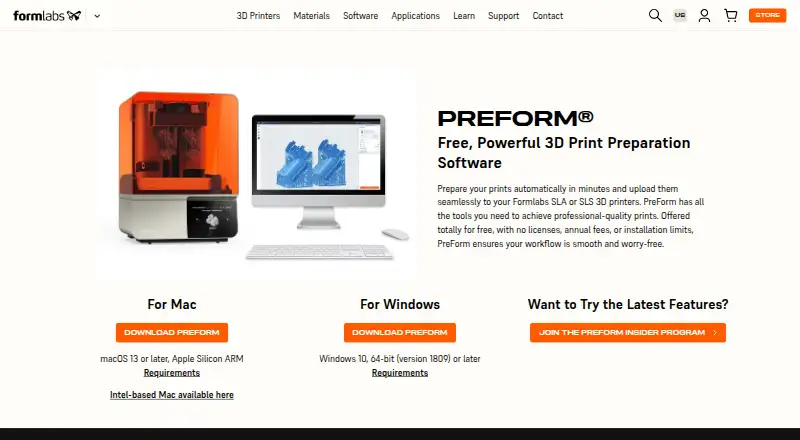
Formlabs PreForm is desktop print-preparation software for Formlabs SLA and SLS 3D printers. It is designed for engineers, designers, manufacturers, dental users, and other teams working with Formlabs hardware. The software imports and manipulates models, generates supports, arranges parts, applies validated print settings, checks printability, estimates print times, slices models, and uploads jobs to compatible printers. It is free, with no licenses, annual fees, or installation limits, and runs on Windows and macOS.
Its strongest case is a validated, production-oriented preparation workflow. PreForm includes automatic support generation, model scaling, orientation and layout, validated material and print settings, printability checks, real-time estimates, and automatic mesh repair for problematic models. Fuse SLS users also get automatic 3D packing. CAD import includes STEP and SolidWorks, while integrations include Rhino, SolidWorks, Onshape, 3Shape, Fusion 360, Netfabb, the Formlabs API, and MES software. These capabilities give Formlabs teams a broad path from model preparation to production handoff without a paid software tier.
PreForm also supports direct and remote job uploads to printers, cloud slicing through Formlabs Dashboard printer groups, and Formlabs API integrations for batch production workflows. The platform fit is therefore clearest for organizations standardizing on Formlabs hardware and connecting preparation to manufacturing processes. Dashboard provides print monitoring, while PreForm handles preparation and job delivery, so teams should distinguish those roles in their workflow. Choose PreForm for Formlabs-centered production, dental, engineering, or design operations that value validated settings and batch workflows. Teams seeking a printer-neutral tool, Linux support, or a broader monitoring environment should consider alternatives.
Your product? Our editors can test Formlabs PreForm in depth and publish a review, labelled as paid · from $149/mo →
Formlabs PreForm pricing
Formlabs PreForm fact sheet
| Free plan | Yes |
|---|---|
| Paid from | Free |
| Auto supports | Yes |
| Printer control | Yes |
| Print monitoring | No |
| Cloud slicing | No |
| Multi-material tools | Not verified |
| Model repair | Yes |
| Deployment | Desktop |
| Platforms | Windows, macOS |
| Support | Docs |
| Built for | Small business, Mid-market, Enterprise (editorial estimate) |
| Integrations | 6 integrations: Rhino, SolidWorks, Onshape, 3Shape, Fusion 360, Netfabb |
| Pricing | Free plan |
| Website | formlabs.com |
| Facts checked | 24 Sep 2026 |
Formlabs PreForm integrations
Formlabs PreForm lists 6 integrations on its own site.
- Rhino
- SolidWorks
- Onshape
- 3Shape
- Fusion 360
- Netfabb
Alternatives to Formlabs PreForm
- Bambu StudioA free, open-source desktop suite for slicing, multi-material preparation, and Bambu printer control.9.4
- OrcaSlicerA calibration-focused FDM slicer with broad printer-host integrations.9.0
- Slic3rA mature free slicer with multi-material tools, printer control, and OctoPrint integration.9.0


See all Formlabs PreForm alternatives →
Formlabs PreForm vs the competition
- Formlabs PreForm vs Bambu Studio
- Formlabs PreForm vs OrcaSlicer
- Formlabs PreForm vs Slic3r
- Formlabs PreForm vs Autodesk Netfabb
- Formlabs PreForm vs IceSL
- Formlabs PreForm vs OctoPrint



Compare Formlabs PreForm with any tool side by side →
Also Ranked In
Formlabs PreForm is ranked in 3 of our directories.
Used Formlabs PreForm? Be the first to review it
The editor score above is our own research. What this page doesn't have yet is a reader's view — what you used Formlabs PreForm for, what worked and what didn't. No stars are seeded and no review is paid for; an editor reads every one before it appears.
Write a reviewTwo minutes · verified accounts only · read by an editor before it appears
Featured on iTechGuides

Formlabs PreForm is listed in our 3D Printing Software directory. Add the badge to your site — it links back to this page.
<a href="https://www.itechguides.com/products/formlabs-preform/"><img src="https://www.itechguides.com/best/badge/formlabs-preform.svg" alt="Featured on iTechGuides" width="230" height="46"></a>
Reviewed by iTechGuides Editors · Editorial team · Updated Oct 2026
Advertiser disclosure: iTechGuides is reader-supported. Vendors can pay for top positions in our rankings and for a place on other products' pages, and we may earn a commission when you click some links. Bought places stand at the number bought; this page and our disclosure say so. Paying vendors may get a fuller, more detailed review from our editors, and that review can change their score. How we rank.
Last updated · How we research and update