
Bambu Studio
Bambu Studio: A free, open-source desktop suite for slicing, multi-material preparation, and Bambu printer control. Ranked #1 of 35 in 3D Printing Software by our editors (9.4/10); pricing: Free plan; best for bambu users needing free multi-material workflows.
At a glance
- Editor score9.4 / 10
- PricingFree plan
- Best forBambu users needing free multi-material workflows
- Free planYes
- Paid fromFree
- Auto supportsYes
- Facts checked24 Sep 2026
Where it wins
- Free, open-source software with Windows, macOS, and Linux releases
- Multi-material painting, slicing parameters, and customizable supports
- Remote printer control, monitoring, and multiple plate management
Where it doesn't
- Integrations focus on Bambu Handy and MakerWorld
- Mesh repair is limited to defect detection and limited automatic repair
- Optional extended networking uses non-free libraries
Our verdict on Bambu Studio
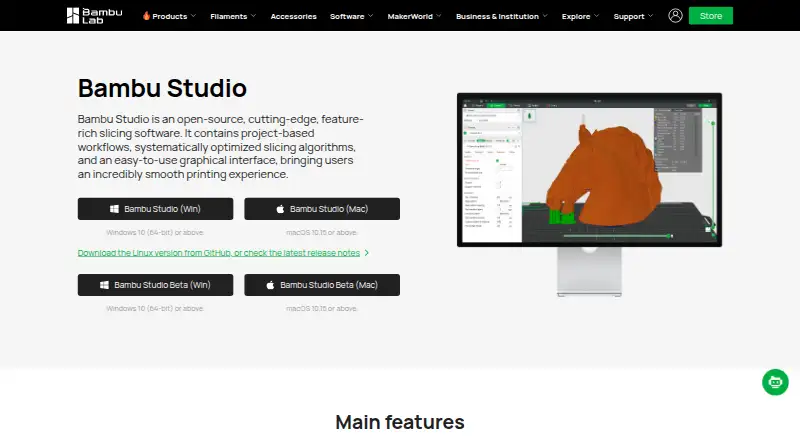
Bambu Studio is desktop software for preparing and managing 3D prints, with a strong focus on Bambu workflows. It combines 3D model slicing, G-code viewing, multiple plate management, remote printer control and monitoring, automatic object arrangement and orientation, support generation, and multi-material preparation. Official releases are available for Windows, macOS, and Linux, making it suitable for users who want a free desktop tool across those operating systems.
Its main strength is the depth of print preparation controls available in one application. Users can choose hybrid, tree, normal, or customized supports; paint multi-material models; and adjust slicing parameters at global, object, or part level. Automatic arrangement and orientation help organize projects, while mesh defect detection and limited automatic repair address some model-preparation issues. The software also supports viewing G-code and managing multiple plates, which fits projects that require more than a single print surface.
Bambu Studio is most compelling for Bambu users who need multi-material workflows, remote printer access, and detailed control without a paid plan. Its ecosystem connections are focused on Bambu Handy and MakerWorld rather than a broad set of listed integrations. Core Bambu Studio is licensed under AGPLv3, while the optional networking plugin uses non-free libraries for extended networking functions. Choose it for Bambu-centered desktop preparation and control; users seeking a wider integration ecosystem or more extensive automatic mesh repair should consider a different tool.
Your product? Our editors can test Bambu Studio in depth and publish a review, labelled as paid · from $149/mo →
Bambu Studio pricing
Bambu Studio fact sheet
| Free plan | Yes |
|---|---|
| Paid from | Free |
| Auto supports | Yes |
| Printer control | Yes |
| Print monitoring | Yes |
| Cloud slicing | Not verified |
| Multi-material tools | Yes |
| Model repair | Not verified |
| Deployment | Desktop |
| Platforms | Windows, macOS, Linux |
| Built for | Solo, Small business (editorial estimate) |
| Pricing | Free plan |
| Website | bambulab.com |
| Facts checked | 24 Sep 2026 |
Alternatives to Bambu Studio
- OrcaSlicerA calibration-focused FDM slicer with broad printer-host integrations.9.0
- Slic3rA mature free slicer with multi-material tools, printer control, and OctoPrint integration.9.0
- Formlabs PreFormA focused, free choice for Formlabs teams preparing and sending SLA or SLS jobs.8.8


See all Bambu Studio alternatives →
Bambu Studio vs the competition
- Bambu Studio vs OrcaSlicer
- Bambu Studio vs Slic3r
- Bambu Studio vs Formlabs PreForm
- Bambu Studio vs Autodesk Netfabb
- Bambu Studio vs IceSL
- Bambu Studio vs OctoPrint



Compare Bambu Studio with any tool side by side →
Also Ranked In
Bambu Studio is ranked in 3 of our directories.
Used Bambu Studio? Be the first to review it
The editor score above is our own research. What this page doesn't have yet is a reader's view — what you used Bambu Studio for, what worked and what didn't. No stars are seeded and no review is paid for; an editor reads every one before it appears.
Write a reviewTwo minutes · verified accounts only · read by an editor before it appears
Featured on iTechGuides

Bambu Studio is listed in our 3D Printing Software directory. Add the badge to your site — it links back to this page.
<a href="https://www.itechguides.com/products/bambu-studio/"><img src="https://www.itechguides.com/best/badge/bambu-studio.svg" alt="Featured on iTechGuides" width="230" height="46"></a>
Reviewed by iTechGuides Editors · Editorial team · Updated Oct 2026
Advertiser disclosure: iTechGuides is reader-supported. Vendors can pay for top positions in our rankings and for a place on other products' pages, and we may earn a commission when you click some links. Bought places stand at the number bought; this page and our disclosure say so. Paying vendors may get a fuller, more detailed review from our editors, and that review can change their score. How we rank.
Last updated · How we research and update