
OrbitOps Pro
OrbitOps Pro: A garage-door-focused field platform with scheduling, field work, payments, and inventory tiers. Ranked #15 of 25 in Garage Door Software by our editors (7.5/10); pricing: Paid; best for installation teams with larger operating budgets.
At a glance
- Editor score7.5 / 10
- PricingPaid
- Best forInstallation teams with larger operating budgets
- Free planNo
- Paid from$149/mo
- Estimate builderYes
- Facts checked21 Sep 2026
Where it wins
- Carries estimates, parts, and line items into scheduled installation jobs
- Technician app includes routes, checklists, notes, photos, and navigation
- Executive adds inventory, route optimization, suppliers, and QuickBooks Online
Where it doesn't
- Starts at $149 per month with no free plan
- Platform coverage is web-only
- Lead capture and pipeline tools are not the product's stated focus
Our verdict on OrbitOps Pro
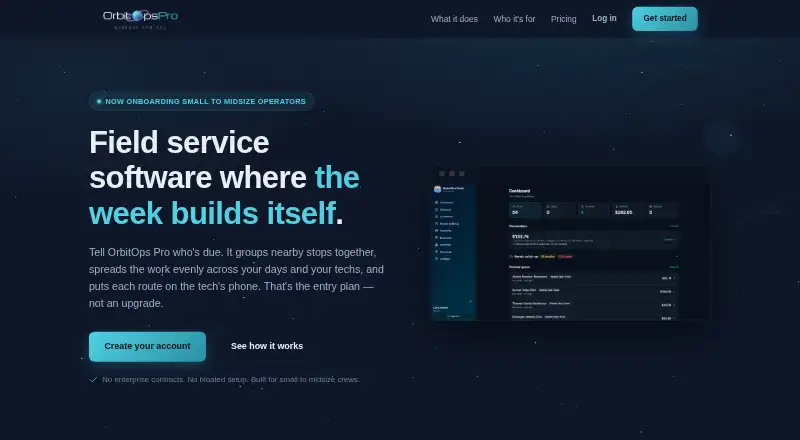
OrbitOps Pro is field-service-management software for garage door companies and other small to midsize service operators. Its workflow connects installation estimates with scheduled jobs, same-day repairs, technician dispatch, parts usage, invoicing, and payments. Technicians can work from a phone-based app with ordered stops, navigation, checklists, notes, and photos. This makes it most relevant to installation teams that want office and field operations in one system, particularly businesses with enough activity to justify paid operational software.
Pricing is structured around three monthly tiers. Signature costs $149 per month and includes scheduling, recurring visits, technician work lists, estimates, approved-job execution, per-visit and monthly invoicing, and Stripe payment links. Executive costs $349 per month and adds inventory tracking, stock draw-down, route optimization, a day map, QuickBooks Online integration, purchase orders, suppliers, and follow-up queues. Premier costs $549 per month and adds timesheets, cost-to-serve, money-recovery reports, service agreements, and no cap on additional seats. The published pricing also states that annual payment provides two months free. There is no free plan, so the lower tier is the practical entry point for teams ready for a recurring commitment.
The main advantage is the depth of the installation workflow: parts and materials recorded in the field can become invoice line items, while higher tiers connect inventory, routes, purchasing, accounting summaries, and service agreements. Stripe payment links support card payments, and the platform also records cash, check, and Zelle payments. The trade-off is focus and coverage. OrbitOps Pro runs on the web, and its follow-up queues are described around existing customers rather than lead capture or pipeline management. Choose it if installation coordination, technician execution, parts, and payments are central priorities. Consider an alternative if you need a broader lead-management system or a free starting plan.
Your product? Our editors can test OrbitOps Pro in depth and publish a review, labelled as paid · from $149/mo →
OrbitOps Pro pricing
All 3 OrbitOps Pro plans and prices →
OrbitOps Pro fact sheet
| Free plan | No |
|---|---|
| Paid from | $149/mo |
| Lead management | Not verified |
| Estimate builder | Yes |
| Parts inventory | Yes |
| Technician dispatch | Yes |
| Payment processing | Yes |
| Technician mobile app | Yes |
| Deployment | Cloud, Mobile |
| Platforms | Web |
| Support | |
| Built for | Small business, Mid-market (editorial estimate) |
| Integrations | 2 integrations: Stripe, QuickBooks Online |
| Pricing | Paid (source) |
| Website | orbitopspro.com |
| Facts checked | 21 Sep 2026 |
OrbitOps Pro integrations
OrbitOps Pro lists 2 integrations on its own site.
- Stripe
- QuickBooks Online
Alternatives to OrbitOps Pro
- FieldForgeA broad garage-door workflow with a free plan and paid team features.9.2
- KaldrexA specialized garage door operations platform with plans starting at $29 per month.9.0
- EyeOnTaskBroad garage-door field-service coverage at a low starting price.8.8


See all OrbitOps Pro alternatives →
Also Ranked In
OrbitOps Pro is ranked in 2 of our directories.
Used OrbitOps Pro? Be the first to review it
The editor score above is our own research. What this page doesn't have yet is a reader's view — what you used OrbitOps Pro for, what worked and what didn't. No stars are seeded and no review is paid for; an editor reads every one before it appears.
Write a reviewTwo minutes · verified accounts only · read by an editor before it appears
Featured on iTechGuides

OrbitOps Pro is listed in our Garage Door Software directory. Add the badge to your site — it links back to this page.
<a href="https://www.itechguides.com/products/orbitops-pro/"><img src="https://www.itechguides.com/best/badge/orbitops-pro.svg" alt="Featured on iTechGuides" width="230" height="46"></a>
Reviewed by iTechGuides Editors · Editorial team · Updated Oct 2026
Advertiser disclosure: iTechGuides is reader-supported. Vendors can pay for top positions in our rankings and for a place on other products' pages, and we may earn a commission when you click some links. Bought places stand at the number bought; this page and our disclosure say so. Paying vendors may get a fuller, more detailed review from our editors, and that review can change their score. How we rank.
Last updated · How we research and update