OpenSpeaks Subtitler
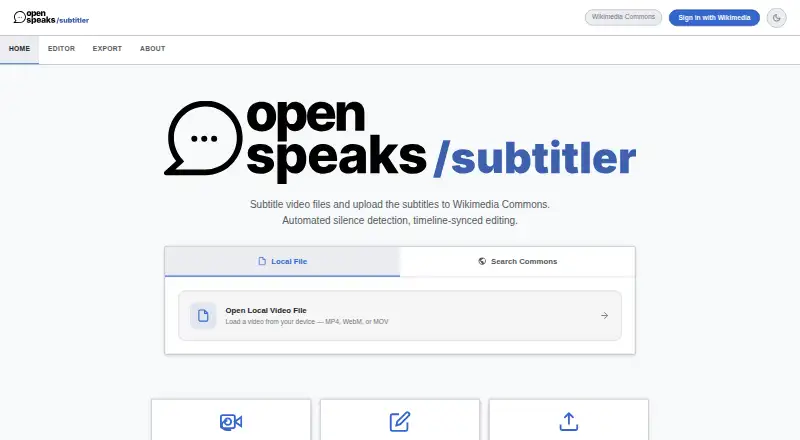
OpenSpeaks Subtitler: A free, open-source subtitle editor built around Wikimedia Commons workflows. Ranked #26 of 30 in Subtitle Software by our editors (6.5/10); pricing: Free plan; best for wikimedia contributors editing subtitles for free.
At a glance
- Editor score6.5 / 10
- PricingFree plan
- Best forWikimedia contributors editing subtitles for free
- Free planYes
- Paid fromFree
- Facts checked23 Sep 2026
Where it wins
- Edit local audio and video offline, or load media from Wikimedia Commons
- Create draft subtitle chunks with silence detection and adjust timing on a timeline
- Translate subtitles, export SRT or VTT, and upload to Wikimedia Commons
Where it doesn't
- The workflow is specifically oriented around Wikimedia Commons
- Silence detection creates draft chunks; speech recognition is not available
- Commons search, loading, and upload require an internet connection
Our verdict on OpenSpeaks Subtitler
OpenSpeaks Subtitler is a free, open-source browser-based tool for creating and editing subtitles, with particular relevance to Wikimedia contributors, language documenters, and archivists. It supports both local audio or video and media from Wikimedia Commons. Local files can be edited offline, while Commons features require an internet connection. Its focus is subtitle production for oral history and language documentation rather than a broad, general-purpose media workflow.
The editing process combines draft generation with manual control. Silence detection can divide media into draft subtitle chunks; users can then edit the text and timing using timeline and video overlay controls. Subtitles can also be translated using machine translation, exported as SRT or VTT, and uploaded to Wikimedia Commons. These features make it a practical fit when the destination is Commons or when contributors need standard subtitle files. Silence detection is not speech recognition, however, so it does not provide automatic transcription of spoken words.
Its free, open-source model suits solo contributors and small projects that want local-media editing without a paid plan, particularly when Commons is part of the workflow. The trade-off is that the product is closely aligned with Wikimedia: teams seeking a tool centered on other platforms or automated speech transcription should consider alternatives. Choose OpenSpeaks Subtitler for subtitle timing, translation, and Commons publishing; look elsewhere if transcription automation or a wider platform focus is essential.
Your product? Our editors can test OpenSpeaks Subtitler in depth and publish a review, labelled as paid · from $149/mo →
OpenSpeaks Subtitler pricing
OpenSpeaks Subtitler fact sheet
| Free plan | Yes |
|---|---|
| Paid from | Free |
| Max video length | Not verified |
| Auto-captioning | Not verified |
| Subtitle translation | Yes |
| Speaker labels | Not verified |
| SRT export | Yes |
| VTT export | Yes |
| Deployment | Cloud, Browser extension |
| Platforms | Web |
| Built for | Solo, Small business (editorial estimate) |
| Integrations | 1 integrations: Wikimedia Commons |
| Pricing | Free plan |
| Website | subtitler.toolforge.org |
| Facts checked | 23 Sep 2026 |
OpenSpeaks Subtitler integrations
OpenSpeaks Subtitler lists 1 integrations on its own site.
- Wikimedia Commons
Alternatives to OpenSpeaks Subtitler
- Subtitle EditA broad, free subtitle toolkit for local editing, transcription, translation, and video processing.9.4
- SRTGenA broad subtitle toolkit for creators who need transcription, localization, and exports.9.2
- EditsubEditsub combines broad subtitle tools, collaboration, and a low-cost annual Pro plan.9.0


See all OpenSpeaks Subtitler alternatives →
Used OpenSpeaks Subtitler? Be the first to review it
The editor score above is our own research. What this page doesn't have yet is a reader's view — what you used OpenSpeaks Subtitler for, what worked and what didn't. No stars are seeded and no review is paid for; an editor reads every one before it appears.
Write a reviewTwo minutes · verified accounts only · read by an editor before it appears
Featured on iTechGuides

OpenSpeaks Subtitler is listed in our Subtitle Software directory. Add the badge to your site — it links back to this page.
<a href="https://www.itechguides.com/products/openspeaks-subtitler/"><img src="https://www.itechguides.com/best/badge/openspeaks-subtitler.svg" alt="Featured on iTechGuides" width="230" height="46"></a>
Reviewed by iTechGuides Editors · Editorial team · Updated Oct 2026
Advertiser disclosure: iTechGuides is reader-supported. Vendors can pay for top positions in our rankings and for a place on other products' pages, and we may earn a commission when you click some links. Bought places stand at the number bought; this page and our disclosure say so. Paying vendors may get a fuller, more detailed review from our editors, and that review can change their score. How we rank.
Last updated · How we research and update