
OpenPencil
OpenPencil: A capable free editor for Figma-compatible UI work, but not for prototyping or handoff. Ranked #19 of 32 in Game UI Design Software by our editors (7.4/10); pricing: Free plan; best for open-source Figma-compatible UI work.
At a glance
- Editor score7.4 / 10
- PricingFree plan
- Best forOpen-source Figma-compatible UI work
- Free planYes
- Paid fromFree
- Real-time collaborationYes
- Facts checked22 Sep 2026
Where it wins
- Native .fig support with vector, text, auto layout, and CSS Grid tools
- Real-time peer-to-peer collaboration with live cursors and follow mode
- CLI, MCP, plugin API, AI, and design-token automation options
Where it doesn't
- No prototype mode or animation support
- No developer handoff or Dev Mode-style workflow
- The broad feature set may exceed the needs of simple UI projects
Our verdict on OpenPencil
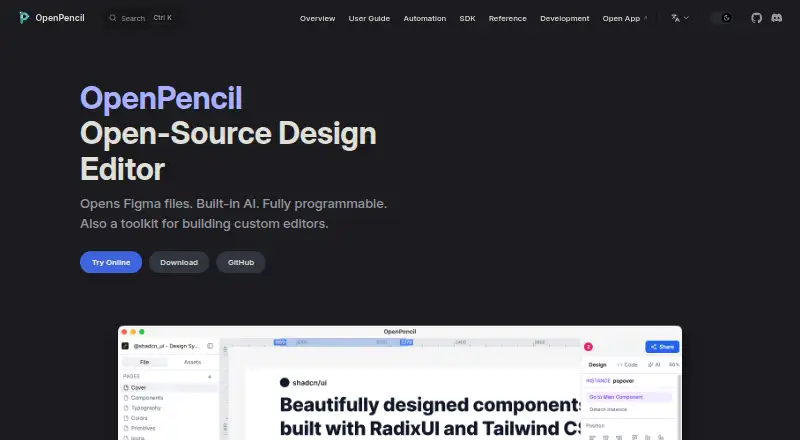
OpenPencil is an open-source design editor for opening, editing, and exporting Figma-compatible .fig files. It is aimed at designers, developers, automation users, and teams seeking a free, local-first alternative to proprietary design tools. The product covers web, Windows, macOS, Linux, iOS, and Android, with a web app and Tauri desktop application included in its positioning.
Its strongest fit is collaborative and programmable UI work. The editor combines vector drawing, text editing, rich-text formatting, auto layout, CSS Grid, reusable components, component sets, variants, and instances. Real-time peer-to-peer collaboration adds live cursors and follow mode. For automation-heavy workflows, the CLI can inspect, export, analyze, and convert design files, while the MCP server and Figma Plugin API extend automation possibilities. Its built-in AI assistant supports multi-provider BYOK connections, including OpenRouter, Anthropic, OpenAI, Google AI, DeepSeek, Z.ai, and MiniMax, alongside tools such as Claude Code, Cursor, and Windsurf.
OpenPencil is less suitable when a game UI workflow depends on interactive prototypes, animation, or developer handoff. The published capabilities include no prototype mode, animation support, or developer handoff, so teams needing those stages should choose a tool with those functions. It is a strong choice for open-source Figma-compatible editing, design systems, collaboration, file conversion, and automation. Teams focused primarily on polished interaction demos or a structured designer-to-developer delivery process should look elsewhere.
Your product? Our editors can test OpenPencil in depth and publish a review, labelled as paid · from $149/mo →
OpenPencil pricing
OpenPencil fact sheet
| Free plan | Yes |
|---|---|
| Paid from | Free |
| Real-time collaboration | Yes |
| Prototype capabilities | None |
| Design systems | Yes |
| Developer handoff | No |
| UI animation support | No |
| Primary platform | Web_desktop |
| Included seats | Not verified |
| Deployment | Cloud, Desktop, Mobile |
| Platforms | Web, Windows, macOS, Linux, iOS, Android |
| Support | Community, Docs |
| Built for | Solo, Small business, Mid-market (editorial estimate) |
| Integrations | 10 integrations: OpenRouter, Anthropic, OpenAI, Google AI, DeepSeek, Z.ai … |
| Pricing | Free plan |
| Website | openpencil.dev |
| Facts checked | 22 Sep 2026 |
OpenPencil integrations
OpenPencil lists 10 integrations on its own site.
- OpenRouter
- Anthropic
- OpenAI
- Google AI
- DeepSeek
- Z.ai
- MiniMax
- Claude Code
- Cursor
- Windsurf
Alternatives to OpenPencil
- UXPinA strong fit for game UI teams that need design systems and dynamic prototypes.9.4
- ProtoPieA strong choice for detailed interactions, device testing, and hardware-linked prototypes.9.2
- Axure RPA deep prototyping tool for teams designing interactive game interfaces.9.1



See all OpenPencil alternatives →
Used OpenPencil? Be the first to review it
The editor score above is our own research. What this page doesn't have yet is a reader's view — what you used OpenPencil for, what worked and what didn't. No stars are seeded and no review is paid for; an editor reads every one before it appears.
Write a reviewTwo minutes · verified accounts only · read by an editor before it appears
Featured on iTechGuides

OpenPencil is listed in our Game UI Design Software directory. Add the badge to your site — it links back to this page.
<a href="https://www.itechguides.com/products/openpencil/"><img src="https://www.itechguides.com/best/badge/openpencil.svg" alt="Featured on iTechGuides" width="230" height="46"></a>
Reviewed by iTechGuides Editors · Editorial team · Updated Oct 2026
Advertiser disclosure: iTechGuides is reader-supported. Vendors can pay for top positions in our rankings and for a place on other products' pages, and we may earn a commission when you click some links. Bought places stand at the number bought; this page and our disclosure say so. Paying vendors may get a fuller, more detailed review from our editors, and that review can change their score. How we rank.
Last updated · How we research and update