
OpenDraft
OpenDraft: A broad, no-cost screenwriting suite for writing, collaboration, revisions, and production planning. Ranked #6 of 27 in Screenwriting Software by our editors (7.9/10); pricing: Free plan; best for free, full-platform collaborative screenwriting.
At a glance
- Editor score7.9 / 10
- PricingFree plan
- Best forFree, full-platform collaborative screenwriting
- Free planYes
- Paid fromFree
- Real-time collaborationYes
- Facts checked20 Sep 2026
Where it wins
- Professional screenplay formatting with beat boards and index cards
- Real-time collaboration, permissions, version history, and track changes
- Broad platform support with imports, exports, and production tagging
Where it doesn't
- Its broad feature set may exceed the needs of simple drafting
- Production tagging is geared toward workflows beyond writing alone
- Self-hosting requires managing the deployment environment
Our verdict on OpenDraft
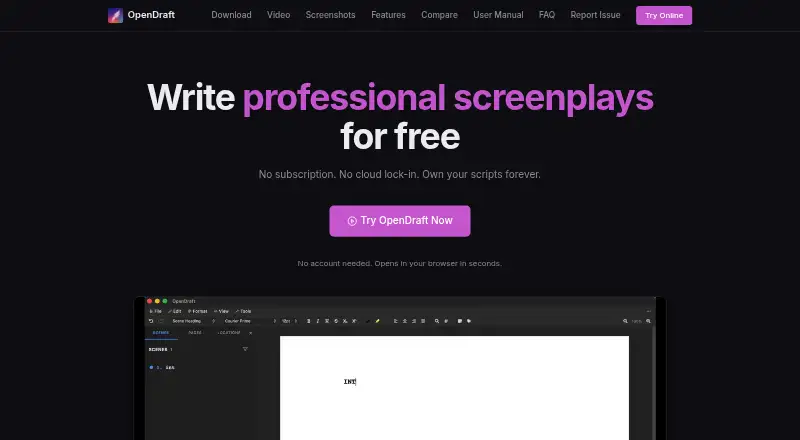
OpenDraft is a free, open-source screenwriting application for writers, collaborators, and production-focused teams. It combines an industry-standard screenplay editor with beat boards, drag-and-drop index cards, character profiles, production tagging, revision mode, and track changes. Projects can be stored locally, and desktop use works offline. The product is suited to users who want writing, planning, collaboration, and revision tools in one application without a subscription.
The Free plan includes professional screenplay formatting, beat boards and index cards, real-time collaboration, version history, and production tagging. Version history supports check-in, comparison, and restoration, while live cursors and permissions support shared work. Production breakdown tagging covers cast, props, costumes, VFX, and other elements. Automatic timestamped backups can be saved to user-selected folders, and custom templates and formatting preferences allow writers to adjust their workflow. There are no paid tiers described, so the listed feature set is available under the free model.
Platform coverage is a central strength: OpenDraft supports the web, Windows, macOS, Linux, iOS, Android, and self-hosted deployments. It also works with iCloud Drive, Google Drive, and Dropbox, and supports imports and exports for Final Draft, Fountain, Fade In, PDF, Word, Open Screenplay Format, and OpenDraft files. That breadth makes it a practical fit for writers and collaborators moving between devices or exchanging projects in established formats. Users seeking only a focused drafting tool may find its planning, revision, collaboration, and production features unnecessary; OpenDraft is better suited to projects that benefit from a fuller workflow.
Your product? Our editors can test OpenDraft in depth and publish a review, labelled as paid · from $149/mo →
OpenDraft pricing
All 1 OpenDraft plans and prices →
OpenDraft fact sheet
| Free plan | Yes |
|---|---|
| Paid from | Free |
| Real-time collaboration | Yes |
| Offline mode | Yes |
| Revision tracking | Yes |
| Production breakdown tools | Yes |
| Supported platforms | macOS, Windows, Linux, iOS/iPadOS, Android, browser |
| Export formats | PDF, Microsoft Word (.docx), Final Draft (.fdx), Fountain (.fountain), Fade In (.fadein), Open Screenplay Format (.osf), OpenDraft (.odraft) |
| Deployment | Self-hosted, Desktop, Mobile |
| Platforms | Web, Windows, macOS, Linux, iOS, Android |
| Support | Community, Docs |
| Built for | Solo, Small business (editorial estimate) |
| Integrations | 3 integrations: iCloud Drive, Google Drive, Dropbox |
| Pricing | Free plan (source) |
| Website | proteus-technologies-private-limited.github.io |
| Facts checked | 20 Sep 2026 |
OpenDraft integrations
OpenDraft lists 3 integrations on its own site.
- iCloud Drive
- Google Drive
- Dropbox
Alternatives to OpenDraft
- Final DraftA mature, full-scope screenwriting suite for writing through production.9.3
- CeltxA strong fit for writers who need production planning beyond screenplay formatting.9.1
- WriterDuetA flexible screenwriting workspace for teams that need collaboration and extensive exports.8.8


See all OpenDraft alternatives →
OpenDraft vs the competition
- OpenDraft vs Final Draft
- OpenDraft vs Celtx
- OpenDraft vs WriterDuet
- OpenDraft vs Fade In
- OpenDraft vs Screenwriter-mode
- OpenDraft vs Story Architect


Compare OpenDraft with any tool side by side →
Used OpenDraft? Be the first to review it
The editor score above is our own research. What this page doesn't have yet is a reader's view — what you used OpenDraft for, what worked and what didn't. No stars are seeded and no review is paid for; an editor reads every one before it appears.
Write a reviewTwo minutes · verified accounts only · read by an editor before it appears
Featured on iTechGuides

OpenDraft is listed in our Screenwriting Software directory. Add the badge to your site — it links back to this page.
<a href="https://www.itechguides.com/products/opendraft/"><img src="https://www.itechguides.com/best/badge/opendraft.svg" alt="Featured on iTechGuides" width="230" height="46"></a>
Reviewed by iTechGuides Editors · Editorial team · Updated Oct 2026
Advertiser disclosure: iTechGuides is reader-supported. Vendors can pay for top positions in our rankings and for a place on other products' pages, and we may earn a commission when you click some links. Bought places stand at the number bought; this page and our disclosure say so. Paying vendors may get a fuller, more detailed review from our editors, and that review can change their score. How we rank.
Last updated · How we research and update