Open Prompter
Open Prompter: A capable free iOS teleprompter with voice tracking, recording, and broad file integrations. Ranked #9 of 32 in Teleprompter Software by our editors (8.2/10); pricing: Free plan; best for free iPhone prompting with file integrations.
At a glance
- Editor score8.2 / 10
- PricingFree plan
- Best forFree iPhone prompting with file integrations
- Free planYes
- Paid fromFree
- Voice trackingYes
- Facts checked20 Sep 2026
Where it wins
- Voice tracking uses on-device speech recognition
- Records front-camera video while displaying the script
- Connects with iCloud, Obsidian, and major cloud drives
Where it doesn't
- Available on iOS rather than across multiple platforms
- No AI features
- Built around Markdown files and the iOS Files workflow
Our verdict on Open Prompter
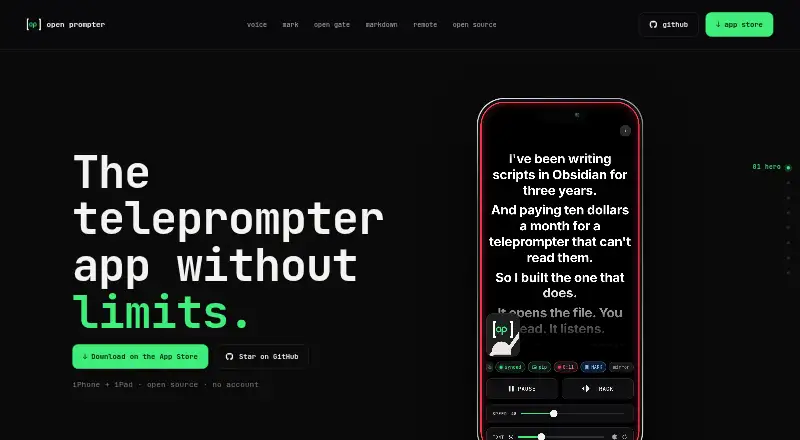
Open Prompter is a free, open-source teleprompter app for iPhone and iPad. It is aimed at creators who want to display scrolling scripts, record video with the front camera, and work with Markdown files stored in folders available through iOS Files. The app supports adjustable scroll speed and font size, making it suitable for scripted recordings where control over reading pace and presentation matters. It also offers horizontal and vertical mirroring for beam-splitter rigs.
Its standout feature is voice-tracked scrolling, which advances the script using on-device speech recognition. Bluetooth keyboards and media remotes can control playback, while the front camera records video with the script displayed on screen. Recordings can be saved to Photos or beside the Markdown script. The built-in editor saves changes back through the system file coordinator, and Markdown rendering supports headings, lists, emphasis, and cleanup of notes metadata. Together, these features give the app a focused workflow for reading, recording, and maintaining scripts from an iPhone or iPad.
The integration range is a strong fit for file-based workflows. Open Prompter works with iCloud, Obsidian, Dropbox, Google Drive, OneDrive, Box, Proton Drive, Nextcloud, and Working Copy. The published pricing details show a free product with no subscriptions, in-app purchases, or paid tier. Its main constraint is platform coverage: the app is designed for iPad and its iOS platform listing does not extend to a verified macOS experience. Choose Open Prompter if free iPhone or iPad prompting, voice tracking, recording, mirroring, and cloud-file access are priorities. Choose another option if you need broader platform support or AI features.
Your product? Our editors can test Open Prompter in depth and publish a review, labelled as paid · from $149/mo →
Open Prompter pricing
Open Prompter fact sheet
| Free plan | Yes |
|---|---|
| Paid from | Free |
| Supported platforms | ios |
| Voice tracking | Yes |
| Remote control | Yes |
| Video recording | Yes |
| Script length limit | Not verified |
| Display modes | Not verified |
| Team script sharing | Not verified |
| Deployment | Mobile |
| Platforms | iOS |
| Support | Email, Community |
| Built for | Solo, Small business (editorial estimate) |
| Integrations | 9 integrations: iCloud, Obsidian, Dropbox, Google Drive, OneDrive, Box … |
| Pricing | Free plan |
| Website | openprompter.app |
| Facts checked | 20 Sep 2026 |
Open Prompter integrations
Open Prompter lists 9 integrations on its own site.
- iCloud
- Obsidian
- Dropbox
- Google Drive
- OneDrive
- Box
- Proton Drive
- Nextcloud
- Working Copy
Alternatives to Open Prompter
- EasyPrompterA flexible teleprompter for solo presenters, live operators, and multi-display productions.9.4
- Teleprompter.comA broad creator video toolkit with voice scrolling, recording, editing, and team workspaces.9.2
- SpeakflowA flexible teleprompter for voice-led recording, remote control, and team collaboration.9.0



See all Open Prompter alternatives →
Used Open Prompter? Be the first to review it
The editor score above is our own research. What this page doesn't have yet is a reader's view — what you used Open Prompter for, what worked and what didn't. No stars are seeded and no review is paid for; an editor reads every one before it appears.
Write a reviewTwo minutes · verified accounts only · read by an editor before it appears
Featured on iTechGuides

Open Prompter is listed in our Teleprompter Software directory. Add the badge to your site — it links back to this page.
<a href="https://www.itechguides.com/products/open-prompter/"><img src="https://www.itechguides.com/best/badge/open-prompter.svg" alt="Featured on iTechGuides" width="230" height="46"></a>
Reviewed by iTechGuides Editors · Editorial team · Updated Oct 2026
Advertiser disclosure: iTechGuides is reader-supported. Vendors can pay for top positions in our rankings and for a place on other products' pages, and we may earn a commission when you click some links. Bought places stand at the number bought; this page and our disclosure say so. Paying vendors may get a fuller, more detailed review from our editors, and that review can change their score. How we rank.
Last updated · How we research and update