OnePager Pro
OnePager Pro: A focused way to present Microsoft Project schedules, not a general slide editor. Ranked #89 of 93 in Presentation Software by our editors (3.0/10); pricing: 15-day trial; best for project managers presenting Microsoft Project schedules.
At a glance
- Editor score3.0 / 10
- Pricing15-day trial
- Best forProject managers presenting Microsoft Project schedules
- Free planNo
- Facts checked25 Sep 2026
Where it wins
- Imports one or multiple Microsoft Project plans
- Shows baselines, dependencies, progress, and schedule changes
- Exports reports to PowerPoint, PDF, and image formats
Where it doesn't
- Windows-only desktop application
- Focused on project timelines, not general-purpose slide authoring
- Paid perpetual license; no free plan
Our verdict on OnePager Pro
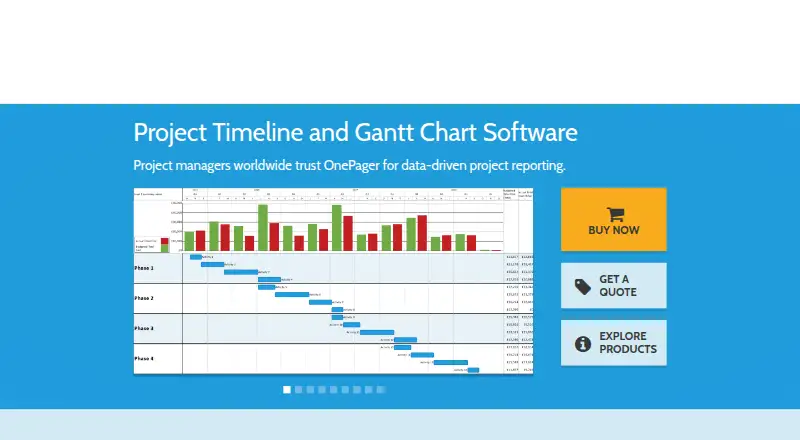
For project managers, schedulers, and portfolio teams who need to communicate Microsoft Project schedules, OnePager Pro turns task and schedule data into Gantt charts, timelines, and project reports. It can import one or multiple project plans and create full-screen presentations or multi-page reports. Its focus is schedule reporting rather than general-purpose slide-deck creation, so it suits people presenting project information more than teams building varied presentations from scratch.
The Microsoft ecosystem connection is central: OnePager Pro works with Microsoft Project and can connect directly to Microsoft Project Server or Project Online; Project Web App is also listed as an integration. Users can filter tasks and milestones, group and sort them into rows and nested swimlanes, and apply conditional formatting based on project data. Charts can show baselines, progress, deadlines, dependencies, and critical path, while change tracking supports comparison between schedule versions. Export options include PowerPoint, PDF, and image formats.
OnePager Pro is a Windows desktop application, with offline access and full-screen presentation mode listed among its category capabilities. The published license is perpetual and includes one year of upgrades and support; a 15-day free trial is available, but there is no free plan. That makes it a specialized option for project teams that already rely on Microsoft Project and want structured schedule visuals. Teams seeking broad slide-authoring features or support beyond Windows should consider a different presentation tool.
Your product? Our editors can test OnePager Pro in depth and publish a review, labelled as paid · from $149/mo →
OnePager Pro pricing
All 1 OnePager Pro plans and prices →
OnePager Pro fact sheet
| Free plan | No |
|---|---|
| Paid from | Not verified |
| AI assistance | Not verified |
| Real-time collaboration | Not verified |
| PowerPoint import | Not verified |
| PowerPoint export | Yes |
| Offline access | Yes |
| Presenter mode | Yes |
| Supported platforms | Windows |
| Free trial | 15 days |
| Deployment | Desktop |
| Platforms | Windows |
| Support | Email, Phone, Tickets |
| Built for | Small business, Mid-market, Enterprise (editorial estimate) |
| Integrations | 4 integrations: Microsoft Project, Microsoft Project Server, Project Online, Project Web App |
| Pricing | 15-day trial (source) |
| Website | onepager.com |
| Facts checked | 25 Sep 2026 |
OnePager Pro integrations
OnePager Pro lists 4 integrations on its own site.
- Microsoft Project
- Microsoft Project Server
- Project Online
- Project Web App
Alternatives to OnePager Pro
- Microsoft PowerPointA broad presentation workspace spanning web, desktop, mobile, collaboration, AI, and rehearsal tools.9.4
- Apple KeynoteA polished free presentation tool for Apple ecosystem users, with optional AI features.9.1
- Zoho ShowA capable free option for teams that need collaboration, offline work, and PPTX support.9.0



See all OnePager Pro alternatives →
Used OnePager Pro? Be the first to review it
The editor score above is our own research. What this page doesn't have yet is a reader's view — what you used OnePager Pro for, what worked and what didn't. No stars are seeded and no review is paid for; an editor reads every one before it appears.
Write a reviewTwo minutes · verified accounts only · read by an editor before it appears
Featured on iTechGuides

OnePager Pro is listed in our Presentation Software directory. Add the badge to your site — it links back to this page.
<a href="https://www.itechguides.com/products/onepager-pro/"><img src="https://www.itechguides.com/best/badge/onepager-pro.svg" alt="Featured on iTechGuides" width="230" height="46"></a>
Guides on presentation software
- 5 Best AI Presentation and PowerPoint Design Tools in 2026Aug 2026
- Best AI Tools for Effortless Presentation Design Compared 2025: 2026 Buyer’s UpdateAug 2026
- Best Presentation Apps for iPad and iPhone: Keynote, PowerPoint, Google Slides, Canva, and PreziAug 2026
Reviewed by iTechGuides Editors · Editorial team · Updated Oct 2026
Advertiser disclosure: iTechGuides is reader-supported. Vendors can pay for top positions in our rankings and for a place on other products' pages, and we may earn a commission when you click some links. Bought places stand at the number bought; this page and our disclosure say so. Paying vendors may get a fuller, more detailed review from our editors, and that review can change their score. How we rank.
Last updated · How we research and update