
Ollang
Ollang: A broad localization platform for teams that need dubbing, subtitles, and workflow control. Ranked #28 of 30 in Subtitle Software by our editors (6.3/10); pricing: 21-day trial; best for localization teams needing dubbing automation.
At a glance
- Editor score6.3 / 10
- Pricing21-day trial
- Best forLocalization teams needing dubbing automation
- Free planNo
- Facts checked20 Sep 2026
Where it wins
- AI dubbing, subtitle translation, captions, and lip synchronization
- Permission-based voice cloning with human review workflows
- REST API, SDK, webhooks, and multiple content integrations
Where it doesn't
- No free plan for basic subtitle editing
- Contact-sales positioning may not suit smaller teams
- Broader localization scope can exceed simple subtitle needs
Our verdict on Ollang
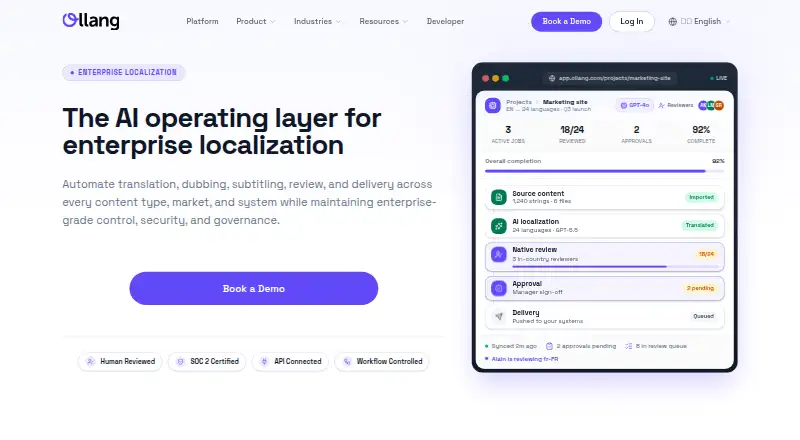
Ollang is an AI-powered localization platform for teams managing multilingual video, audio, documents, and other content. Its capabilities cover subtitle translation, closed-caption generation, transcription, AI dubbing, lip synchronization, voice cloning with permission controls, and human review. The product is aimed at localization teams and enterprise-scale content operations rather than users seeking only a basic subtitle editor. It is available through the web and API, with project, translator, and localization workflow management included in its broader platform scope.
The published plans are Starter, Pro, and Enterprise, with a 21-day trial and no free plan. Starter includes all translation services, self project management, 20 minutes of AI dubbing, permission-based cloned voice support, and human review when requested. Pro adds full project management, 45 minutes of AI dubbing, and integrations with Dropbox, Google Drive, and WeTransfer. Enterprise adds website translation, customizable AI dubbing minutes, unique voice creation, workflow API management, analytics, and reporting. This tier structure makes the product suitable for teams that expect to expand from individual projects into managed localization operations.
Ollang’s strongest distinction is the breadth of its production workflow. Teams can batch-process video libraries, manage review and approval steps, and connect content through Google Drive, Dropbox, Vimeo, WeTransfer, Mux, TikTok One, Jira, and Tridion Docs. REST APIs, webhooks, an SDK, and MCP integrations extend that workflow into other systems. The trade-off is focus: teams that only need straightforward subtitle editing may find dubbing, voice, lip-sync, and enterprise workflow features unnecessary, especially without a free plan. Ollang is the better fit for localization teams coordinating multilingual content at scale, while simpler subtitle-only work calls for a narrower tool.
Your product? Our editors can test Ollang in depth and publish a review, labelled as paid · from $149/mo →
Ollang pricing
All 3 Ollang plans and prices →
Ollang fact sheet
| Free plan | No |
|---|---|
| Paid from | Not verified |
| Max video length | Not verified |
| Auto-captioning | Not verified |
| Subtitle translation | Not verified |
| Speaker labels | Not verified |
| SRT export | Not verified |
| VTT export | Not verified |
| Free trial | 21 days |
| Deployment | Cloud |
| Platforms | Web |
| Compliance & security | SOC 2, GDPR, ISO 27001, SSO/SAML |
| Support | Email, Docs |
| Built for | Mid-market, Enterprise (editorial estimate) |
| Integrations | 30+ integrations: Google Drive, Dropbox, Vimeo, WeTransfer, Mux, TikTok One … |
| Pricing | 21-day trial (source) |
| Website | ollang.com |
| Facts checked | 20 Sep 2026 |
Ollang integrations
Ollang lists 30+ integrations on its own site — the 8 named here are the ones its pages call out.
- Google Drive
- Dropbox
- Vimeo
- WeTransfer
- Mux
- TikTok One
- Jira
- Tridion Docs
Alternatives to Ollang
- Subtitle EditA broad, free subtitle toolkit for local editing, transcription, translation, and video processing.9.4
- SRTGenA broad subtitle toolkit for creators who need transcription, localization, and exports.9.2
- EditsubEditsub combines broad subtitle tools, collaboration, and a low-cost annual Pro plan.9.0


Also Ranked In
Ollang is ranked in 3 of our directories.
Used Ollang? Be the first to review it
The editor score above is our own research. What this page doesn't have yet is a reader's view — what you used Ollang for, what worked and what didn't. No stars are seeded and no review is paid for; an editor reads every one before it appears.
Write a reviewTwo minutes · verified accounts only · read by an editor before it appears
Featured on iTechGuides

Ollang is listed in our Subtitle Software directory. Add the badge to your site — it links back to this page.
<a href="https://www.itechguides.com/products/ollang/"><img src="https://www.itechguides.com/best/badge/ollang.svg" alt="Featured on iTechGuides" width="230" height="46"></a>
Reviewed by iTechGuides Editors · Editorial team · Updated Oct 2026
Advertiser disclosure: iTechGuides is reader-supported. Vendors can pay for top positions in our rankings and for a place on other products' pages, and we may earn a commission when you click some links. Bought places stand at the number bought; this page and our disclosure say so. Paying vendors may get a fuller, more detailed review from our editors, and that review can change their score. How we rank.
Last updated · How we research and update