
OKIOCAM Stop-Motion
OKIOCAM Stop-Motion: A focused, free classroom tool for OKIOCAM-based stop-motion projects. Ranked #24 of 29 in Stop Motion Software by our editors (6.6/10); pricing: Free plan; best for OKIOCAM and classroom workflows.
At a glance
- Editor score6.6 / 10
- PricingFree plan
- Best forOKIOCAM and classroom workflows
- Free planYes
- Paid fromFree
- Onion skinningYes
- Facts checked20 Sep 2026
Where it wins
- Free on Windows, Mac OS, and as a Chrome extension
- Onion skinning, timeline preview, and adjustable playback speed
- Google Drive and Google Classroom integrations
Where it doesn't
- Camera workflow is specialized around connected OKIOCAM hardware
- The application centers on visual frame capture and video export
- Editing is focused on stop-motion sequences rather than broad video production
Our verdict on OKIOCAM Stop-Motion
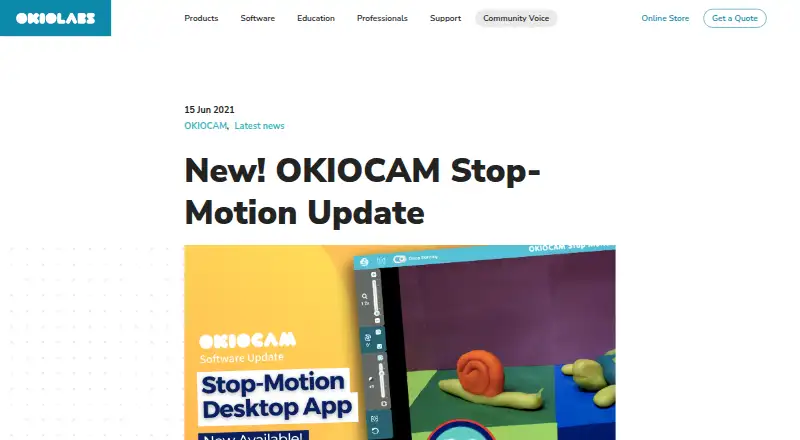
OKIOCAM Stop-Motion is free software for creating stop-motion videos with an OKIOCAM document camera. It is aimed at teachers, students, and classroom activities where users capture snapshots, arrange frames, preview sequences, and export completed projects. The platform supports Windows, Mac OS, and a Google Chrome extension, giving schools several ways to access the workflow. Its best fit is a classroom or learning environment already using OKIOCAM cameras and looking for a focused stop-motion tool without a paid plan.
The core feature set covers the main stages of a frame-based animation project. Onion skinning helps align successive frames, while the timeline supports scrolling and playback preview. Users can adjust frames-per-second playback, change brightness during capture, and use mirror, rotate, reset, and zoom controls. Projects can be imported and exported before completion, which supports pausing and resuming unfinished work. Completed projects can be exported as videos. These features keep the workflow centered on capturing and refining stop-motion sequences rather than broader video production.
Its classroom fit is strengthened by Google Drive and Google Classroom integrations. Those connections can support file handling and educational workflows alongside the camera capture process. The main trade-off is specialization: the software is built around connected OKIOCAM cameras, so it is a less natural choice for teams working with a wider range of camera hardware. The described workflow also focuses on visual frame capture and video export, making it better suited to silent or separately produced classroom animations than projects that depend on an integrated audio process. Choose it for accessible OKIOCAM-based instruction; consider a broader stop-motion or video editor when hardware flexibility or richer production tools matter.
Your product? Our editors can test OKIOCAM Stop-Motion in depth and publish a review, labelled as paid · from $149/mo →
OKIOCAM Stop-Motion pricing
OKIOCAM Stop-Motion fact sheet
| Free plan | Yes |
|---|---|
| Paid from | Free |
| Onion skinning | Yes |
| Live frame capture | Yes |
| Exposure controls | Yes |
| Timeline editing | Yes |
| Audio support | Not verified |
| Supported platforms | Windows, Mac OS, Chrome Extension |
| Deployment | Desktop, Browser extension |
| Platforms | Windows, macOS, Chrome extension |
| Built for | Small business, Mid-market (editorial estimate) |
| Integrations | 2 integrations: Google Drive, Google Classroom |
| Pricing | Free plan |
| Website | okiolabs.com |
| Facts checked | 20 Sep 2026 |
OKIOCAM Stop-Motion integrations
OKIOCAM Stop-Motion lists 2 integrations on its own site.
- Google Drive
- Google Classroom
Alternatives to OKIOCAM Stop-Motion
- DragonframeA deep professional toolkit with broad hardware support and a high one-time price.9.4
- MOTK ShootA capable open-source capture studio with camera control, editing, audio, and recovery tools.9.2
- Stop Motion StudioA broad stop-motion toolkit with capture, editing, camera controls, audio, and compositing.8.9


See all OKIOCAM Stop-Motion alternatives →
Used OKIOCAM Stop-Motion? Be the first to review it
The editor score above is our own research. What this page doesn't have yet is a reader's view — what you used OKIOCAM Stop-Motion for, what worked and what didn't. No stars are seeded and no review is paid for; an editor reads every one before it appears.
Write a reviewTwo minutes · verified accounts only · read by an editor before it appears
Featured on iTechGuides

OKIOCAM Stop-Motion is listed in our Stop Motion Software directory. Add the badge to your site — it links back to this page.
<a href="https://www.itechguides.com/products/okiocam-stop-motion/"><img src="https://www.itechguides.com/best/badge/okiocam-stop-motion.svg" alt="Featured on iTechGuides" width="230" height="46"></a>
Reviewed by iTechGuides Editors · Editorial team · Updated Oct 2026
Advertiser disclosure: iTechGuides is reader-supported. Vendors can pay for top positions in our rankings and for a place on other products' pages, and we may earn a commission when you click some links. Bought places stand at the number bought; this page and our disclosure say so. Paying vendors may get a fuller, more detailed review from our editors, and that review can change their score. How we rank.
Last updated · How we research and update