
Okada
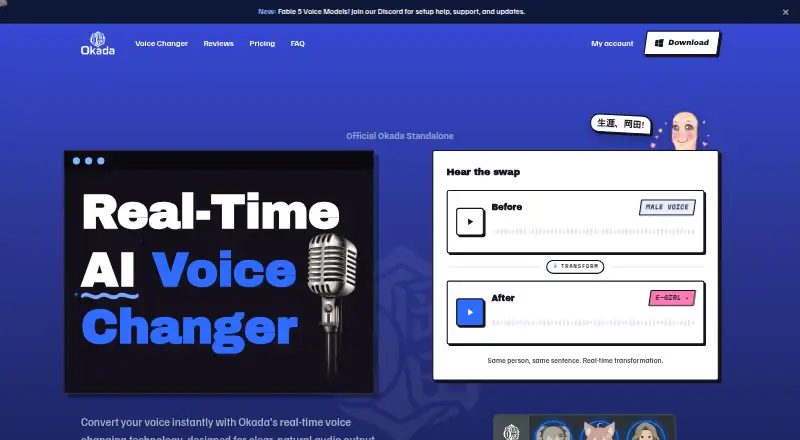
Okada: Live voice transformation with presets and a virtual microphone, but Windows only. Ranked #29 of 45 in Voice Changer Software by our editors (5.8/10); pricing: Free plan; best for windows users changing voice live in apps.
At a glance
- Editor score5.8 / 10
- PricingFree plan
- Best forWindows users changing voice live in apps
- Free planYes
- Paid from$19/mo
- Real-time changingYes
- Facts checked19 Sep 2026
Where it wins
- Transforms speech in real time with selectable voice presets.
- Virtual microphone routes transformed voice to supported apps.
- Works with games, chat, streaming, and meeting applications.
Where it doesn't
- Available for Windows 10 and 11 (64-bit); macOS is in development.
- Free plan includes one voice and standard-quality output.
- Free recordings include a watermark; removing it requires Pro at $19 monthly.
Our verdict on Okada
Okada is a Windows voice changer that applies AI voice transformation in real time, aimed at gamers, streamers, and other users whose applications accept microphone input. Selectable presets include E-girl, Mommy, Soft Femme, and Anime, with pitch and tone adjustment for shaping the output. A virtual microphone sends the transformed voice into apps rather than limiting the effect to a standalone recording workflow. Its fit is strongest for people who want live character voices in games, chat, streaming, or meetings; it is less suitable for anyone needing a macOS version today.
The app's integration range is broad for a voice tool: listed options include Discord, Roblox, Valorant, Twitch, YouTube, VRChat, OBS, Zoom, Fortnite, Minecraft, TeamSpeak, and Google Meet. That means it is positioned for both entertainment and meeting scenarios, wherever an application can take microphone input. The key distinction is live routing, not documented audio-file export: recording is mentioned, but export of audio files is not explicitly described. Buyers focused on finished audio files should weigh that limitation before choosing it.
Pricing is straightforward. Free costs $0 forever and includes one E-girl voice, standard quality, and a watermark on recordings. Pro costs $19 per month and adds all voices, including Mommy and Anime, studio-level output quality, watermark-free recordings, early access to new and beta voices, and priority support. The free tier offers a way to try a limited voice and live transformation, while Pro makes sense for users who want the wider voice selection and cleaner recordings. Choose Okada if Windows live voice effects and app compatibility are the priority; look elsewhere if you need macOS support.
Your product? Our editors can test Okada in depth and publish a review, labelled as paid · from $149/mo →
Okada pricing
All 2 Okada plans and prices →
Okada fact sheet
| Free plan | Yes |
|---|---|
| Paid from | $19/mo |
| Real-time changing | Yes |
| Recorded-audio changing | Not verified |
| Virtual microphone | Yes |
| Character voices | Yes |
| Audio export | Not verified |
| Platform support | Desktop |
| Deployment | Desktop |
| Platforms | Windows |
| Integrations | 12 integrations: Discord, Roblox, Valorant, Twitch, YouTube, VRChat … |
| Pricing | Free plan (source) |
| Website | okadavoice.com |
| Facts checked | 19 Sep 2026 |
Okada integrations
Okada lists 12 integrations on its own site.
- Discord
- Roblox
- Valorant
- Twitch
- YouTube
- VRChat
- OBS
- Zoom
- Fortnite
- Minecraft
- TeamSpeak
- Google Meet
Alternatives to Okada
- EaseUS VoiceWaveA flexible Windows voice changer with recording and exports, but a costly monthly entry plan.9.2
- Voice.aiReal-time and recorded voice tools across desktop, mobile, and API offerings.8.9
- Altered StudioA broad voice-production suite, with monthly morphing limits on its paid individual plans.8.7


Also Ranked In
Okada is ranked in 2 of our directories.
Used Okada? Be the first to review it
The editor score above is our own research. What this page doesn't have yet is a reader's view — what you used Okada for, what worked and what didn't. No stars are seeded and no review is paid for; an editor reads every one before it appears.
Write a reviewTwo minutes · verified accounts only · read by an editor before it appears
Featured on iTechGuides

Okada is listed in our Voice Changer Software directory. Add the badge to your site — it links back to this page.
<a href="https://www.itechguides.com/products/okada/"><img src="https://www.itechguides.com/best/badge/okada.svg" alt="Featured on iTechGuides" width="230" height="46"></a>
Reviewed by iTechGuides Editors · Editorial team · Updated Oct 2026
Advertiser disclosure: iTechGuides is reader-supported. Vendors can pay for top positions in our rankings and for a place on other products' pages, and we may earn a commission when you click some links. Bought places stand at the number bought; this page and our disclosure say so. Paying vendors may get a fuller, more detailed review from our editors, and that review can change their score. How we rank.
Last updated · How we research and update