NoNoise Mac
NoNoise Mac: A focused, open-source macOS tool for real-time cleanup across meetings, recording, and streaming. Ranked #4 of 24 in AI Noise Cancellation Software by our editors (8.8/10); pricing: Free plan; best for mac users wanting powerful open-source cleanup.
At a glance
- Editor score8.8 / 10
- PricingFree plan
- Best forMac users wanting powerful open-source cleanup
- Free planYes
- Paid fromFree
- Real-time cancellationYes
- Facts checked20 Sep 2026
Where it wins
- Free, open-source real-time cancellation with on-device processing
- Cleans microphone, room reverb, echo, and incoming system audio
- Works with Zoom, Meet, Discord, OBS, Slack, QuickTime, and Stream Deck
Where it doesn't
- Requires macOS 13 or later
- Apple Silicon only; Intel Macs are not supported
- Mac-only platform limits use across other operating systems
Our verdict on NoNoise Mac
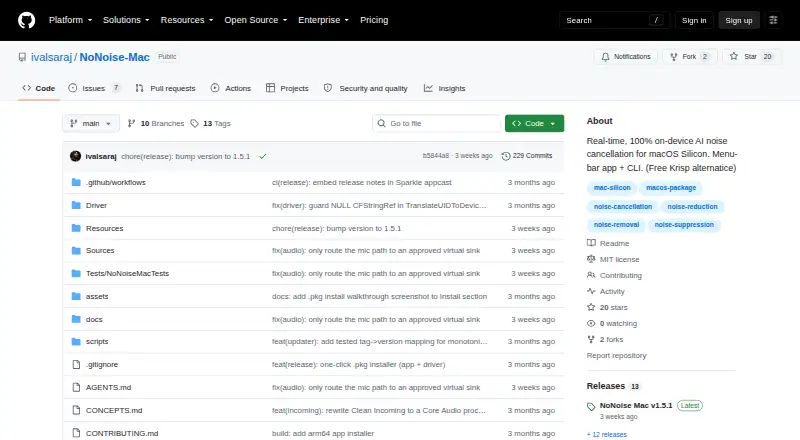
NoNoise Mac is a free, open-source menu-bar application for Apple Silicon Macs that cleans audio in real time. It is aimed at people who need clearer microphone input for meetings, podcasts, tutorials, streaming, or recordings, as well as users who want to process incoming system audio. Its DeepFilterNet3 model runs on-device through CoreML and the Neural Engine, while a virtual microphone routes the processed signal to other applications.
Its strongest fit is the breadth of audio workflows around a focused noise-cancellation function. Meeting, Podcast, Tutorial, and Custom modes provide different starting points, while Broadcast Voice and mouth-noise suppression add more control. Room de-reverberation, echo reduction, microphone cleanup, and Clean Incoming / Guest processing cover both sides of a call. Offline WAV-file cleanup through the CLI extends the product beyond live use, and recording and streaming workflows are supported alongside global hotkeys and Stream Deck URL actions.
The ecosystem fit is practical for Mac-based communication and production: integrations include Zoom, Google Meet, Discord, OBS, Slack, QuickTime, and Stream Deck. The main trade-off is platform scope. NoNoise Mac requires macOS 13 or later and an Apple Silicon Mac, so it is not suited to Intel Macs or users who need Windows or broader operating-system coverage. Choose it when free, on-device processing and open-source availability matter; choose an alternative when cross-platform support is essential.
Your product? Our editors can test NoNoise Mac in depth and publish a review, labelled as paid · from $149/mo →
NoNoise Mac pricing
NoNoise Mac fact sheet
| Free plan | Yes |
|---|---|
| Paid from | Free |
| Real-time cancellation | Yes |
| Supported operating systems | Macos |
| Recording support | Yes |
| Streaming support | Yes |
| Voice isolation | Yes |
| Echo cancellation | Yes |
| Audio source support | Microphone_system_audio |
| Deployment | Desktop |
| Platforms | macOS |
| Support | Docs |
| Built for | Solo, Small business (editorial estimate) |
| Integrations | 7 integrations: Zoom, Google Meet, Discord, OBS, Slack, QuickTime … |
| Pricing | Free plan |
| Website | github.com |
| Facts checked | 20 Sep 2026 |
NoNoise Mac integrations
NoNoise Mac lists 7 integrations on its own site.
- Zoom
- Google Meet
- Discord
- OBS
- Slack
- QuickTime
- Stream Deck
Alternatives to NoNoise Mac
- KleervoxA broad freemium option for cleaner meetings, streams, recordings, and calls.9.4
- neepA cross-platform choice for bidirectional noise removal with local processing.9.2
- NVIDIA BroadcastA free Windows toolkit for noise removal, audio routing, and meeting or streaming effects.9.0


See all NoNoise Mac alternatives →
NoNoise Mac vs the competition
- NoNoise Mac vs Kleervox
- NoNoise Mac vs neep
- NoNoise Mac vs NVIDIA Broadcast
- NoNoise Mac vs DeskBroadcast
- NoNoise Mac vs SoliCall Pro
- NoNoise Mac vs SoliCall Noise Firewall



Compare NoNoise Mac with any tool side by side →
Used NoNoise Mac? Be the first to review it
The editor score above is our own research. What this page doesn't have yet is a reader's view — what you used NoNoise Mac for, what worked and what didn't. No stars are seeded and no review is paid for; an editor reads every one before it appears.
Write a reviewTwo minutes · verified accounts only · read by an editor before it appears
Featured on iTechGuides

NoNoise Mac is listed in our AI Noise Cancellation Software directory. Add the badge to your site — it links back to this page.
<a href="https://www.itechguides.com/products/nonoise-mac/"><img src="https://www.itechguides.com/best/badge/nonoise-mac.svg" alt="Featured on iTechGuides" width="230" height="46"></a>
Reviewed by iTechGuides Editors · Editorial team · Updated Oct 2026
Advertiser disclosure: iTechGuides is reader-supported. Vendors can pay for top positions in our rankings and for a place on other products' pages, and we may earn a commission when you click some links. Bought places stand at the number bought; this page and our disclosure say so. Paying vendors may get a fuller, more detailed review from our editors, and that review can change their score. How we rank.
Last updated · How we research and update