Nomi
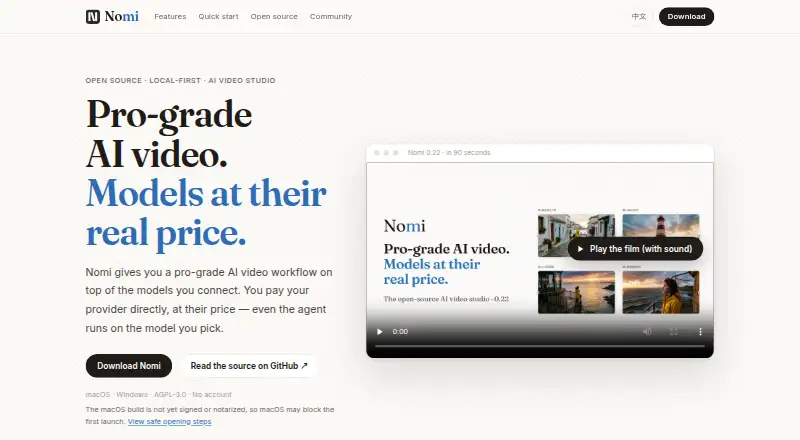
Nomi: A local AI video workbench for planning, generation, editing, and automation. Ranked #207 of 241 in AI Video Generators by our editors (3.0/10); pricing: Open source; best for technical creators wanting local production workflows.
At a glance
- Editor score3.0 / 10
- PricingOpen source
- Best forTechnical creators wanting local production workflows
- Paid fromFree
- Facts checked20 Sep 2026
Where it wins
- Combines scripts, storyboards, references, blocking, generation, and editing
- Supports image-to-video, MP4 export, CLI, and MCP automation
- Works with ComfyUI and OpenAI- or Anthropic-compatible endpoints
Where it doesn't
- Requires users to supply model providers, APIs, subscriptions, or ComfyUI
- External model services may add separate charges
- Desktop support is limited to Windows and macOS
Our verdict on Nomi
Nomi is an open-source desktop workbench for AI video creation on Windows and macOS. It is aimed at technical creators who want a local-first workflow that connects planning, visual development, model-based generation, and editing in one project. Its scope covers script and story planning, storyboard and shot breakdowns, character and visual reference anchoring, 3D scene blocking, camera references, image generation, video generation, image-to-video workflows, an editable timeline, and MP4 export.
The workflow is designed around connected models rather than a bundled generation service. Users can bring model subscriptions, APIs, or a local ComfyUI installation, with support for Dreamina, ComfyUI, OpenAI-compatible endpoints, and Anthropic-compatible endpoints. This gives Nomi a broad integration surface for creators who already have preferred providers or local model workflows. External model services may charge separately, so the overall cost depends on the providers, subscriptions, APIs, or local setup connected to the workbench.
Automation is a notable fit for technical production teams and individual creators who want projects and media managed outside a purely visual interface. Nomi supports CLI and MCP automation, including workflows involving Codex, Claude Code, and Cursor, while local project and media storage keeps the work centered on the desktop application. Choose Nomi if you want open-source software with planning, references, generation, timeline editing, and automation together. It is less suitable if you want a self-contained video generator with included model access or a browser-first workflow.
Your product? Our editors can test Nomi in depth and publish a review, labelled as paid · from $149/mo →
Nomi pricing
Nomi fact sheet
| Free plan | Not verified |
|---|---|
| Paid from | Free |
| Text-to-video | Yes |
| Image-to-video | Yes |
| AI avatars | Not verified |
| Maximum video length | Not verified |
| Maximum resolution | Not verified |
| API access | Yes |
| Commercial use | Not verified |
| Deployment | Desktop |
| Platforms | Windows, macOS |
| Support | Email, Community, Docs |
| Built for | Solo, Small business, Mid-market, Enterprise (editorial estimate) |
| Integrations | 7 integrations: Dreamina, ComfyUI, OpenAI-compatible endpoints, Anthropic-compatible endpoints, Codex, Claude Code … |
| Pricing | Open source |
| Website | nomiaqm.com |
| Facts checked | 20 Sep 2026 |
Nomi integrations
Nomi lists 7 integrations on its own site.
- Dreamina
- ComfyUI
- OpenAI-compatible endpoints
- Anthropic-compatible endpoints
- Codex
- Claude Code
- Cursor
Alternatives to Nomi
- Google VeoText, image, and audio generation with camera controls and Google platform access.9.4
- RunwayA broad generative media platform with professional workflows, APIs, and mobile apps.9.3
- TikTok Symphony Creative StudioA free, TikTok-focused AI studio for creating, editing, and exporting social videos.9.2



Used Nomi? Be the first to review it
The editor score above is our own research. What this page doesn't have yet is a reader's view — what you used Nomi for, what worked and what didn't. No stars are seeded and no review is paid for; an editor reads every one before it appears.
Write a reviewTwo minutes · verified accounts only · read by an editor before it appears
Featured on iTechGuides

Nomi is listed in our AI Video Generators directory. Add the badge to your site — it links back to this page.
<a href="https://www.itechguides.com/products/nomi-ai-video-generator/"><img src="https://www.itechguides.com/best/badge/nomi-ai-video-generator.svg" alt="Featured on iTechGuides" width="230" height="46"></a>
Reviewed by iTechGuides Editors · Editorial team · Updated Oct 2026
Advertiser disclosure: iTechGuides is reader-supported. Vendors can pay for top positions in our rankings and for a place on other products' pages, and we may earn a commission when you click some links. Bought places stand at the number bought; this page and our disclosure say so. Paying vendors may get a fuller, more detailed review from our editors, and that review can change their score. How we rank.
Last updated · How we research and update