
Noise-o-matic
Noise-o-matic: A broad Windows voice toolkit with soundboards, editing, speech tools, and optional cloning. Ranked #18 of 29 in Game Voice Changers by our editors (7.7/10); pricing: Paid; best for windows users wanting soundboards and cloning.
At a glance
- Editor score7.7 / 10
- PricingPaid
- Best forWindows users wanting soundboards and cloning
- Free planNo
- Facts checked20 Sep 2026
Where it wins
- Multiple simultaneous soundboard streams with hotkey control
- Includes recording, editing, voice changing, and speech tools
- Steam Workshop and optional ElevenLabs voice cloning support
Where it doesn't
- Windows 10 and 11 64-bit only
- ElevenLabs cloning requires a separate account and API key
- Sold as a paid one-time purchase rather than a free plan
Our verdict on Noise-o-matic
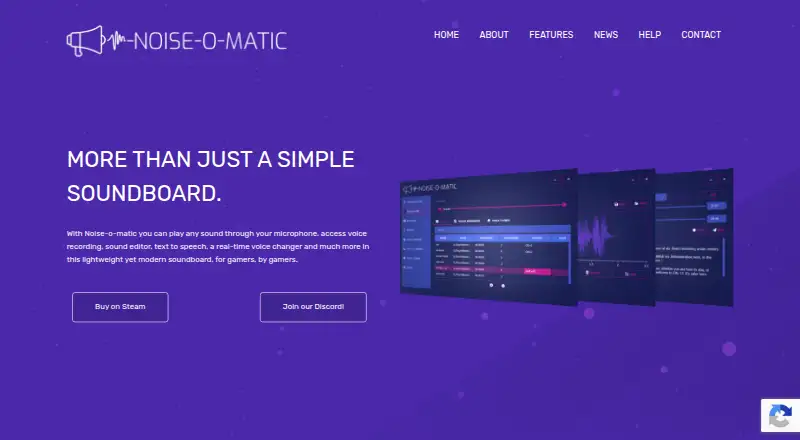
Noise-o-matic is Windows desktop software for gamers and voice-chat users who want more than a basic real-time voice changer. It routes music and sounds through a microphone, provides a hotkey-enabled soundboard with multiple simultaneous playback streams, records microphone or application audio, and changes microphone output in real time. The product supports Windows 10 and Windows 11 64-bit systems and requires a microphone and output device. Its feature set also covers text-to-speech, speech-to-text, Steam Workshop sharing, and optional ElevenLabs voice cloning.
The strongest fit is for users who want a broad audio toolkit inside one Windows application. Steam Workshop support enables sharing, browsing, rating, and downloading soundboards, while the audio recorder and embedded editor add a practical layer for creating or refining clips. Microsoft or Sherpa text-to-speech and Microsoft Speech to Text extend the product beyond live voice effects. The combination makes Noise-o-matic suitable for game sessions, voice chats, soundboard playback, and audio capture where multiple functions matter more than a narrow voice-changing workflow.
Noise-o-matic is sold as a paid one-time purchase, and Steam lists a free demo. Optional ElevenLabs text-to-speech and instant voice cloning work through an API key, require a separate ElevenLabs account, and may involve third-party charges. That makes the cloning feature useful for buyers who specifically want custom voice creation and are comfortable managing an external service. Users on macOS or other platforms should choose a Windows-compatible alternative, while buyers seeking an entirely self-contained voice-cloning package should consider whether the separate ElevenLabs requirement suits their needs. For Windows users who value soundboards, recording, editing, and several speech features together, Noise-o-matic is a strong breadth-focused option.
Your product? Our editors can test Noise-o-matic in depth and publish a review, labelled as paid · from $149/mo →
Noise-o-matic pricing
All 1 Noise-o-matic plans and prices →
Noise-o-matic fact sheet
| Free plan | No |
|---|---|
| Paid from | Not verified |
| Voice effects | Not verified |
| Custom voice creation | Yes |
| Voice cloning | Yes |
| System-wide mode | Yes |
| Supported platforms | Windows 10 and Windows 11 64-bit |
| Soundboard included | Yes |
| Deployment | Desktop |
| Platforms | Windows |
| Support | Email, Community, Docs |
| Built for | Solo, Small business (editorial estimate) |
| Integrations | 4 integrations: Steam Workshop, ElevenLabs API, Microsoft Speech to Text, Microsoft Windows text-to-speech |
| Pricing | Paid (source) |
| Website | noiseomatic.com |
| Facts checked | 20 Sep 2026 |
Noise-o-matic integrations
Noise-o-matic lists 4 integrations on its own site.
- Steam Workshop
- ElevenLabs API
- Microsoft Speech to Text
- Microsoft Windows text-to-speech
Alternatives to Noise-o-matic
- BadloVoiceA flexible open-source voice changer for live conversion, models, effects, and offline audio.9.4
- Dubbing AIA broad free voice changer for gamers and creators across desktop, mobile, and major platforms.9.3
- Voice.aiA broad voice library and real-time conversion make Voice.ai a flexible choice for gamers.9.2

See all Noise-o-matic alternatives →
Used Noise-o-matic? Be the first to review it
The editor score above is our own research. What this page doesn't have yet is a reader's view — what you used Noise-o-matic for, what worked and what didn't. No stars are seeded and no review is paid for; an editor reads every one before it appears.
Write a reviewTwo minutes · verified accounts only · read by an editor before it appears
Featured on iTechGuides

Noise-o-matic is listed in our Game Voice Changers directory. Add the badge to your site — it links back to this page.
<a href="https://www.itechguides.com/products/noise-o-matic/"><img src="https://www.itechguides.com/best/badge/noise-o-matic.svg" alt="Featured on iTechGuides" width="230" height="46"></a>
Reviewed by iTechGuides Editors · Editorial team · Updated Oct 2026
Advertiser disclosure: iTechGuides is reader-supported. Vendors can pay for top positions in our rankings and for a place on other products' pages, and we may earn a commission when you click some links. Bought places stand at the number bought; this page and our disclosure say so. Paying vendors may get a fuller, more detailed review from our editors, and that review can change their score. How we rank.
Last updated · How we research and update