Noise Gator
Noise Gator: A free open-source microphone cleaner with flexible filtering and virtual-device routing. Ranked #10 of 24 in AI Noise Cancellation Software by our editors (7.8/10); pricing: Free plan; best for free Windows and Mac microphone cleanup.
At a glance
- Editor score7.8 / 10
- PricingFree plan
- Best forFree Windows and Mac microphone cleanup
- Free planYes
- Paid fromFree
- Real-time cancellationYes
- Facts checked20 Sep 2026
Where it wins
- Supports RNNoise and DeepFilterNet denoise engines
- Adds noise gate, EQ, high-pass filter, and automatic gain
- Offers virtual-device routing, hot-plug support, and headless mode
Where it doesn't
- Supports Windows and macOS, with no other platforms listed
- Virtual audio routing requires VB-Cable or BlackHole installation
- Focused on microphone input rather than broader audio sources
Our verdict on Noise Gator
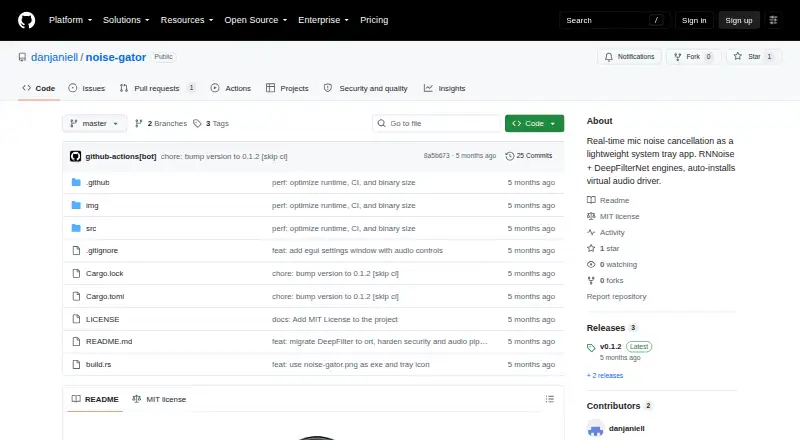
Noise Gator is a lightweight open-source desktop application for cleaning microphone audio in real time on Windows and macOS. It captures microphone input, processes it through selectable noise-suppression engines, and sends the result to a virtual audio device. That makes it suitable for people who want cleaner voice input in applications such as Discord, Teams, or Zoom without relying on a commercial SaaS service. The system-tray design, settings window, device selection, and configuration persistence support regular desktop use, while headless command-line operation gives advanced users another way to run it.
Its main strength is the combination of two denoise engines—RNNoise and DeepFilterNet—with additional controls for different recording conditions. A high-pass filter, noise gate, EQ, and automatic gain let users shape the processed microphone signal beyond basic background-noise reduction. The application also supports Bluetooth headsets and device hot-plugging, which is useful when audio hardware changes during a session. This broader control set gives Noise Gator more flexibility than a single-purpose mute or filter utility, while keeping its focus on microphone cleanup.
Noise Gator fits users comfortable installing and selecting a virtual audio path. VB-Cable or BlackHole can provide the virtual device that other applications use as a microphone, but that requirement adds an extra setup step compared with tools that expose a processed input directly. Windows and macOS coverage is clear, while users on other operating systems or those seeking broader audio-source processing should look elsewhere. Choose Noise Gator for free, open-source microphone cleanup with configurable processing and command-line support; choose an alternative if you need wider platform coverage or a simpler all-in-one installation.
Your product? Our editors can test Noise Gator in depth and publish a review, labelled as paid · from $149/mo →
Noise Gator pricing
Noise Gator fact sheet
| Free plan | Yes |
|---|---|
| Paid from | Free |
| Real-time cancellation | Yes |
| Supported operating systems | Windows_macos |
| Recording support | Not verified |
| Streaming support | Not verified |
| Voice isolation | Not verified |
| Echo cancellation | Not verified |
| Audio source support | Microphone |
| Deployment | Desktop |
| Platforms | Windows, macOS |
| Built for | Solo, Small business (editorial estimate) |
| Pricing | Free plan |
| Website | github.com |
| Facts checked | 20 Sep 2026 |
Alternatives to Noise Gator
- KleervoxA broad freemium option for cleaner meetings, streams, recordings, and calls.9.4
- neepA cross-platform choice for bidirectional noise removal with local processing.9.2
- NVIDIA BroadcastA free Windows toolkit for noise removal, audio routing, and meeting or streaming effects.9.0


See all Noise Gator alternatives →
Also Ranked In
Noise Gator is ranked in 2 of our directories.
Used Noise Gator? Be the first to review it
The editor score above is our own research. What this page doesn't have yet is a reader's view — what you used Noise Gator for, what worked and what didn't. No stars are seeded and no review is paid for; an editor reads every one before it appears.
Write a reviewTwo minutes · verified accounts only · read by an editor before it appears
Featured on iTechGuides

Noise Gator is listed in our AI Noise Cancellation Software directory. Add the badge to your site — it links back to this page.
<a href="https://www.itechguides.com/products/noise-gator/"><img src="https://www.itechguides.com/best/badge/noise-gator.svg" alt="Featured on iTechGuides" width="230" height="46"></a>
Reviewed by iTechGuides Editors · Editorial team · Updated Oct 2026
Advertiser disclosure: iTechGuides is reader-supported. Vendors can pay for top positions in our rankings and for a place on other products' pages, and we may earn a commission when you click some links. Bought places stand at the number bought; this page and our disclosure say so. Paying vendors may get a fuller, more detailed review from our editors, and that review can change their score. How we rank.
Last updated · How we research and update