
NIUBI Partition Editor
NIUBI Partition Editor: A Windows partition manager with broad disk tasks, from resizing to migration. Ranked #14 of 17 in Hard Drive Partitioning Software by our editors (7.6/10); pricing: Free plan; best for windows users seeking free tools and a long refund window.
At a glance
- Editor score7.6 / 10
- PricingFree plan
- Best forWindows users seeking free tools and a long refund window
- Free planYes
- Paid from$39 one-time
- Facts checked23 Sep 2026
Where it wins
- Free non-commercial edition for home computers
- Handles resizing, moving, merging, cloning, and OS migration
- Paid editions include bootable media and a 90-day refund period
Where it doesn't
- Limited to Windows PCs and servers
- Filesystem support listed for NTFS and FAT32
- Bootable media is available only in Professional and higher editions
Our verdict on NIUBI Partition Editor
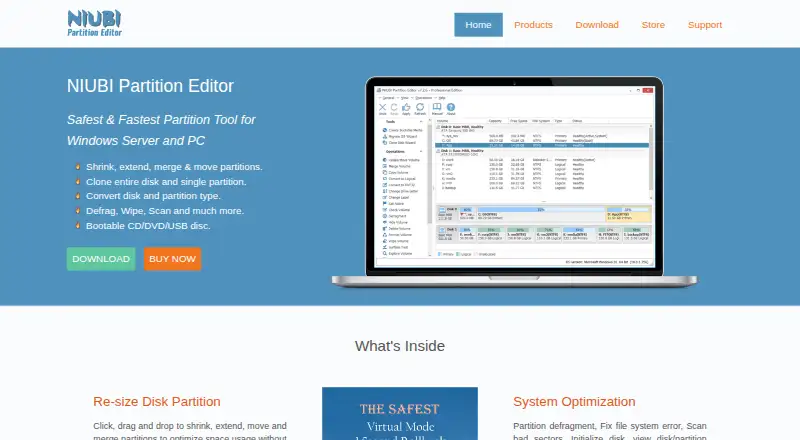
NIUBI Partition Editor is disk partition management software for Windows PCs and servers. It suits home users who want a free non-commercial edition, as well as administrators and service providers who need paid editions for broader use. Its task range covers shrinking and extending partitions, moving and merging them, cloning disks or partitions, converting MBR disks to GPT, and migrating an operating system to a new disk. It also includes partition defragmentation, bad-sector scans, and data erasure tools.
The edition structure spans home use through organizational and service-provider needs. NPE Free Edition is free for home computers and non-commercial usage. NPE Professional Edition costs $39 one time and adds bootable CD, DVD, or USB media, with one license key for two computers. Server Edition costs $139 one time and supports Windows Server with one license for two servers. Enterprise Edition is $399 one time for medium and large organizations, with unlimited PCs and servers within one company. Technician Edition costs $699 one time for technical service providers, with unlimited companies and individuals. Paid customers also have a 90-day refund period. Professional and higher editions support bootable media; the free edition does not list that capability.
This is a Windows-only desktop product, so it is not a fit for users seeking a tool for another operating system. Its listed filesystem support is NTFS and FAT32, which may narrow its usefulness for environments built around other filesystems. The free edition makes sense for home users with non-commercial needs, while the paid tiers map to multiple computers, servers, organizations, or technical service work. Choose it if those Windows partition tasks and licensing options align with your needs; consider an alternative if your platform or filesystem requirements fall outside that scope.
Your product? Our editors can test NIUBI Partition Editor in depth and publish a review, labelled as paid · from $149/mo →
NIUBI Partition Editor pricing
All 5 NIUBI Partition Editor plans and prices →
NIUBI Partition Editor fact sheet
| Free plan | Yes |
|---|---|
| Paid from | $39 one-time |
| Resize and move | Not verified |
| Disk cloning | Not verified |
| Bootable media | Yes |
| Supported OS | Not verified |
| Partition tables | Both |
| Max disk size | Not verified |
| Money-back guarantee | 90 days |
| Deployment | Desktop |
| Platforms | Windows |
| Support | Email, Live chat · 24/7 |
| Built for | Solo, Small business, Mid-market, Enterprise (editorial estimate) |
| Pricing | Free plan (source) |
| Website | partition-editor.com |
| Facts checked | 23 Sep 2026 |
Alternatives to NIUBI Partition Editor
- EaseUS Partition MasterA broad Windows partition suite with a free plan and paid options for individuals and service providers.9.2
- GPartedA free, open-source partition editor with broad filesystem support and bootable media.8.9
- Paragon Partition Manager Community EditionA capable free Windows partition utility with recovery, boot media, and broad filesystem support.8.7


See all NIUBI Partition Editor alternatives →
Also Ranked In
NIUBI Partition Editor is ranked in 2 of our directories.
Used NIUBI Partition Editor? Be the first to review it
The editor score above is our own research. What this page doesn't have yet is a reader's view — what you used NIUBI Partition Editor for, what worked and what didn't. No stars are seeded and no review is paid for; an editor reads every one before it appears.
Write a reviewTwo minutes · verified accounts only · read by an editor before it appears
Featured on iTechGuides

NIUBI Partition Editor is listed in our Hard Drive Partitioning Software directory. Add the badge to your site — it links back to this page.
<a href="https://www.itechguides.com/products/niubi-partition-editor/"><img src="https://www.itechguides.com/best/badge/niubi-partition-editor.svg" alt="Featured on iTechGuides" width="230" height="46"></a>
Reviewed by iTechGuides Editors · Editorial team · Updated Oct 2026
Advertiser disclosure: iTechGuides is reader-supported. Vendors can pay for top positions in our rankings and for a place on other products' pages, and we may earn a commission when you click some links. Bought places stand at the number bought; this page and our disclosure say so. Paying vendors may get a fuller, more detailed review from our editors, and that review can change their score. How we rank.
Last updated · How we research and update