
Niki Talk
Niki Talk: A flexible touch-based AAC tool with broad language and voice support. Ranked #16 of 26 in AAC Communication Software by our editors (6.2/10); pricing: Free plan · 30-day trial; best for multilingual touch AAC with many voices.
At a glance
- Editor score6.2 / 10
- PricingFree plan · 30-day trial
- Best forMultilingual touch AAC with many voices
- Free planYes
- Symbol systemSymbol
- Founded2012 · Italy
- Facts checked21 Sep 2026
Where it wins
- Text-to-speech supports 31 languages and 70 voices
- Creates boards with pictograms, photos, layouts and colors
- Downloads albums across iPad, iPhone and Android devices
Where it doesn't
- Touch is the stated access method
- Trial access lasts 30 days and limits albums to 30 pictures
- No AI features or open-source access
Our verdict on Niki Talk
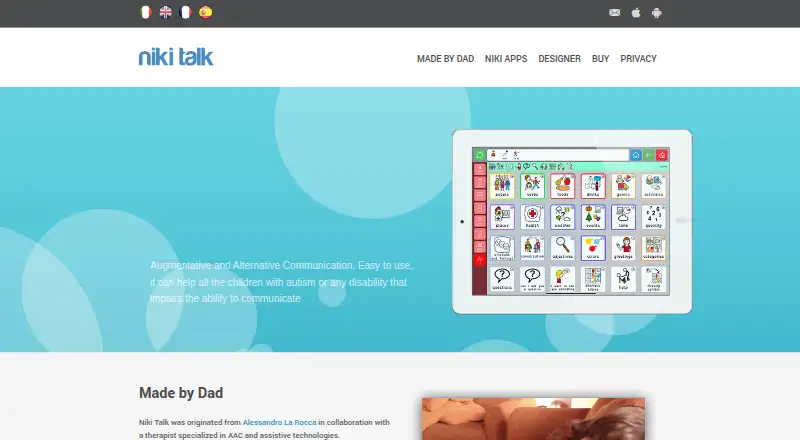
Niki Talk is an augmentative and alternative communication app for children with autism or disabilities affecting communication. It is also designed for parents, therapists and educators who need to create personalized communication boards. Users can combine pictograms and photos, arrange pages with customizable colors and layouts, compose messages with a sentence strip, and produce speech output in 31 languages with 70 available voices. The product is intended for touch-based communication on iPhone, iPad, Android and Kindle, with Niki Talk Designer available on PC, Mac and iPad.
The published plans separate a 30-day Trial version from a Full version. Both plans support one user, unlimited downloads on iPad, iPhone and Android, and text-to-speech in 31 languages with 70 voices. The Trial version limits the album to 30 pictures and access to 30 days. The Full version provides unlimited access and unlimited album pictures. This structure gives families and professionals a defined way to explore board creation before choosing ongoing access, while the central speech and download capabilities remain consistent between the two plans.
Board creation is the standout strength. Photo and pictogram uploads support personalized vocabulary, while the drawing board offers a temporary way to communicate when a needed symbol is unavailable. The sentence strip helps users assemble messages, and customizable layouts allow boards to be adapted to different communication needs. Niki Talk is a strong fit for users who communicate through touch and need multilingual speech options across supported mobile devices. Those seeking AI features, open-source software or access methods beyond touch should consider a different AAC product.
Niki Talk pricing
All 2 Niki Talk plans and prices →
Niki Talk fact sheet
| Free plan | Yes |
|---|---|
| Paid from | Not verified |
| Symbol system | Symbol |
| Speech output | Yes |
| Access methods | touch |
| Offline use | Not verified |
| Supported platforms | iPad, iPhone, Android, Kindle; Designer on PC, Mac and iPad |
| Layout customization | Customizable |
| Free trial | 30 days |
| Deployment | Cloud, Mobile |
| Platforms | Web, Windows, macOS, iOS, Android |
| Support | |
| Built for | Solo, Small business (editorial estimate) |
| Pricing | Free plan · 30-day trial (source) |
| Website | nikitalk.com |
| Facts checked | 21 Sep 2026 |
Alternatives to Niki Talk
- Asterics AACA flexible free AAC option for users needing personalized grids and varied input methods.9.0
- TD SnapA free AAC foundation with eye-gaze, switch and scanning access, plus paid page-set upgrades.9.0
- CboardA flexible free AAC core across web, Windows, and Android, with paid Pro additions.8.5


See all Niki Talk alternatives →
Used Niki Talk? Be the first to review it
The editor score above is our own research. What this page doesn't have yet is a reader's view — what you used Niki Talk for, what worked and what didn't. No stars are seeded and no review is paid for; an editor reads every one before it appears.
Write a reviewTwo minutes · verified accounts only · read by an editor before it appears
Featured on iTechGuides

Niki Talk is listed in our AAC Communication Software directory. Add the badge to your site — it links back to this page.
<a href="https://www.itechguides.com/products/niki-talk/"><img src="https://www.itechguides.com/best/badge/niki-talk.svg" alt="Featured on iTechGuides" width="230" height="46"></a>
Reviewed by iTechGuides Editors · Editorial team · Updated Sep 2026
Advertiser disclosure: iTechGuides is reader-supported. We may earn a commission when you click some links. It never changes a score or a verdict. How we rank.
Last updated · How we research and update