NebulaQuest Editor Mobile
NebulaQuest Editor Mobile: A free Android toolkit for editing Bedrock worlds and creating resource or behavior packs. Ranked #16 of 26 in Minecraft Add-on Editors by our editors (7.6/10); pricing: Free plan; best for android Bedrock world and pack editing.
At a glance
- Editor score7.6 / 10
- PricingFree plan
- Best forAndroid Bedrock world and pack editing
- Free planYes
- Paid fromFree
- Editor modeVisual
- Facts checked21 Sep 2026
Where it wins
- Combines world, NBT, chunk, player, entity, block and item tools
- Supports custom blocks, items, recipes, textures, sounds and commands
- Exports resource and behavior packs directly to Minecraft Bedrock
Where it doesn't
- Android-only access limits cross-platform editing workflows
- Visual editing may not suit code-first creation workflows
- Scripting-led or custom-entity projects may need another editor
Our verdict on NebulaQuest Editor Mobile
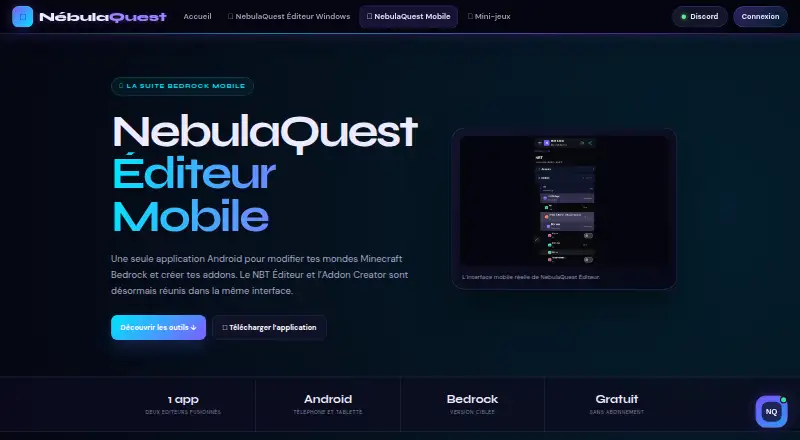
NebulaQuest Editor Mobile is a free Android application for editing Minecraft Bedrock worlds and creating add-ons. It brings world editing and pack creation into one visual interface, with tools for NBT data, chunks, players, inventories, entities, block entities and effects. It is aimed at Bedrock players and creators who want to work from an Android device rather than split world and asset tasks across separate tools.
Its main strength is breadth within the Bedrock workflow. The editor covers custom blocks, custom items, recipes, textures, sounds, music assets and commands, alongside world data and gameplay content. Texture import and drawing support asset work in the same environment, while pack export lets creators move finished projects into Minecraft Bedrock. This makes it a practical fit for personal projects that combine world changes with resource packs or behavior packs.
The product is free for personal use and runs on Android, with Minecraft Bedrock as its listed integration. That keeps the cost straightforward, but the platform choice narrows access for creators who work across desktop or other mobile operating systems. The visual editor is also a better match for creators who prefer guided editing than for workflows centered on scripting or custom-entity creation. Pick NebulaQuest Editor Mobile for broad Android-based Bedrock world and add-on editing; choose another editor when cross-platform access or code-led project work is central.
Your product? Our editors can test NebulaQuest Editor Mobile in depth and publish a review, labelled as paid · from $149/mo →
NebulaQuest Editor Mobile pricing
NebulaQuest Editor Mobile fact sheet
| Free plan | Yes |
|---|---|
| Paid from | Free |
| Pack types | resource packs, behavior packs |
| Editor mode | Visual |
| Custom entity tools | Not verified |
| Scripting support | Not verified |
| Version targeting | Unspecified |
| Available platforms | Android |
| Deployment | Mobile |
| Platforms | Android |
| Support | |
| Built for | Solo, Small business (editorial estimate) |
| Integrations | 1 integrations: Minecraft Bedrock |
| Pricing | Free plan |
| Website | nebulaquest.fr |
| Facts checked | 21 Sep 2026 |
NebulaQuest Editor Mobile integrations
NebulaQuest Editor Mobile lists 1 integrations on its own site.
- Minecraft Bedrock
Alternatives to NebulaQuest Editor Mobile
- bridge.A broad Bedrock editor combining pack authoring, scripting, previews, and validation.9.4
- Addons Maker for Minecraft PEA broad mobile toolkit for building and exporting Bedrock add-ons without code.9.0
- Crafty CraftA hybrid editor for visual Minecraft creation with JSON and JavaScript workflows.8.9



See all NebulaQuest Editor Mobile alternatives →
Used NebulaQuest Editor Mobile? Be the first to review it
The editor score above is our own research. What this page doesn't have yet is a reader's view — what you used NebulaQuest Editor Mobile for, what worked and what didn't. No stars are seeded and no review is paid for; an editor reads every one before it appears.
Write a reviewTwo minutes · verified accounts only · read by an editor before it appears
Featured on iTechGuides

NebulaQuest Editor Mobile is listed in our Minecraft Add-on Editors directory. Add the badge to your site — it links back to this page.
<a href="https://www.itechguides.com/products/nebulaquest-editor-mobile/"><img src="https://www.itechguides.com/best/badge/nebulaquest-editor-mobile.svg" alt="Featured on iTechGuides" width="230" height="46"></a>
Reviewed by iTechGuides Editors · Editorial team · Updated Oct 2026
Advertiser disclosure: iTechGuides is reader-supported. Vendors can pay for top positions in our rankings and for a place on other products' pages, and we may earn a commission when you click some links. Bought places stand at the number bought; this page and our disclosure say so. Paying vendors may get a fuller, more detailed review from our editors, and that review can change their score. How we rank.
Last updated · How we research and update