
MyTimeo
MyTimeo: A flexible Apple planner with strong input options, calendar sync, and offline entry. Ranked #93 of 137 in Daily Planner Apps by our editors (3.0/10); pricing: Free plan; best for apple users who plan by voice, text, or photos.
At a glance
- Editor score3.0 / 10
- PricingFree plan
- Best forApple users who plan by voice, text, or photos
- Free planYes
- Planning methodHybrid
- Facts checked21 Sep 2026
Where it wins
- Turns voice, text, and photos into organized plans
- Syncs with Apple Calendar, Google Calendar, and Outlook
- Supports recurring items, AI editing, offline entry, and widgets
Where it doesn't
- Available on macOS and iOS rather than broader platforms
- Paid plan pricing may vary by region
- Several useful features require Premium
Our verdict on MyTimeo
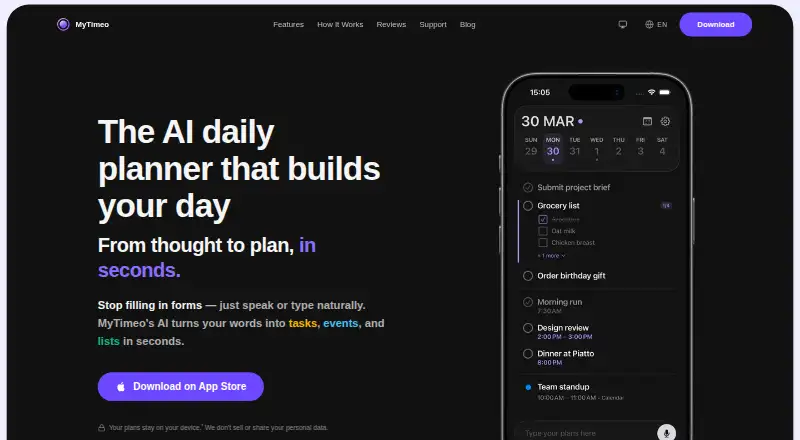
MyTimeo is a daily-planning app for Apple users who want to organize tasks, events, reminders, lists, and schedules through voice, text, or photos. It places items on a timeline and supports iPhone, iPad, Mac, and Apple Vision Pro. The free access includes manual task and list entry, including offline entry, while the app also offers Premium Monthly and Premium Yearly subscriptions.
Its strongest fit is flexible planning input. Users can import schedules and notes from photos, create items by voice or text, and edit existing plans with AI by voice or text. Recurring tasks and events support custom repeat patterns, while checklists add progress counters. Home Screen widgets keep planning visible on Apple devices. These features make MyTimeo suited to people who want to capture plans in different formats rather than build every item manually.
Calendar and reminder features broaden its daily-planning role. MyTimeo connects with Apple Calendar, Google Calendar, Outlook, and iCloud, while smart reminders and custom categories are among the features associated with Premium. The main trade-off is platform coverage: the product is centered on Apple devices, so people who need broader desktop or mobile support should consider another planner. Buyers should also review the subscription terms for their region, since the published app pricing may differ by location. MyTimeo is a strong choice for Apple users who value voice, photo, and text capture; it is less suitable for teams or households that need a cross-platform planning environment.
Your product? Our editors can test MyTimeo in depth and publish a review, labelled as paid · from $149/mo →
MyTimeo pricing
All 2 MyTimeo plans and prices →
MyTimeo fact sheet
| Free plan | Yes |
|---|---|
| Paid from | Not verified |
| Planning method | Hybrid |
| Calendar sync | Yes |
| Recurring tasks | Yes |
| Mobile platforms | Ios |
| Daily task limit | Not verified |
| Focus sessions | Not verified |
| Deployment | Mobile, Desktop |
| Platforms | macOS, iOS |
| Support | |
| Built for | Solo, Small business (editorial estimate) |
| Integrations | 4 integrations: Apple Calendar, Google Calendar, Outlook, iCloud |
| Pricing | Free plan (source) |
| Website | mytimeo.com |
| Facts checked | 21 Sep 2026 |
MyTimeo integrations
MyTimeo lists 4 integrations on its own site.
- Apple Calendar
- Google Calendar
- Outlook
- iCloud
Alternatives to MyTimeo
- SunsamaA guided daily planner for turning tasks, calendars, and workload limits into a focused workday.8.9
- Amazing MarvinA flexible planner for people who want structured days without a fixed workflow.8.8
- MotionA broad AI planner for scheduling, booking, calendars, and project work.8.7


See all MyTimeo alternatives →
Used MyTimeo? Be the first to review it
The editor score above is our own research. What this page doesn't have yet is a reader's view — what you used MyTimeo for, what worked and what didn't. No stars are seeded and no review is paid for; an editor reads every one before it appears.
Write a reviewTwo minutes · verified accounts only · read by an editor before it appears
Featured on iTechGuides

MyTimeo is listed in our Daily Planner Apps directory. Add the badge to your site — it links back to this page.
<a href="https://www.itechguides.com/products/mytimeo/"><img src="https://www.itechguides.com/best/badge/mytimeo.svg" alt="Featured on iTechGuides" width="230" height="46"></a>
Reviewed by iTechGuides Editors · Editorial team · Updated Oct 2026
Advertiser disclosure: iTechGuides is reader-supported. Vendors can pay for top positions in our rankings and for a place on other products' pages, and we may earn a commission when you click some links. Bought places stand at the number bought; this page and our disclosure say so. Paying vendors may get a fuller, more detailed review from our editors, and that review can change their score. How we rank.
Last updated · How we research and update