
MySheetAI
MySheetAI: A browser-based spreadsheet analyst for small files, with capped free use and paid exports. Ranked #15 of 27 in AI Data Analysis Tools by our editors (7.0/10); pricing: Free plan · 7-day trial; best for small spreadsheet-analysis workloads.
At a glance
- Editor score7.0 / 10
- PricingFree plan · 7-day trial
- Best forSmall spreadsheet-analysis workloads
- Free planYes
- Paid from$12/mo
- Natural-language queriesYes
- Facts checked19 Sep 2026
Where it wins
- Answers natural-language questions with calculations and supporting work
- Automatically selects charts for comparisons, trends, and breakdowns
- Reads files in the browser and generates Excel and Google Sheets formulas
Where it doesn't
- Free plan allows 5 questions monthly and limits uploads to 3 MB
- Pro uploads are limited to 25 MB; Elite uploads are limited to 50 MB
- Exports beyond charts require a paid plan
Our verdict on MySheetAI
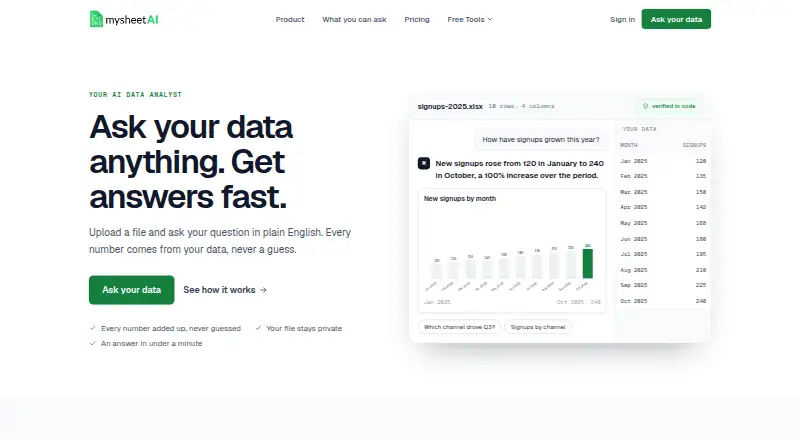
MySheetAI is a browser-based AI analysis tool for people who need answers from spreadsheets or exported business data without building dashboards. Upload CSV, TSV, plain-text, or Excel files, then ask questions in natural language. It returns plain-English answers with supporting calculations and can choose charts for comparisons, trends, and breakdowns. Its formula generator also turns plain-language requests into Excel and Google Sheets formulas, making it relevant to spreadsheet users who want analysis and formula help in one place.
File handling is a notable part of its fit: MySheetAI reads spreadsheet files in the browser without uploading raw rows, while summarized data is sent for AI-generated responses. It can analyze exports from services including Stripe, Shopify, QuickBooks, GA4, Google Ads, and Mailchimp, alongside other listed integrations. That suits an export-based workflow, but the product is positioned around uploaded files rather than dashboard building. People looking for direct SQL database connections or shared workspaces should consider alternatives that specifically provide those capabilities.
The Free plan allows 5 questions per month, uploads up to 3 MB, and offers an unlimited formula generator; exports are chart-only. Pro costs $12 per person per month when billed monthly and raises the limits to 200 questions and 25 MB, with exports for charts, numbers, and sheets. Elite costs $25 per person per month, allows unlimited questions and 50 MB uploads, and adds priority support; it also includes the broader export types. Both paid plans list annual billing options, and Pro has a 7-day trial available. Choose MySheetAI for modest spreadsheet analysis and formula work; look elsewhere if larger files or a database-centered workflow are central to the job.
Your product? Our editors can test MySheetAI in depth and publish a review, labelled as paid · from $149/mo →
MySheetAI pricing
All 3 MySheetAI plans and prices →
MySheetAI fact sheet
| Free plan | Yes |
|---|---|
| Paid from | $12/mo |
| File imports | CSV, TSV, plain text, .xlsx, .xlsm |
| SQL connections | Not verified |
| Natural-language queries | Yes |
| AI visualizations | Yes |
| Maximum upload size | 3 MB |
| Export formats | chart, numbers, sheet |
| Team collaboration | Not verified |
| Free trial | 7 days |
| Deployment | Cloud |
| Platforms | Web |
| Integrations | 11 integrations: Stripe, Shopify, QuickBooks, GA4, Google Ads, Meta Ads … |
| Pricing | Free plan · 7-day trial (source) |
| Website | mysheetai.com |
| Facts checked | 19 Sep 2026 |
MySheetAI integrations
MySheetAI lists 11 integrations on its own site.
- Stripe
- Shopify
- QuickBooks
- GA4
- Google Ads
- Meta Ads
- Mailchimp
- PayPal
- Amazon
- Etsy
- Xero
Alternatives to MySheetAI
- H2O.aiA broad enterprise suite for automated ML, forecasting, governance, and deployment.9.1
- Julius AIAsk questions of files and connected data, then generate charts, analysis, and reports.8.8
- VeezooConversational analytics with governed metrics, broad warehouse support, and sales-led pricing.8.5



See all MySheetAI alternatives →
Used MySheetAI? Be the first to review it
The editor score above is our own research. What this page doesn't have yet is a reader's view — what you used MySheetAI for, what worked and what didn't. No stars are seeded and no review is paid for; an editor reads every one before it appears.
Write a reviewTwo minutes · verified accounts only · read by an editor before it appears
Featured on iTechGuides

MySheetAI is listed in our AI Data Analysis Tools directory. Add the badge to your site — it links back to this page.
<a href="https://www.itechguides.com/products/mysheetai/"><img src="https://www.itechguides.com/best/badge/mysheetai.svg" alt="Featured on iTechGuides" width="230" height="46"></a>
Reviewed by iTechGuides Editors · Editorial team · Updated Oct 2026
Advertiser disclosure: iTechGuides is reader-supported. Vendors can pay for top positions in our rankings and for a place on other products' pages, and we may earn a commission when you click some links. Bought places stand at the number bought; this page and our disclosure say so. Paying vendors may get a fuller, more detailed review from our editors, and that review can change their score. How we rank.
Last updated · How we research and update