MultiMFA Authenticator
MultiMFA Authenticator: A focused web authenticator for organizations managing shared TOTP access. Ranked #99 of 111 in Authenticator Apps by our editors (3.0/10); pricing: Paid; best for organizations managing shared TOTP access.
At a glance
- Editor score3.0 / 10
- PricingPaid
- Best forOrganizations managing shared TOTP access
- Free planNo
- Paid from$50/user/yr
- Push approvalsNo
- Facts checked22 Sep 2026
Where it wins
- Individual vaults keep each licensed user's TOTP codes separate
- Enrollment supports QR images, camera scans, URIs, and manual keys
- Admins get managed seats, access controls, and audit-ready logs
Where it doesn't
- No free plan is available
- Coverage is limited to the web
- Designed for TOTP rather than push or passkey approvals
Our verdict on MultiMFA Authenticator
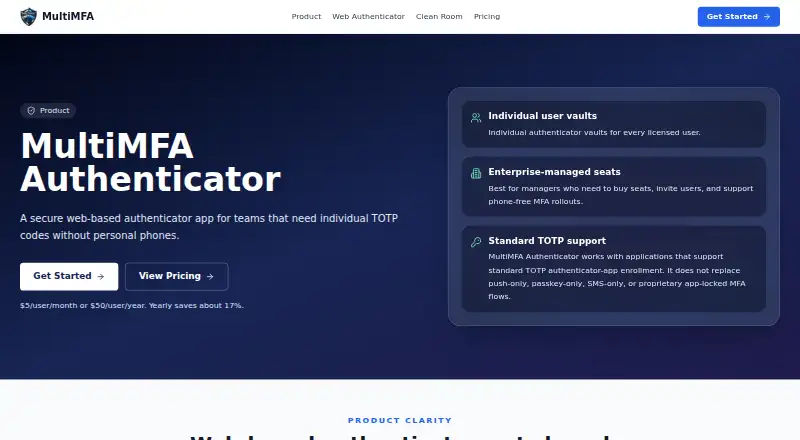
MultiMFA Authenticator is a browser-based authenticator for organizations that need individual TOTP codes without relying on personal phones. Administrators purchase seats, invite users by email, and manage organization access, while each licensed user maintains a private TOTP vault. It suits clean-room, offshore, support, and other controlled work environments where teams need browser-based access to rolling authentication codes.
Pricing is straightforward across two paid plans. Monthly costs $5 per user per month, while Yearly costs $50 per user per year with annual billing. Both plans include an individual TOTP vault, browser-based code viewing, QR code, otpauth URI, or manual setup-key enrollment, email invitations, and per-seat licensing. The paid structure fits organizations that need managed access rather than a standalone personal authenticator, though teams should account for a seat-based subscription from the start.
The product's main strength is administrative control around standard TOTP workflows. Organization-managed seats, user-level access controls, audit-ready access logs, and encrypted TOTP secret storage give administrators a clearer way to govern shared work processes while keeping user vaults separate. Enrollment can use QR images, camera scans, clipboard images, URIs, or manual keys, which accommodates different provisioning procedures. Coverage is web-only, and the product is focused on TOTP rather than push approvals, passkeys, SMS-only authentication, or proprietary MFA flows. Choose it when browser access and centralized TOTP administration are the priority; choose another authenticator when mobile apps or push-based approvals are essential.
Your product? Our editors can test MultiMFA Authenticator in depth and publish a review, labelled as paid · from $149/mo →
MultiMFA Authenticator pricing
All 2 MultiMFA Authenticator plans and prices →
MultiMFA Authenticator fact sheet
| Free plan | No |
|---|---|
| Paid from | $50/user/yr |
| Code type | Totp |
| Push approvals | No |
| Encrypted backup | Not verified |
| Multi-device sync | Not verified |
| Team administration | Yes |
| Supported platforms | web |
| Deployment | Cloud |
| Platforms | Web |
| Support | Email, Live chat, Tickets |
| Built for | Small business, Mid-market, Enterprise (editorial estimate) |
| Pricing | Paid (source) |
| Website | multimfa.com |
| Facts checked | 22 Sep 2026 |
Alternatives to MultiMFA Authenticator
- Proton AuthenticatorA mature free option for secure 2FA codes across mobile and desktop platforms.9.4
- Google AuthenticatorA free, straightforward authenticator with offline codes, sync, and QR transfers.9.2
- AuthyA focused free authenticator for mobile users who need synced TOTP tokens.9.1


See all MultiMFA Authenticator alternatives →
Used MultiMFA Authenticator? Be the first to review it
The editor score above is our own research. What this page doesn't have yet is a reader's view — what you used MultiMFA Authenticator for, what worked and what didn't. No stars are seeded and no review is paid for; an editor reads every one before it appears.
Write a reviewTwo minutes · verified accounts only · read by an editor before it appears
Featured on iTechGuides

MultiMFA Authenticator is listed in our Authenticator Apps directory. Add the badge to your site — it links back to this page.
<a href="https://www.itechguides.com/products/multimfa-authenticator/"><img src="https://www.itechguides.com/best/badge/multimfa-authenticator.svg" alt="Featured on iTechGuides" width="230" height="46"></a>
Reviewed by iTechGuides Editors · Editorial team · Updated Oct 2026
Advertiser disclosure: iTechGuides is reader-supported. Vendors can pay for top positions in our rankings and for a place on other products' pages, and we may earn a commission when you click some links. Bought places stand at the number bought; this page and our disclosure say so. Paying vendors may get a fuller, more detailed review from our editors, and that review can change their score. How we rank.
Last updated · How we research and update