
Move AI
Move AI: A production-focused motion-capture platform with strong 3D workflows, not a full animation suite. Ranked #15 of 23 in AI Animation Makers by our editors (7.8/10); pricing: Free plan; best for production-grade 3D motion capture.
At a glance
- Editor score7.8 / 10
- PricingFree plan
- Best forProduction-grade 3D motion capture
- Free planYes
- Paid from$18/mo
- AI character creationNo
- Facts checked20 Sep 2026
Where it wins
- Supports single-camera, multi-camera, and multi-actor capture
- Offers local Nvidia GPU processing and real-time previsualization
- Exports to FBX, USDC, BLEND, and USDZ with major 3D integrations
Where it doesn't
- Paid plans start at $18 per month plus VAT
- Does not include character creation or scene editing
- Move One video recordings are limited to 60 seconds on paid plans
Our verdict on Move AI
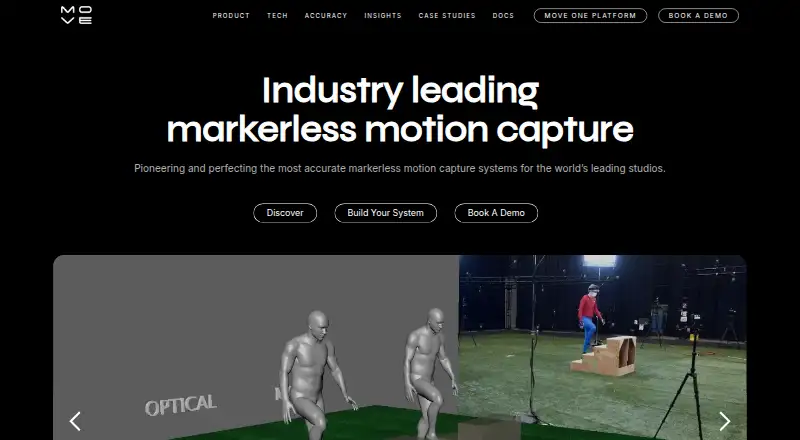
Move AI is markerless motion-capture software that converts video performances into 3D motion data. It is designed for professional studios, creators, enterprise production teams, visual effects, games, virtual reality, animation, and movement analysis. Move One uses a single iPhone camera, while Genesis supports multi-camera capture and local processing with Nvidia GPUs. The product is therefore a focused choice for turning recorded movement into animation data rather than a general-purpose tool for designing characters or complete scenes.
The published Move One plans use a freemium structure. Free includes 30 one-time credits and supports videos up to 30 seconds. Starter costs $18 per month and includes 60 credits per month, with paid users able to record videos up to 60 seconds. Standard costs $48 per month for 180 credits, Plus costs $225 per month for 240 credits, and Advanced costs $490 per month for 700 credits. The plan structure gives occasional users a way to assess the workflow, while higher tiers are aimed at projects requiring more monthly credits. Pricing is listed monthly plus VAT.
Move AI’s strongest fit is its production ecosystem. It supports web, iOS, a Chrome extension, and an API, with workflows for Blender and Unreal Engine. Integrations also include NVIDIA Omniverse, Maya, Cinema 4D, Unity, Peel Capture, and OpenSim. Exports include FBX, USDC, BLEND, USDZ, and MP4. Real-time previsualization, multi-actor capture, and local processing add options for studio pipelines. Choose Move AI when motion transfer and 3D export are the priority; choose a broader animation maker when character creation, scene editing, or image-to-animation is central.
Your product? Our editors can test Move AI in depth and publish a review, labelled as paid · from $149/mo →
Move AI pricing
All 5 Move AI plans and prices →
Move AI fact sheet
| Free plan | Yes |
|---|---|
| Paid from | $18/mo |
| AI character creation | No |
| Scene editor | No |
| Image-to-animation | No |
| Motion transfer | Yes |
| Reference consistency | Not verified |
| Maximum clip duration | 60 seconds |
| Export formats | .fbx, .usdc, .blend, .usdz, .mp4 |
| Money-back guarantee | 14 days |
| Deployment | Cloud, Self-hosted, Desktop, Mobile, Browser extension |
| Platforms | Web, iOS, Chrome extension |
| Compliance & security | GDPR |
| Support | Email, Docs |
| Built for | Small business, Mid-market, Enterprise (editorial estimate) |
| Integrations | 8 integrations: Blender, Unreal Engine, NVIDIA Omniverse, Maya, Cinema 4D, Unity … |
| Pricing | Free plan (source) |
| Website | move.ai |
| Facts checked | 20 Sep 2026 |
Move AI integrations
Move AI lists 8 integrations on its own site.
- Blender
- Unreal Engine
- NVIDIA Omniverse
- Maya
- Cinema 4D
- Unity
- Peel Capture
- OpenSim
Alternatives to Move AI
- LTX StudioA broad AI filmmaking workspace that connects generation, planning, editing, audio, and export.9.4
- ArtiroomBroad AI animation tools with character consistency, scene composition, and flexible plans.9.3
- TheToonMakerA focused 2D animation workspace for producing consistent cartoon episodes.9.1


See all Move AI alternatives →
Also Ranked In
Move AI is ranked in 4 of our directories.
Used Move AI? Be the first to review it
The editor score above is our own research. What this page doesn't have yet is a reader's view — what you used Move AI for, what worked and what didn't. No stars are seeded and no review is paid for; an editor reads every one before it appears.
Write a reviewTwo minutes · verified accounts only · read by an editor before it appears
Featured on iTechGuides

Move AI is listed in our AI Animation Makers directory. Add the badge to your site — it links back to this page.
<a href="https://www.itechguides.com/products/move-ai/"><img src="https://www.itechguides.com/best/badge/move-ai.svg" alt="Featured on iTechGuides" width="230" height="46"></a>
Reviewed by iTechGuides Editors · Editorial team · Updated Oct 2026
Advertiser disclosure: iTechGuides is reader-supported. Vendors can pay for top positions in our rankings and for a place on other products' pages, and we may earn a commission when you click some links. Bought places stand at the number bought; this page and our disclosure say so. Paying vendors may get a fuller, more detailed review from our editors, and that review can change their score. How we rank.
Last updated · How we research and update