
Motion Transfer AI
Motion Transfer AI: A focused image-to-motion tool for basic, reference-guided animation clips. Ranked #22 of 23 in AI Animation Makers by our editors (7.1/10); pricing: Free plan; best for basic image-to-motion experiments.
At a glance
- Editor score7.1 / 10
- PricingFree plan
- Best forBasic image-to-motion experiments
- Free planYes
- AI character creationNo
- Facts checked20 Sep 2026
Where it wins
- Transfers movement from custom videos or motion templates
- Supports Kling Motion Control and Wan Animate models
- Offers generation history and completed-video downloads
Where it doesn't
- Focused on motion transfer rather than character creation
- Paid plans list credits but not their prices
- The free plan is limited to one portrait and one reference video
Our verdict on Motion Transfer AI
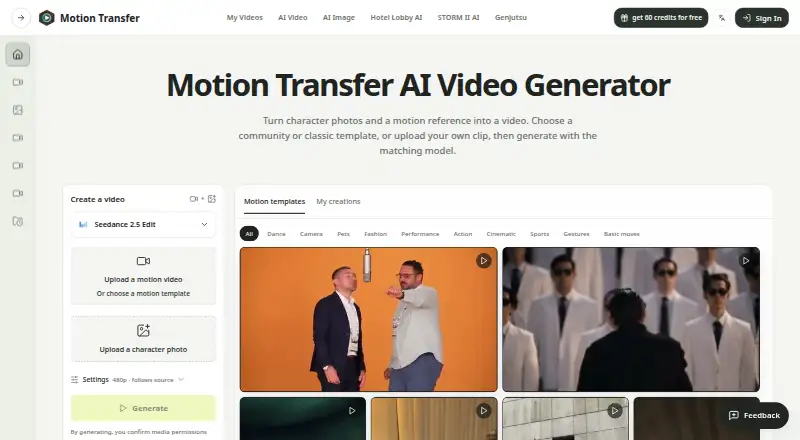
Motion Transfer AI is a web-based animation tool for creators and teams who want to apply movement from a reference video to a character or portrait photo. Users can upload one image, select a template for gestures, dances, sports, or other basic moves, or provide a custom motion clip. The service supports image-to-animation and motion-transfer workflows, with options for scene details in Kling workflows and reference consistency. It is available on the web and iOS, and is not positioned as a character-creation tool.
The free Basic plan provides one-time signup gift credits, allows one portrait and one reference video, and supports setting adjustments before sign-in. Paid plans are organized around annual credit allocations: Starter includes 10,800 credits, Pro includes 28,800, and Business includes 108,000. All three list output up to 1080p depending on the model, along with Kling Motion Control and Wan Animate. Generation history is included across the paid tiers, while downloading completed videos is listed for Pro and Business. The published plan structure makes the upgrade path primarily about credit volume and access to additional workflow capabilities.
The strongest fit is for basic experiments that need a subject to follow existing movement rather than for users seeking broad animation production tools. Kling supports 720p and 1080p output, while Wan Animate offers additional resolutions. Users can revisit work through Generation history and My Videos/My creations access, then download completed videos where that capability is included. Choose Motion Transfer AI for portrait-driven gestures, dances, sports, and other reference-led clips; choose an alternative if character creation, broader animation controls, or a wider production workflow is the priority.
Your product? Our editors can test Motion Transfer AI in depth and publish a review, labelled as paid · from $149/mo →
Motion Transfer AI pricing
All 4 Motion Transfer AI plans and prices →
Motion Transfer AI fact sheet
| Free plan | Yes |
|---|---|
| Paid from | Not verified |
| AI character creation | No |
| Scene editor | Not verified |
| Image-to-animation | Yes |
| Motion transfer | Yes |
| Reference consistency | Yes |
| Maximum clip duration | Not verified |
| Export formats | Not verified |
| Deployment | Cloud, Mobile |
| Platforms | Web, iOS |
| Support | |
| Built for | Solo, Small business, Mid-market (editorial estimate) |
| Pricing | Free plan (source) |
| Website | motiontransfer.app |
| Facts checked | 20 Sep 2026 |
Alternatives to Motion Transfer AI
- LTX StudioA broad AI filmmaking workspace that connects generation, planning, editing, audio, and export.9.4
- ArtiroomBroad AI animation tools with character consistency, scene composition, and flexible plans.9.3
- TheToonMakerA focused 2D animation workspace for producing consistent cartoon episodes.9.1


See all Motion Transfer AI alternatives →
Used Motion Transfer AI? Be the first to review it
The editor score above is our own research. What this page doesn't have yet is a reader's view — what you used Motion Transfer AI for, what worked and what didn't. No stars are seeded and no review is paid for; an editor reads every one before it appears.
Write a reviewTwo minutes · verified accounts only · read by an editor before it appears
Featured on iTechGuides

Motion Transfer AI is listed in our AI Animation Makers directory. Add the badge to your site — it links back to this page.
<a href="https://www.itechguides.com/products/motion-transfer-ai/"><img src="https://www.itechguides.com/best/badge/motion-transfer-ai.svg" alt="Featured on iTechGuides" width="230" height="46"></a>
Reviewed by iTechGuides Editors · Editorial team · Updated Oct 2026
Advertiser disclosure: iTechGuides is reader-supported. Vendors can pay for top positions in our rankings and for a place on other products' pages, and we may earn a commission when you click some links. Bought places stand at the number bought; this page and our disclosure say so. Paying vendors may get a fuller, more detailed review from our editors, and that review can change their score. How we rank.
Last updated · How we research and update