
Mobilus Visual IVR
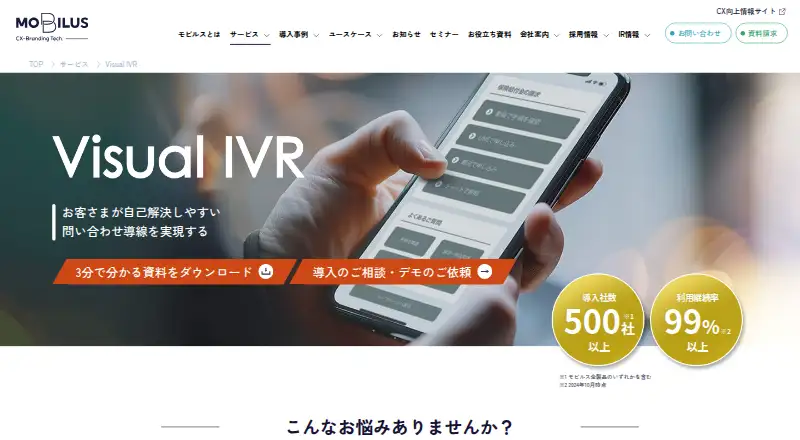
Mobilus Visual IVR: A visual web IVR for guiding customers across self-service and assisted support channels. Ranked #21 of 22 in IVR Software by our editors (6.8/10); pricing: Pricing on request; best for visual customer-service journeys.
At a glance
- Editor score6.8 / 10
- PricingPricing on request
- Best forVisual customer-service journeys
- Founded2011 · Shinagawa-ku, Tokyo, Japan
- Facts checked20 Sep 2026
Where it wins
- Drag-and-drop graphical scenario-flow editing
- Support menus spanning FAQs, chat, LINE, bots, and telephone
- Website deployment with buttons or QR codes plus flow analytics
Where it doesn't
- Pricing requires contacting Mobilus
- Web-based delivery limits the platform scope
- Visual routing is not suited to every voice-automation workflow
Our verdict on Mobilus Visual IVR
Mobilus Visual IVR is a web-based visual inquiry-routing system for businesses and contact centers. It guides customers through graphical menus toward FAQs, web chat, LINE, chatbots, voicebots, or telephone support. Teams can use it to present multiple service paths in one customer-facing journey, with website deployment available through a button or QR code. Its best fit is organizations that want to make support-channel selection more visual and structured rather than relying only on traditional voice menus.
The product’s standout capability is its visual scenario editor. Drag-and-drop link changes support adjustments to customer journeys, while customizable page designs can be created in simple mode or with HTML/CSS. Preview and publishing controls provide a defined workflow for preparing visual IVR content. Access, traffic-source, and user-behavior analytics add visibility into how customers reach and navigate those journeys. Mobilus also describes integration with voicebots that can send SMS links to Visual IVR menus, connecting voice interactions with web-based support selection.
Mobilus lists pricing as contact sales, so the buying process begins with a direct conversation rather than a published plan comparison. The product is focused on web-based visual IVR, making it a strong choice for teams prioritizing graphical routing, multichannel menus, and website access. Organizations that require API or webhook workflows, speech-input capabilities, recording specifications, or a broader voice-automation focus should compare alternatives before choosing. Mobilus Visual IVR is most appropriate when the central problem is directing inquiries to the right support channel through a visual customer experience.
Your product? Our editors can test Mobilus Visual IVR in depth and publish a review, labelled as paid · from $149/mo →
Mobilus Visual IVR pricing
Mobilus Visual IVR fact sheet
| Free plan | Not verified |
|---|---|
| Paid from | Not verified |
| Speech input | Not verified |
| Visual flow builder | Yes |
| Concurrent calls | Not verified |
| Supported languages | Not verified |
| Webhooks or API | Not verified |
| Call recording | Not verified |
| Deployment | Cloud |
| Platforms | Web |
| Built for | Mid-market, Enterprise (editorial estimate) |
| Integrations | 6 integrations: FAQ, Web chat, LINE, Chatbot, Voicebot, Telephone |
| Pricing | Pricing on request (source) |
| Website | mobilus.co.jp |
| Facts checked | 20 Sep 2026 |
Mobilus Visual IVR integrations
Mobilus Visual IVR lists 6 integrations on its own site.
- FAQ
- Web chat
- LINE
- Chatbot
- Voicebot
- Telephone
Alternatives to Mobilus Visual IVR
- Teloz IVRA broad IVR toolkit with affordable entry pricing and strong automation coverage.9.4
- Genesys Enterprise IVREnterprise IVR with visual design, speech understanding, analytics and broad integrations.9.2
- Momo Business IVRStructured IVR with visual controls, AI destinations, and a low-cost starting tier.9.0


See all Mobilus Visual IVR alternatives →
Used Mobilus Visual IVR? Be the first to review it
The editor score above is our own research. What this page doesn't have yet is a reader's view — what you used Mobilus Visual IVR for, what worked and what didn't. No stars are seeded and no review is paid for; an editor reads every one before it appears.
Write a reviewTwo minutes · verified accounts only · read by an editor before it appears
Featured on iTechGuides

Mobilus Visual IVR is listed in our IVR Software directory. Add the badge to your site — it links back to this page.
<a href="https://www.itechguides.com/products/mobilus-visual-ivr/"><img src="https://www.itechguides.com/best/badge/mobilus-visual-ivr.svg" alt="Featured on iTechGuides" width="230" height="46"></a>
Reviewed by iTechGuides Editors · Editorial team · Updated Oct 2026
Advertiser disclosure: iTechGuides is reader-supported. Vendors can pay for top positions in our rankings and for a place on other products' pages, and we may earn a commission when you click some links. Bought places stand at the number bought; this page and our disclosure say so. Paying vendors may get a fuller, more detailed review from our editors, and that review can change their score. How we rank.
Last updated · How we research and update