
MMGuardian
MMGuardian: A broad parental-control suite with detailed monitoring and AI-powered safety alerts. Ranked #10 of 106 in Parental Control Apps by our editors (8.2/10); pricing: 14-day trial; best for parents prioritizing safety-risk detection.
At a glance
- Editor score8.2 / 10
- Pricing14-day trial
- Best forParents prioritizing safety-risk detection
- Free planNo
- Content filteringYes
- Founded2012 · 78 John Miller Way, Suite 326-HD, Kearny, NJ 07032, USA
- Facts checked20 Sep 2026
Where it wins
- AI alerts cover bullying, drugs, suicide, predators, sexting, and violence
- Combines filtering, schedules, app controls, reports, location, and remote locking
- Family plans cover up to five child devices
Where it doesn't
- Monitoring and controls require a paid subscription
- Some social-media message monitoring is limited to supported services
- Features and coverage vary by child device and platform
Our verdict on MMGuardian
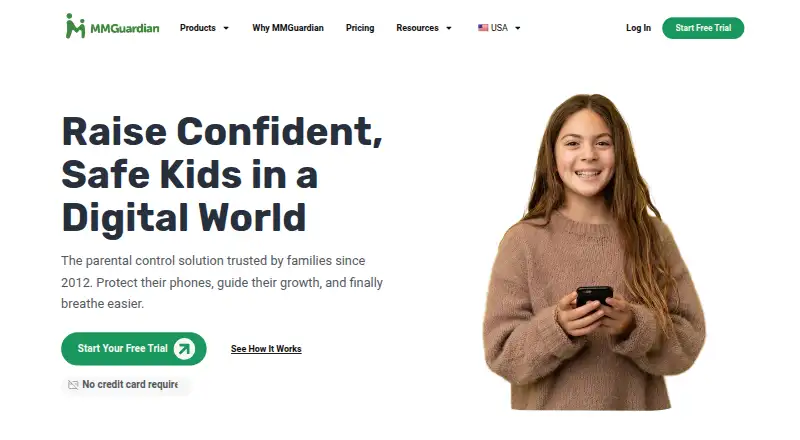
MMGuardian is a paid parental-control solution for families managing Android phones, iPhones, iPads, or MMGuardian Phones. Parents can use mobile apps or a web portal to manage screen time, block individual apps, filter web content, review activity, monitor messages, track location, and remotely lock or unlock a child’s phone. It is particularly suited to parents who want safety-risk detection alongside everyday controls for device use.
The feature set covers both routine supervision and more specific safety concerns. Web filtering can be configured by age range, category, URL, and search term, while recurring downtime schedules, screen-time limits, and app usage limits support household rules. Reports cover app usage, calls, web browsing, and messages. On-demand and scheduled location tracking add location visibility, and SMS plus supported social-media message monitoring extend oversight beyond browser activity. AI-generated safety alerts address bullying, drugs, suicide, predators, sexting, and violence, making risk detection a central part of the product rather than an add-on.
MMGuardian offers separate Single Phone Monthly, Single Phone Annual, Family Monthly, and Family Annual plans. Single-phone plans cover one child phone, while family plans cover up to five child devices. A 14-day free trial is available, and there is no free plan. The service supports web, iOS, and Android, with integrations including Apple Screen Time, Safari, and Chrome. Parents should choose MMGuardian when they want a wide set of controls and detailed safety monitoring across supported devices. Families seeking a free option, or message monitoring without platform and service limitations, should consider alternatives.
Your product? Our editors can test MMGuardian in depth and publish a review, labelled as paid · from $149/mo →
MMGuardian pricing
All 2 MMGuardian plans and prices →
MMGuardian fact sheet
| Free plan | No |
|---|---|
| Paid from | Not verified |
| Device platforms | Not verified |
| Content filtering | Yes |
| Screen-time schedules | Yes |
| App blocking | Yes |
| Activity reports | Yes |
| Location tracking | Yes |
| Device limit | 1 devices |
| Free trial | 14 days · no card needed |
| Deployment | Cloud, Desktop, Mobile |
| Platforms | Web, Windows, macOS, iOS, Android |
| Support | Email, Docs |
| Built for | Solo, Small business, Mid-market (editorial estimate) |
| Integrations | 8 integrations: WhatsApp, Instagram, Snapchat, TikTok, Facebook Messenger, Kik … |
| Pricing | 14-day trial (source) |
| Website | mmguardian.com |
| Facts checked | 20 Sep 2026 |
MMGuardian integrations
MMGuardian lists 8 integrations on its own site.
- Snapchat
- TikTok
- Facebook Messenger
- Kik
- Discord
- Tinder
Alternatives to MMGuardian
- BarkA broad cross-platform monitor with schedules, blocking, alerts, and location tools.9.2
- QustodioA broad parental-control suite with AI safety alerts and five-platform coverage.9.0
- OurPactA broad parental-control toolkit for families managing up to 20 child devices.8.9



See all MMGuardian alternatives →
Used MMGuardian? Be the first to review it
The editor score above is our own research. What this page doesn't have yet is a reader's view — what you used MMGuardian for, what worked and what didn't. No stars are seeded and no review is paid for; an editor reads every one before it appears.
Write a reviewTwo minutes · verified accounts only · read by an editor before it appears
Featured on iTechGuides

MMGuardian is listed in our Parental Control Apps directory. Add the badge to your site — it links back to this page.
<a href="https://www.itechguides.com/products/mmguardian/"><img src="https://www.itechguides.com/best/badge/mmguardian.svg" alt="Featured on iTechGuides" width="230" height="46"></a>
Reviewed by iTechGuides Editors · Editorial team · Updated Oct 2026
Advertiser disclosure: iTechGuides is reader-supported. Vendors can pay for top positions in our rankings and for a place on other products' pages, and we may earn a commission when you click some links. Bought places stand at the number bought; this page and our disclosure say so. Paying vendors may get a fuller, more detailed review from our editors, and that review can change their score. How we rank.
Last updated · How we research and update