MKVToolNix
MKVToolNix: A focused, free toolkit for Matroska remuxing, inspection and track management. Ranked #70 of 74 in Video Converter Software by our editors (3.0/10); pricing: Free plan; best for free Matroska remuxing and track management.
At a glance
- Editor score3.0 / 10
- PricingFree plan
- Best forFree Matroska remuxing and track management
- Free planYes
- Paid fromFree
- Supported platformsCross-platform
- Founded2003
- Facts checked22 Sep 2026
Where it wins
- Free and open source on Windows, macOS and Linux
- Multiplexes video, audio and subtitles into Matroska files
- Extracts tracks, chapters, tags, attachments and timestamps
Where it doesn't
- Primarily remuxes existing streams instead of transcoding codecs
- Does not provide batch conversion
- No hardware acceleration
Our verdict on MKVToolNix
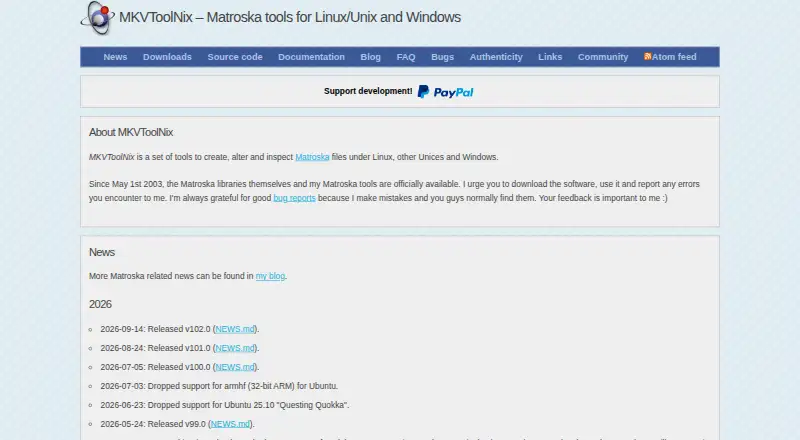
MKVToolNix is a desktop suite for creating, editing and inspecting Matroska files. It is aimed at media enthusiasts, archivists and solo or small-team workflows that need container-level control rather than broad codec conversion. The GUI and command-line tools can multiplex selected video, audio and subtitle tracks, create WebM-compliant files with supported streams, inspect containers and track IDs, and extract media elements such as chapters, tags, attachments, cues and timestamps. It runs on Windows, macOS and Linux, with direct downloads available from the official site.
Its main strength is depth within Matroska and related track operations. Users can edit headers and properties, import or export chapters and tags, inspect output in text or JSON, and save and restore multiplexing settings. The command-line tools also support scriptable workflows, while audio extraction is included among the category capabilities. These features make MKVToolNix a practical choice when the goal is to reorganize, inspect or preserve existing streams without changing their codecs. It also handles a broad set of listed stream and container types, including WebM, AAC, FLAC, MP3, H.264, H.265, AVI and Ogg.
The trade-off is focus. MKVToolNix is not a general-purpose converter: it primarily remuxes and manipulates existing streams, does not offer batch conversion, and lacks hardware acceleration. That limits its fit for users who need codec transcoding, large conversion queues or an all-in-one media conversion workflow. Its open-source model keeps the core software free, while a separately offered Microsoft Store edition is available for a fee. Choose MKVToolNix for precise Matroska and WebM container work, and consider a broader converter when format transcoding is the central requirement.
Your product? Our editors can test MKVToolNix in depth and publish a review, labelled as paid · from $149/mo →
MKVToolNix pricing
MKVToolNix fact sheet
| Free plan | Yes |
|---|---|
| Paid from | Free |
| Supported platforms | Cross-platform |
| Output formats | Matroska (MKV), WebM, AAC, AC-3, CAF, DTS, FLAC, MP2, MP3, Ogg Opus, WAV, RealMedia, TrueHD/MLP, TTA, Ogg Vorbis, WV, MPEG, H.264, H.265, AVI, Ogg and IVF |
| Batch conversion | No |
| Hardware acceleration | Not verified |
| Maximum output resolution | Not verified |
| Audio extraction | Yes |
| Deployment | Desktop |
| Platforms | Windows, macOS, Linux |
| Support | Community, Docs |
| Built for | Solo, Small business (editorial estimate) |
| Pricing | Free plan |
| Website | mkvtoolnix.download |
| Facts checked | 22 Sep 2026 |
Alternatives to MKVToolNix
- FFmpegA powerful open-source toolkit for technical media workflows across major desktop platforms.9.4
- HandBrakeA capable free converter for everyday desktop encoding, presets, queues, and disc sources.9.3
- Adobe Media EncoderA deep Adobe-centered encoder for teams managing complex media pipelines.9.2



See all MKVToolNix alternatives →
Also Ranked In
MKVToolNix is ranked in 2 of our directories.
Used MKVToolNix? Be the first to review it
The editor score above is our own research. What this page doesn't have yet is a reader's view — what you used MKVToolNix for, what worked and what didn't. No stars are seeded and no review is paid for; an editor reads every one before it appears.
Write a reviewTwo minutes · verified accounts only · read by an editor before it appears
Featured on iTechGuides

MKVToolNix is listed in our Video Converter Software directory. Add the badge to your site — it links back to this page.
<a href="https://www.itechguides.com/products/mkvtoolnix/"><img src="https://www.itechguides.com/best/badge/mkvtoolnix.svg" alt="Featured on iTechGuides" width="230" height="46"></a>
Reviewed by iTechGuides Editors · Editorial team · Updated Oct 2026
Advertiser disclosure: iTechGuides is reader-supported. Vendors can pay for top positions in our rankings and for a place on other products' pages, and we may earn a commission when you click some links. Bought places stand at the number bought; this page and our disclosure say so. Paying vendors may get a fuller, more detailed review from our editors, and that review can change their score. How we rank.
Last updated · How we research and update