
minsMe
minsMe: A governance-focused meeting recorder with search, summaries, privacy controls, and a free plan. Ranked #14 of 34 in Meeting Recording Software by our editors (8.0/10); pricing: Free plan; best for teams needing governance-focused free recording.
At a glance
- Editor score8.0 / 10
- PricingFree plan
- Best forTeams needing governance-focused free recording
- Free planYes
- Recording scopeAudio and video
- Facts checked21 Sep 2026
Where it wins
- Records audio and video across Google Meet, Zoom, and Microsoft Teams
- Adds speaker-attributed transcripts, summaries, actions, and workspace Q&A
- Includes controlled sharing, PII redaction, audit logs, and workspace roles
Where it doesn't
- Not open source
- Primarily focused on meeting capture and intelligence
- Paid plan structure requires separate evaluation for larger deployments
Our verdict on minsMe
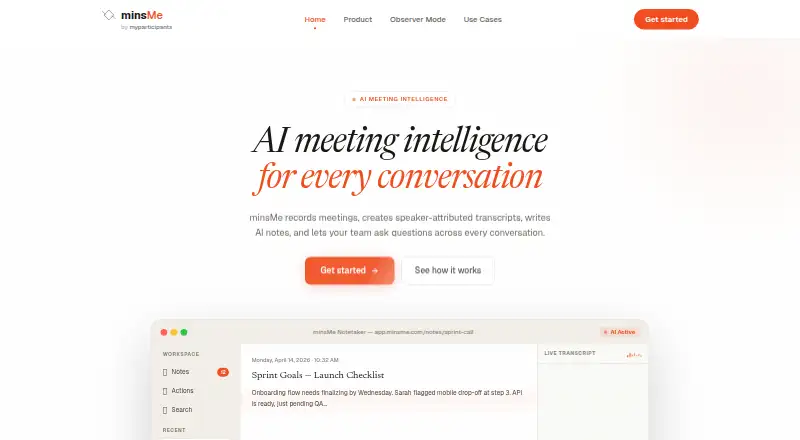
minsMe is an AI meeting-intelligence platform for teams that need to capture, understand, and manage recorded conversations. It records audio and video from Google Meet, Zoom, and Microsoft Teams, creates speaker-attributed transcripts, and generates summaries, action items, and highlights. Search works across transcripts and the workspace, while questions can be asked about individual meetings or broader workspace content. A free plan makes the product relevant to teams evaluating governed meeting recording without starting with a paid commitment.
Its strongest distinction is the combination of meeting intelligence and governance controls. Controlled sharing supports expiry and revocation, while PII redaction, participant masking, audit logs, observer mode with private notes, and workspace roles address privacy and administrative needs. Calendar-based automatic capture can reduce the effort of recording recurring meetings, and audio or video uploads extend the workflow to existing files. Teams that need searchable meeting knowledge with defined access controls should find this feature mix more suitable than a recorder focused only on transcription.
minsMe also fits teams with an established collaboration stack. It connects with Google Calendar, Microsoft Outlook, Slack, Notion, Jira, HubSpot, and Linear, alongside Google Meet, Zoom, and Microsoft Teams. The web app, Chrome extension, and API provide several access points, although the product remains centered on meeting content rather than general-purpose work management. Choose minsMe if recording, follow-up, search, and governance belong in one workflow; consider an alternative if open-source software or a broader non-meeting platform is the priority.
Your product? Our editors can test minsMe in depth and publish a review, labelled as paid · from $149/mo →
minsMe pricing
minsMe fact sheet
| Free plan | Yes |
|---|---|
| Paid from | Not verified |
| Recording scope | Audio and video |
| Transcript search | Yes |
| Recording retention | Not verified |
| Meeting platforms | Google Meet, Zoom, Microsoft Teams |
| Sharing controls | Advanced governance |
| Recording limit | Not verified |
| Deployment | Cloud, Browser extension |
| Platforms | Web, Chrome extension |
| Support | |
| Built for | Small business, Mid-market, Enterprise (editorial estimate) |
| Integrations | 10 integrations: Google Meet, Zoom, Microsoft Teams, Google Calendar, Microsoft Outlook, Slack … |
| Pricing | Free plan |
| Website | minsme.com |
| Facts checked | 21 Sep 2026 |
minsMe integrations
minsMe lists 10 integrations on its own site.
- Google Meet
- Zoom
- Microsoft Teams
- Google Calendar
- Microsoft Outlook
- Slack
- Notion
- Jira
- HubSpot
- Linear
Alternatives to minsMe
- MeetGeekA broad meeting capture and follow-up suite with a useful free plan and wide integrations.9.3
- Fireflies.aiA broad meeting intelligence platform with strong integrations and flexible plans.9.2
- NottaA budget-friendly meeting notetaker with broad transcription, translation, and export tools.9.1



Used minsMe? Be the first to review it
The editor score above is our own research. What this page doesn't have yet is a reader's view — what you used minsMe for, what worked and what didn't. No stars are seeded and no review is paid for; an editor reads every one before it appears.
Write a reviewTwo minutes · verified accounts only · read by an editor before it appears
Featured on iTechGuides

minsMe is listed in our Meeting Recording Software directory. Add the badge to your site — it links back to this page.
<a href="https://www.itechguides.com/products/minsme/"><img src="https://www.itechguides.com/best/badge/minsme.svg" alt="Featured on iTechGuides" width="230" height="46"></a>
Reviewed by iTechGuides Editors · Editorial team · Updated Oct 2026
Advertiser disclosure: iTechGuides is reader-supported. Vendors can pay for top positions in our rankings and for a place on other products' pages, and we may earn a commission when you click some links. Bought places stand at the number bought; this page and our disclosure say so. Paying vendors may get a fuller, more detailed review from our editors, and that review can change their score. How we rank.
Last updated · How we research and update