
Minitooler Video Repair
Minitooler Video Repair: A low-cost local browser tool for automatic repairs across common video formats. Ranked #13 of 26 in Video Repair Software by our editors (8.1/10); pricing: Free plan; best for low-cost local browser repair.
At a glance
- Editor score8.1 / 10
- PricingFree plan
- Best forLow-cost local browser repair
- Free planYes
- Paid from$5/mo
- Repair modeAutomatic
- Facts checked20 Sep 2026
Where it wins
- Processes files locally in the browser
- Supports MP4, MOV, MKV, AVI, WebM and TS
- Repairs without watermarks and diagnoses issues first
Where it doesn't
- Free plan allows three repairs per day
- Free plan limits files to 100 MB
- Web-only, automatic repair may not suit desktop workflows
Our verdict on Minitooler Video Repair
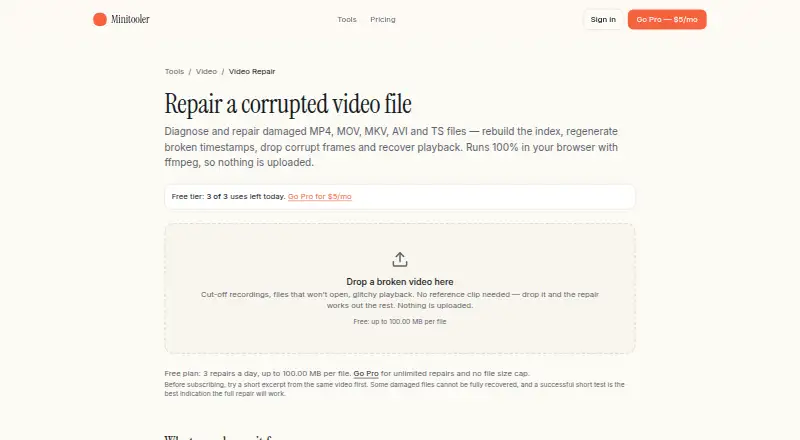
Minitooler Video Repair is a browser-based tool for repairing corrupted video files locally on a user's device. It is aimed at people who need to restore playback or repair damaged media without uploading files. The tool supports MP4, MOV, MKV, AVI, WebM and TS, and can address broken indexes, incorrect presentation timestamps, corrupt packets, damaged audio tracks and playback failures.
The free plan includes browser-based repair and local processing, with three repairs per day for files up to 100 MB. The Pro plan costs $5 per month and adds unlimited repairs with no file-size cap. Both plans use automatic repair, while the paid tier is the practical choice for recurring work or larger files. Repaired videos can be exported without a watermark, and lossless repacking is available before re-encoding.
Its strongest distinction is local browser processing through FFmpeg compiled to WebAssembly, keeping files on the device rather than uploading them. The repair workflow diagnoses files before applying fixes, rebuilds missing or misplaced indexes, regenerates broken timestamps and can drop corrupt packets or damaged audio tracks. Choose Minitooler Video Repair for affordable, format-flexible browser repair with local processing. It is less suitable for users who need a native desktop application, manual repair controls or a workflow beyond automatic correction.
Your product? Our editors can test Minitooler Video Repair in depth and publish a review, labelled as paid · from $149/mo →
Minitooler Video Repair pricing
All 2 Minitooler Video Repair plans and prices →
Minitooler Video Repair fact sheet
| Free plan | Yes |
|---|---|
| Paid from | $5/mo |
| Repair mode | Automatic |
| Supported formats | MP4, MOV, MKV, AVI, WebM, TS |
| Maximum file size | Not verified |
| Reference file needed | Not verified |
| Batch repair | Not verified |
| Preview before saving | Not verified |
| Deployment | Cloud |
| Platforms | Web |
| Support | |
| Built for | Solo, Small business (editorial estimate) |
| Pricing | Free plan (source) |
| Website | minitooler.com |
| Facts checked | 20 Sep 2026 |
Alternatives to Minitooler Video Repair
- VidRepairA free, open-source Windows repair tool with automatic recovery and validation.9.3
- Bitwar Video RepairA broad-format desktop repair tool with batch processing, previews, and 4K support.9.2
- RepairMyVideoA free web service for repairing large, damaged video files with playability checks.9.1



See all Minitooler Video Repair alternatives →
Used Minitooler Video Repair? Be the first to review it
The editor score above is our own research. What this page doesn't have yet is a reader's view — what you used Minitooler Video Repair for, what worked and what didn't. No stars are seeded and no review is paid for; an editor reads every one before it appears.
Write a reviewTwo minutes · verified accounts only · read by an editor before it appears
Featured on iTechGuides

Minitooler Video Repair is listed in our Video Repair Software directory. Add the badge to your site — it links back to this page.
<a href="https://www.itechguides.com/products/minitooler-video-repair/"><img src="https://www.itechguides.com/best/badge/minitooler-video-repair.svg" alt="Featured on iTechGuides" width="230" height="46"></a>
Reviewed by iTechGuides Editors · Editorial team · Updated Oct 2026
Advertiser disclosure: iTechGuides is reader-supported. Vendors can pay for top positions in our rankings and for a place on other products' pages, and we may earn a commission when you click some links. Bought places stand at the number bought; this page and our disclosure say so. Paying vendors may get a fuller, more detailed review from our editors, and that review can change their score. How we rank.
Last updated · How we research and update