Milton
Milton: A focused free painting app for infinite-canvas drawing on Windows and Linux. Ranked #41 of 46 in Digital Painting Software by our editors (6.0/10); pricing: Free plan; best for simple free infinite-canvas drawing.
At a glance
- Editor score6.0 / 10
- PricingFree plan
- Best forSimple free infinite-canvas drawing
- Free planYes
- Paid fromFree
- Layer supportYes
- Facts checked21 Sep 2026
Where it wins
- Infinite canvas uses vector-based rendering for flexible drawing space
- Layers, unlimited undo and redo, and automatic saving support ongoing work
- Free and open source, with smooth brushes and pressure-to-opacity support
Where it doesn't
- Official platform coverage centers on Windows and Linux
- Linux users need to compile the application
- macOS support is described as experimental or unsupported
Our verdict on Milton
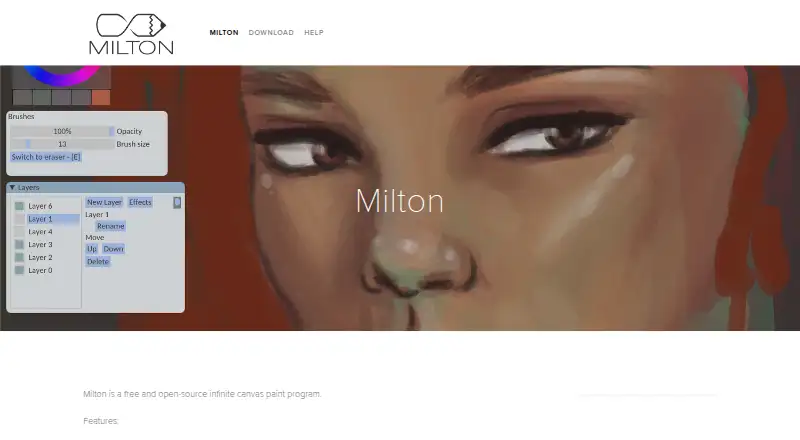
Milton is a free, open-source desktop painting program for drawing, sketching, and painting on an infinite canvas. It is aimed at artists and visual note-takers who want a focused drawing workspace rather than a broad suite of creative tools. Vector-based rendering provides the canvas foundation while the painting experience remains raster-like, and layer support, smooth brushes, blur and line tools, and pressure-to-opacity support cover core drawing needs. Windows users have official downloads, while Linux users can compile the application.
The Free plan includes the complete published feature set: an infinite canvas, layers, unlimited undo and redo, and JPEG and PNG export. Key workflow features include automatic saving after changes and export at supported resolutions. The combination makes Milton a straightforward option for users who want to start drawing without a paid tier or subscription structure. Its scope is concentrated around canvas-based painting, so the appeal is strongest for people who value a simple workspace over a larger ecosystem of creative applications or specialized production tools.
Platform fit is the main consideration. Windows is directly supported through official downloads, while Linux is identified as a free platform but requires compilation according to the project documentation. macOS support is described as experimental or unsupported, which makes Milton a poor choice for Mac-centered workflows. The official site lists release v1.9.1, and the project’s published toolset is narrower than that of larger digital painting applications. Choose Milton for free, open-source infinite-canvas drawing with layers, pressure-to-opacity support, autosave, and unlimited undo; choose an alternative if you need officially supported macOS use or a broader feature ecosystem.
Your product? Our editors can test Milton in depth and publish a review, labelled as paid · from $149/mo →
Milton pricing
All 1 Milton plans and prices →
Milton fact sheet
| Free plan | Yes |
|---|---|
| Paid from | Free |
| Brush customization | Not verified |
| Layer support | Yes |
| Pressure sensitivity | Yes |
| Supported platforms | Windows, Linux |
| Color management | Not verified |
| Stroke stabilization | Not verified |
| Deployment | Desktop |
| Platforms | Windows, Linux |
| Support | Email, Community |
| Built for | Solo, Small business (editorial estimate) |
| Pricing | Free plan (source) |
| Website | miltonpaint.com |
| Facts checked | 21 Sep 2026 |
Alternatives to Milton
- KritaA broad, professional-grade painting toolkit with no paid plan and wide platform coverage.9.4
- Clip Studio PaintA broad digital art workspace spanning illustration, comics, 3D, animation, and cloud tools.9.3
- ProcreateA polished iPad painting workflow with broad creative tools and limited platform coverage.9.1



Used Milton? Be the first to review it
The editor score above is our own research. What this page doesn't have yet is a reader's view — what you used Milton for, what worked and what didn't. No stars are seeded and no review is paid for; an editor reads every one before it appears.
Write a reviewTwo minutes · verified accounts only · read by an editor before it appears
Featured on iTechGuides

Milton is listed in our Digital Painting Software directory. Add the badge to your site — it links back to this page.
<a href="https://www.itechguides.com/products/milton/"><img src="https://www.itechguides.com/best/badge/milton.svg" alt="Featured on iTechGuides" width="230" height="46"></a>
Reviewed by iTechGuides Editors · Editorial team · Updated Oct 2026
Advertiser disclosure: iTechGuides is reader-supported. Vendors can pay for top positions in our rankings and for a place on other products' pages, and we may earn a commission when you click some links. Bought places stand at the number bought; this page and our disclosure say so. Paying vendors may get a fuller, more detailed review from our editors, and that review can change their score. How we rank.
Last updated · How we research and update