
MilleMots
MilleMots: A focused iOS infographic maker for turning spoken or written content into visual summaries. Ranked #20 of 24 in AI Infographic Makers by our editors (7.2/10); pricing: Free plan; best for iOS users creating infographics from voice or documents.
At a glance
- Editor score7.2 / 10
- PricingFree plan
- Best foriOS users creating infographics from voice or documents
- Free planYes
- AI generationYes
- Facts checked20 Sep 2026
Where it wins
- Accepts voice, text, PDF, Word, and text-file inputs with OCR.
- Offers 14 layouts, including timelines, roadmaps, SWOT, and mind maps.
- Gallery tools support search, filtering, favorites, editing, and sharing.
Where it doesn't
- Available on iOS only.
- The Free plan allows 3 infographics and 1 edit per month.
- Higher monthly limits require Starter or Pro subscriptions.
Our verdict on MilleMots
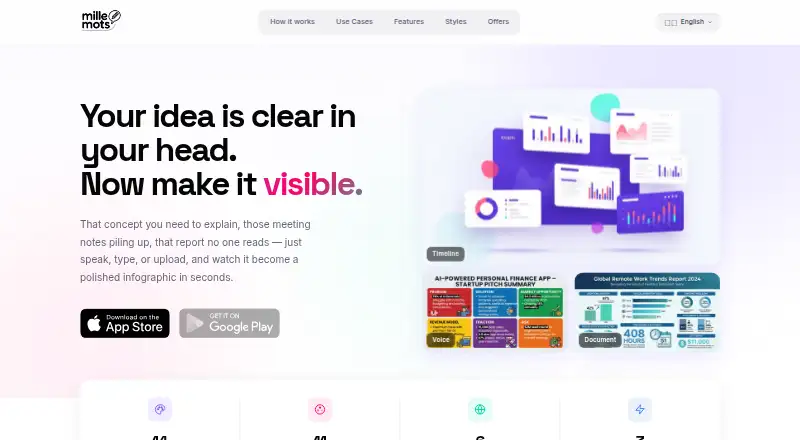
MilleMots is a mobile AI infographic maker for iOS users who want to turn voice notes, typed content, and documents into visual summaries. It automatically transcribes voice recordings, analyzes imported material, selects a layout, and generates an infographic. PDF, Word, and text-file imports are supported with OCR, while available formats include timelines, comparisons, statistics, mind maps, roadmaps, and SWOT diagrams. This makes it suited to people summarizing ideas, source documents, or structured information without starting from a blank canvas.
Its main strength is the combination of input flexibility and layout variety. Users can begin with speech, text, or documents, then choose from 14 layout styles and multiple color themes and language options. The product also includes high-quality downloads and a gallery for saving, searching, filtering, favoriting, editing, and sharing infographics. That workflow gives MilleMots a broader content-to-visual focus than a tool limited to one infographic format. It is a practical fit for iOS users who value quick transformation from source material into shareable visual content.
The platform choice is also its clearest boundary: MilleMots is available on iOS only. The Free plan includes 3 infographics per month, 1 free edit per month, all 14 layout styles, voice, text, and document inputs, and 6 languages. Starter raises the allowance to 10 infographics, 5 free edits, 5 extra generations, and no watermark, while Pro provides 30 infographics, 15 free edits, 5 extra generations, no watermark, and priority generation. Choose MilleMots if iOS access and document or voice input matter most; choose another option if you need broader platform coverage or a higher-volume workflow without subscription limits.
Your product? Our editors can test MilleMots in depth and publish a review, labelled as paid · from $149/mo →
MilleMots pricing
All 4 MilleMots plans and prices →
MilleMots fact sheet
| Free plan | Yes |
|---|---|
| Paid from | Not verified |
| AI generation | Yes |
| Data import | Yes |
| Chart builder | Yes |
| SVG export | Not verified |
| Brand kit | Not verified |
| Team collaboration | Not verified |
| Deployment | Mobile |
| Platforms | iOS |
| Compliance & security | GDPR |
| Support | |
| Built for | Solo, Small business (editorial estimate) |
| Pricing | Free plan (source) |
| Website | millemots.app |
| Facts checked | 20 Sep 2026 |
Alternatives to MilleMots
- Jeda.aiA broad AI infographic workspace with imports, collaboration, brand tools, and flexible exports.9.4
- a.graphicsA free web tool for turning concepts and data into exportable infographics.9.2
- AutoContent APIA strong choice for automated, data-heavy infographic production with paid plans only.9.1



See all MilleMots alternatives →
Used MilleMots? Be the first to review it
The editor score above is our own research. What this page doesn't have yet is a reader's view — what you used MilleMots for, what worked and what didn't. No stars are seeded and no review is paid for; an editor reads every one before it appears.
Write a reviewTwo minutes · verified accounts only · read by an editor before it appears
Featured on iTechGuides

MilleMots is listed in our AI Infographic Makers directory. Add the badge to your site — it links back to this page.
<a href="https://www.itechguides.com/products/millemots/"><img src="https://www.itechguides.com/best/badge/millemots.svg" alt="Featured on iTechGuides" width="230" height="46"></a>
Reviewed by iTechGuides Editors · Editorial team · Updated Oct 2026
Advertiser disclosure: iTechGuides is reader-supported. Vendors can pay for top positions in our rankings and for a place on other products' pages, and we may earn a commission when you click some links. Bought places stand at the number bought; this page and our disclosure say so. Paying vendors may get a fuller, more detailed review from our editors, and that review can change their score. How we rank.
Last updated · How we research and update