
Microsoft Authenticator
Microsoft Authenticator: A focused free authenticator for Microsoft accounts and compatible third-party services. Ranked #4 of 111 in Authenticator Apps by our editors (9.0/10); pricing: Free plan; best for microsoft users wanting push and passwordless sign-in.
At a glance
- Editor score9.0 / 10
- PricingFree plan
- Best forMicrosoft users wanting push and passwordless sign-in
- Free planYes
- Paid fromFree
- Push approvalsYes
- Facts checked21 Sep 2026
Where it wins
- Push approvals support passwordless and multifactor sign-in
- Includes passkeys, TOTP codes, QR setup, and biometric verification
- Free on iOS and Android with backup for supported account data
Where it doesn't
- Available only on iOS and Android
- Backup and restore works between devices of the same type
- HOTP support is not available for Microsoft Entra ID
Our verdict on Microsoft Authenticator
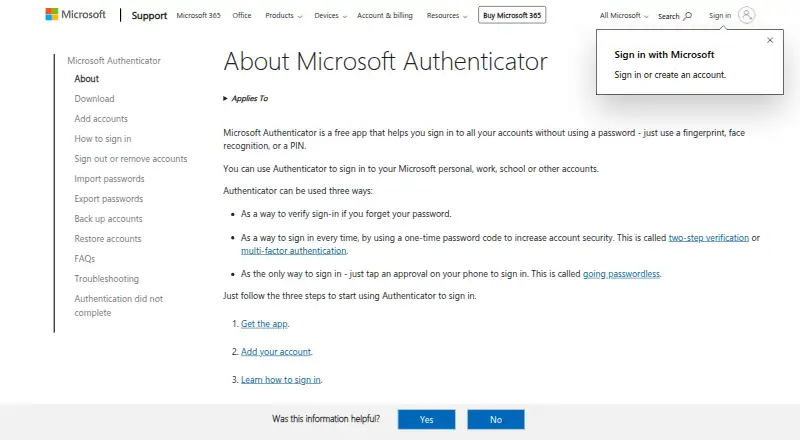
Microsoft Authenticator is a free mobile app for signing in to Microsoft personal, work, school, and other accounts. Its core options include passwordless sign-in through approval notifications, multifactor authentication through push notifications, passkeys on supported devices, and time-based one-time password codes. QR-code setup supports Microsoft accounts and compatible third-party services such as Google, Facebook, and Amazon. It is intended for people who want a mobile approval flow alongside code-based authentication, particularly within Microsoft account environments.
The free plan covers the product’s main authentication functions: passwordless sign-in, multifactor authentication, and one-time verification codes. The published feature set also includes biometric or device-PIN verification, device registration for work or school accounts, and cloud backup and restore for supported account data. Microsoft Authenticator therefore offers a broad set of sign-in methods without a paid tier or upgrade path to evaluate. Passkey support is available on supported Android and iOS devices, while account setup can be handled by scanning QR codes.
Its strongest fit is the Microsoft ecosystem, including Microsoft personal accounts and Microsoft Entra ID work and school accounts. The app also supports compatible accounts from Google, Facebook, and Amazon, giving it useful reach beyond Microsoft services. Platform coverage is limited to iOS and Android, and backup and restore operates between devices of the same type. Microsoft Entra ID uses TOTP rather than HOTP, so organizations requiring HOTP should choose an alternative that explicitly supports that method. Choose Microsoft Authenticator for free push approvals, passwordless access, passkeys, and TOTP in a Microsoft-centered setup; look elsewhere if broader platform coverage or HOTP is essential.
Your product? Our editors can test Microsoft Authenticator in depth and publish a review, labelled as paid · from $149/mo →
Microsoft Authenticator pricing
Microsoft Authenticator fact sheet
| Free plan | Yes |
|---|---|
| Paid from | Free |
| Code type | Totp |
| Push approvals | Yes |
| Encrypted backup | Not verified |
| Multi-device sync | No |
| Team administration | Not verified |
| Supported platforms | iOS, Android |
| Deployment | Mobile |
| Platforms | iOS, Android |
| Support | Docs |
| Built for | Solo, Small business, Mid-market, Enterprise (editorial estimate) |
| Pricing | Free plan |
| Website | support.microsoft.com |
| Facts checked | 21 Sep 2026 |
Alternatives to Microsoft Authenticator
- Proton AuthenticatorA mature free option for secure 2FA codes across mobile and desktop platforms.9.4
- Google AuthenticatorA free, straightforward authenticator with offline codes, sync, and QR transfers.9.2
- AuthyA focused free authenticator for mobile users who need synced TOTP tokens.9.1


See all Microsoft Authenticator alternatives →
Microsoft Authenticator vs the competition
- Microsoft Authenticator vs Proton Authenticator
- Microsoft Authenticator vs Google Authenticator
- Microsoft Authenticator vs Authy
- Microsoft Authenticator vs Duo Mobile
- Microsoft Authenticator vs Yubico Authenticator
- Microsoft Authenticator vs Zoho OneAuth


Compare Microsoft Authenticator with any tool side by side →
Used Microsoft Authenticator? Be the first to review it
The editor score above is our own research. What this page doesn't have yet is a reader's view — what you used Microsoft Authenticator for, what worked and what didn't. No stars are seeded and no review is paid for; an editor reads every one before it appears.
Write a reviewTwo minutes · verified accounts only · read by an editor before it appears
Featured on iTechGuides

Microsoft Authenticator is listed in our Authenticator Apps directory. Add the badge to your site — it links back to this page.
<a href="https://www.itechguides.com/products/microsoft-authenticator/"><img src="https://www.itechguides.com/best/badge/microsoft-authenticator.svg" alt="Featured on iTechGuides" width="230" height="46"></a>
Reviewed by iTechGuides Editors · Editorial team · Updated Oct 2026
Advertiser disclosure: iTechGuides is reader-supported. Vendors can pay for top positions in our rankings and for a place on other products' pages, and we may earn a commission when you click some links. Bought places stand at the number bought; this page and our disclosure say so. Paying vendors may get a fuller, more detailed review from our editors, and that review can change their score. How we rank.
Last updated · How we research and update