MicroProfile
MicroProfile: A free, open-source profiler for CPU/GPU timing and browser-based frame analysis. Ranked #12 of 22 in Game Profiling Software by our editors (7.2/10); pricing: Free plan; best for lightweight browser-based CPU/GPU profiling.
At a glance
- Editor score7.2 / 10
- PricingFree plan
- Best forLightweight browser-based CPU/GPU profiling
- Free planYes
- Paid fromFree
- Frame-time analysisYes
- Facts checked22 Sep 2026
Where it wins
- CPU and GPU timing across major graphics APIs
- Live browser view with HTML or CSV capture export
- Markers, counters, comparisons, and optional instrumentation
Where it doesn't
- Requires integration into a native application
- The browser view depends on the instrumented application
- Dynamic instrumentation is limited to x86-64 applications
Our verdict on MicroProfile
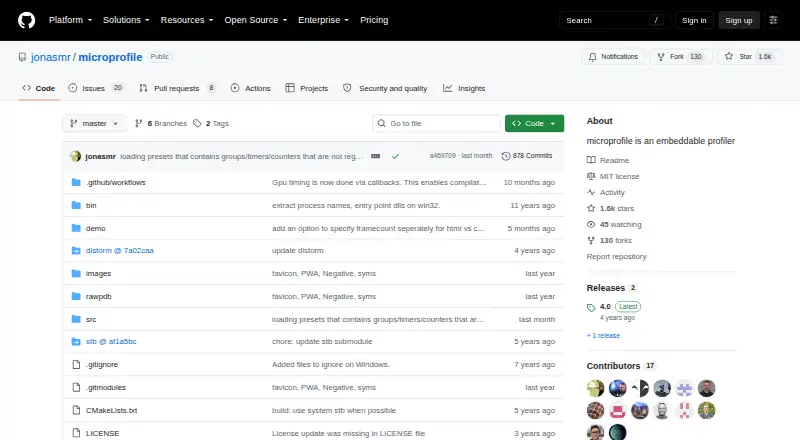
MicroProfile is an embeddable C++ profiler for games and other native applications. It records CPU timers, GPU timings, counters, timelines, and frame captures, then presents live profiling data through a browser-based view served by the instrumented application. Its intended audience is developers who want a focused profiling layer inside their own projects rather than a hosted commercial service. The project is free and open source, and supports Windows, macOS, Linux, and self-hosted use.
The profiling feature set covers both frame-time investigation and broader runtime inspection. GPU timing supports OpenGL, Direct3D 11, Direct3D 12, and Vulkan, while CPU timer instrumentation helps trace application work. Timeline markers can identify long-running application states, and counter tracking adds context around captured activity. Developers can save captures as HTML or CSV, compare captures, and share exported results. Optional x86-64 dynamic instrumentation extends the tool beyond manually embedded instrumentation on Windows, macOS, and Linux.
MicroProfile fits teams that want direct control over profiling inside a native game or engine codebase, especially when browser access and portable capture formats are useful. Its main tradeoff is integration: it is an embeddable library, so adoption involves adding it to the application rather than opening a standalone hosted dashboard. The browser view also comes from the instrumented application, and dynamic instrumentation applies only to x86-64 applications. Choose MicroProfile for lightweight CPU/GPU analysis with source-level integration; choose another option if you need a hosted service or a profiling workflow centered on a standalone desktop interface.
Your product? Our editors can test MicroProfile in depth and publish a review, labelled as paid · from $99/mo →
MicroProfile pricing
MicroProfile fact sheet
| Free plan | Yes |
|---|---|
| Paid from | Free |
| CPU profiling | Yes |
| GPU profiling | Yes |
| Memory profiling | Not verified |
| Frame-time analysis | Yes |
| Render API capture | Not verified |
| Remote profiling | Not verified |
| Supported platforms | Windows, macOS, Linux; console support is mentioned but consoles are unspecified |
| Deployment | Cloud, Self-hosted, Browser extension |
| Platforms | Web, Windows, macOS, Linux |
| Support | Docs, Community |
| Built for | Solo, Small business, Mid-market, Enterprise (editorial estimate) |
| Pricing | Free plan |
| Website | github.com |
| Facts checked | 22 Sep 2026 |
Alternatives to MicroProfile
- Tracy ProfilerA free, broad profiler covering CPU, GPU, memory, frames, and remote capture.9.4
- RAD TelemetryA wide-ranging telemetry suite for teams investigating CPU, GPU, memory, and frame-time performance.9.2
- Arm Performance StudioA free, multi-tool suite for CPU, GPU, frame, API, and shader analysis on Arm graphics.9.0


See all MicroProfile alternatives →
Used MicroProfile? Be the first to review it
The editor score above is our own research. What this page doesn't have yet is a reader's view — what you used MicroProfile for, what worked and what didn't. No stars are seeded and no review is paid for; an editor reads every one before it appears.
Write a reviewTwo minutes · verified accounts only · read by an editor before it appears
Featured on iTechGuides

MicroProfile is listed in our Game Profiling Software directory. Add the badge to your site — it links back to this page.
<a href="https://www.itechguides.com/products/microprofile/"><img src="https://www.itechguides.com/best/badge/microprofile.svg" alt="Featured on iTechGuides" width="230" height="46"></a>
Reviewed by iTechGuides Editors · Editorial team · Updated Oct 2026
Advertiser disclosure: iTechGuides is reader-supported. Vendors can pay for top positions in our rankings and for a place on other products' pages, and we may earn a commission when you click some links. Bought places stand at the number bought; this page and our disclosure say so. Paying vendors may get a fuller, more detailed review from our editors, and that review can change their score. How we rank.
Last updated · How we research and update