
Memoriam
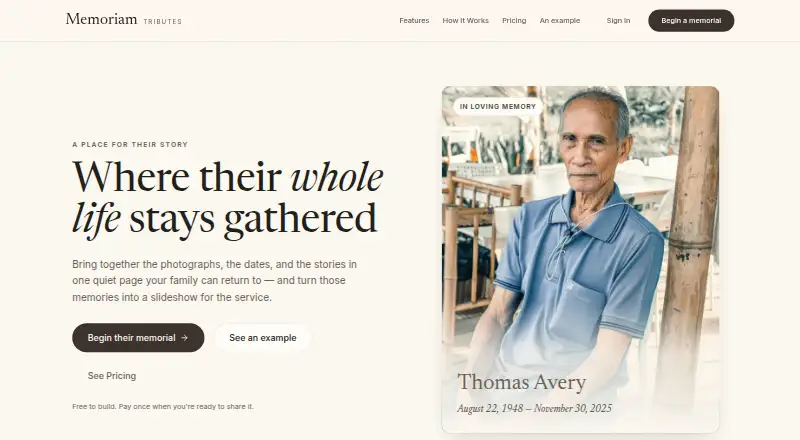
Memoriam: A budget-friendly memorial slideshow maker with free drafting and one-time publishing. Ranked #15 of 23 in Photo Slideshow Makers by our editors (6.9/10); pricing: Free plan; best for budget memorial slideshows with shareable pages.
At a glance
- Editor score6.9 / 10
- PricingFree plan
- Best forBudget memorial slideshows with shareable pages
- Free planYes
- Paid from$99/mo
- Facts checked20 Sep 2026
Where it wins
- Free plan supports photo and video slideshow drafts
- One-time $10 purchase publishes a tribute page and exports video
- Captions, transitions, display duration, and Ken Burns add control
Where it doesn't
- Publishing one memorial costs $10 beyond the free draft plan
- Unlimited publishing and branding require a $99 monthly plan
- Available through the web rather than native desktop or mobile apps
Our verdict on Memoriam
Memoriam is a web application for families creating memorial pages, photo and video slideshows, and finished memorial videos. Its free plan supports memorial drafts, uploads, slideshow building, and previews, while published memorials can be shared through a link without requiring guests to sign in. Funeral homes are also a clear audience, with professional tools for branded pages, team access, and ongoing publishing.
Pricing is straightforward by use case. The Free plan costs $0 and covers draft creation, uploads, and slideshow previews. The Publish Memorial option costs $10 one time and adds one public tribute page, a shareable memorial link, and one finished memorial video export, with no subscription required. The Professional Plan costs $99 per month and adds unlimited memorial publishing, a branded memoriam.app subdomain, custom logo, colors, and footer branding, team member invitations, and video exports without the free-tier watermark. For a single family memorial, the one-time tier keeps the commitment limited; recurring professional pricing is aimed at organizations handling multiple memorials.
The editing feature set focuses on remembrance presentations rather than broad multimedia production. Users can arrange slides, adjust transitions and display duration, add captions, quotes, and dates, and apply a Ken Burns pan-and-zoom effect. Playback can be handled through a download, web link, or at a service. Families should choose Memoriam when they need a focused memorial page and slideshow workflow with shareable access. Funeral homes that need branding, team collaboration, and unlimited publishing have a dedicated upgrade path. It is less suitable for buyers seeking a general-purpose slideshow tool across multiple platforms or a wider audio-production workflow.
Your product? Our editors can test Memoriam in depth and publish a review, labelled as paid · from $149/mo →
Memoriam pricing
All 3 Memoriam plans and prices →
Memoriam fact sheet
| Free plan | Yes |
|---|---|
| Paid from | $99/mo |
| Maximum photos | Not verified |
| Caption tools | Yes |
| Audio upload | Not verified |
| Export formats | video |
| Playback options | download, web link, playback at a service |
| Supported platforms | web |
| Deployment | Cloud |
| Platforms | Web |
| Support | |
| Built for | Small business (editorial estimate) |
| Pricing | Free plan (source) |
| Website | memoriam.app |
| Facts checked | 20 Sep 2026 |
Alternatives to Memoriam
- MAGIX Photostory deluxeA feature-rich Windows slideshow editor for personal photo and video projects.8.9
- PhotoStageA versatile slideshow maker with broad export options and a non-commercial free version.8.7
- Icecream Slideshow MakerA capable free Windows slideshow maker with paid 4K, DVD, and cloud-upload features.8.4



See all Memoriam alternatives →
Used Memoriam? Be the first to review it
The editor score above is our own research. What this page doesn't have yet is a reader's view — what you used Memoriam for, what worked and what didn't. No stars are seeded and no review is paid for; an editor reads every one before it appears.
Write a reviewTwo minutes · verified accounts only · read by an editor before it appears
Featured on iTechGuides

Memoriam is listed in our Photo Slideshow Makers directory. Add the badge to your site — it links back to this page.
<a href="https://www.itechguides.com/products/memoriam/"><img src="https://www.itechguides.com/best/badge/memoriam.svg" alt="Featured on iTechGuides" width="230" height="46"></a>
Reviewed by iTechGuides Editors · Editorial team · Updated Oct 2026
Advertiser disclosure: iTechGuides is reader-supported. Vendors can pay for top positions in our rankings and for a place on other products' pages, and we may earn a commission when you click some links. Bought places stand at the number bought; this page and our disclosure say so. Paying vendors may get a fuller, more detailed review from our editors, and that review can change their score. How we rank.
Last updated · How we research and update