
Mega Voxels
Mega Voxels: A versatile mobile editor for creating, animating, rendering, and exporting voxel art. Ranked #8 of 26 in Voxel Editors by our editors (8.4/10); pricing: Free plan; best for mobile voxel and pixel animation.
At a glance
- Editor score8.4 / 10
- PricingFree plan
- Best forMobile voxel and pixel animation
- Free planYes
- Animation toolsYes
- Facts checked21 Sep 2026
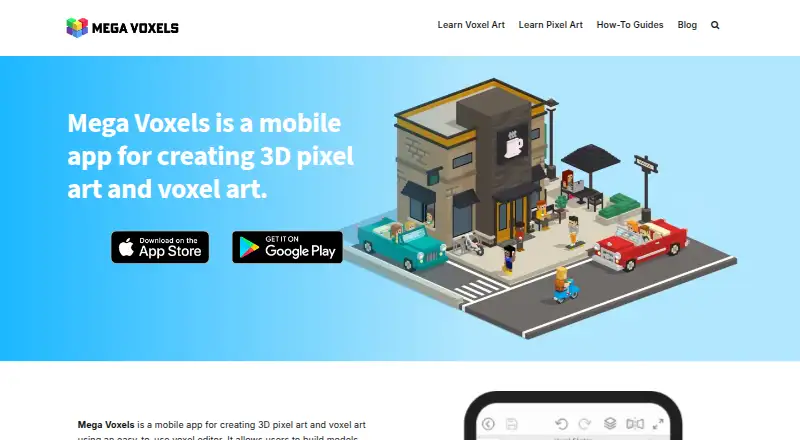
Where it wins
- Combines 3D voxel modeling with 2D pixel art editing
- Supports frame-by-frame, camera, and real-time rendering workflows
- Exports VOX, OBJ, PNG, sprite sheets, and MP4 video
Where it doesn't
- Designed for iOS and Android smartphones and tablets
- Advanced workflows may require moving files between mobile and desktop tools
- Freemium access includes in-app purchases
Our verdict on Mega Voxels
Mega Voxels is a mobile voxel and pixel art editor for artists, game developers, hobbyists, and beginners. It supports 3D voxel modeling, 2D grid-based pixel drawing, layer-based editing, scene creation, color painting, animation, rendering, and augmented-reality viewing. The app runs on iOS and Android smartphones and tablets, with local and cloud file saving and sharing features. Its focus suits creators who want to make voxel models, pixel artwork, and animated assets from a mobile device.
The freemium model provides a free plan, with in-app purchases available. Its feature set covers both construction and finishing work: users can add, erase, paint, and fill voxel scenes; work with palettes, custom colors, gradients, and voxel painting; and organize projects with layers. Animation support includes frame-by-frame pixel animation and camera animations, while real-time preview and rendering help review voxel models before export. A library of pre-made voxel models can also support projects that do not start from an empty scene.
Mega Voxels is particularly suited to creators who need mobile-first export options. Projects can be exported as VOX, OBJ, PNG, sprite sheets, and MP4 video, and the product lists integrations with Unity, Blender, Godot, and GameMaker. Those options connect mobile creation with game engines and desktop 3D or art workflows. Choose it for accessible voxel and pixel editing, animation, AR viewing, and varied asset output on iOS or Android. Choose another tool if your priority is a desktop-native editor or a workflow centered outside mobile devices.
Your product? Our editors can test Mega Voxels in depth and publish a review, labelled as paid · from $149/mo →
Mega Voxels pricing
Mega Voxels fact sheet
| Free plan | Yes |
|---|---|
| Paid from | Not verified |
| Max grid dimension | Not verified |
| Animation tools | Yes |
| Game engine export | Yes |
| Texture painting | Yes |
| Scene editing | Yes |
| Supported platforms | iOS, Android |
| Deployment | Mobile |
| Platforms | iOS, Android |
| Support | |
| Built for | Solo, Small business (editorial estimate) |
| Integrations | 4 integrations: Unity, Blender, Godot, GameMaker |
| Pricing | Free plan |
| Website | megavoxels.com |
| Facts checked | 21 Sep 2026 |
Mega Voxels integrations
Mega Voxels lists 4 integrations on its own site.
- Unity
- Blender
- Godot
- GameMaker
Alternatives to Mega Voxels
- pixembossA free web editor for creating, animating, and exporting pixel and voxel game assets.9.4
- Vengi VoxEditA broad voxel suite covering modeling, materials, animation, scripting, and scenes.9.3
- MagicaVoxelA deep free desktop toolkit for creating, animating, rendering, and exporting voxel assets.9.1



See all Mega Voxels alternatives →
Mega Voxels vs the competition
- Mega Voxels vs pixemboss
- Mega Voxels vs Vengi VoxEdit
- Mega Voxels vs MagicaVoxel
- Mega Voxels vs Blockhammer
- Mega Voxels vs VoxelDraft
- Mega Voxels vs VoxShop



Compare Mega Voxels with any tool side by side →
Used Mega Voxels? Be the first to review it
The editor score above is our own research. What this page doesn't have yet is a reader's view — what you used Mega Voxels for, what worked and what didn't. No stars are seeded and no review is paid for; an editor reads every one before it appears.
Write a reviewTwo minutes · verified accounts only · read by an editor before it appears
Featured on iTechGuides

Mega Voxels is listed in our Voxel Editors directory. Add the badge to your site — it links back to this page.
<a href="https://www.itechguides.com/products/mega-voxels/"><img src="https://www.itechguides.com/best/badge/mega-voxels.svg" alt="Featured on iTechGuides" width="230" height="46"></a>
Reviewed by iTechGuides Editors · Editorial team · Updated Oct 2026
Advertiser disclosure: iTechGuides is reader-supported. Vendors can pay for top positions in our rankings and for a place on other products' pages, and we may earn a commission when you click some links. Bought places stand at the number bought; this page and our disclosure say so. Paying vendors may get a fuller, more detailed review from our editors, and that review can change their score. How we rank.
Last updated · How we research and update