
MCTools
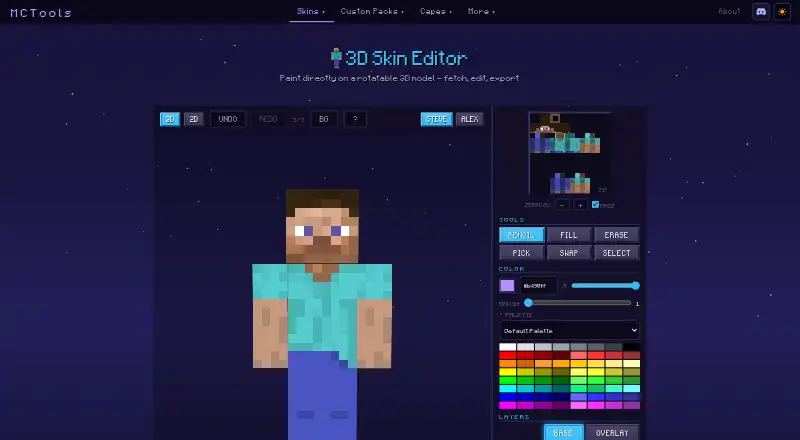
MCTools: A 3D skin editor with layers and username fetch, inside a toolkit that packages skins for Bedrock. Ranked #9 of 9 in Minecraft Skin Editors by our editors (7.4/10); pricing: Free · no account needed; best for making skins for Bedrock skin packs.
At a glance
- Editor score7.4 / 10
- PricingFree · no account needed
- Best forMaking skins for Bedrock skin packs
- Free to useYes
- Paint on 3D modelYes
- Facts checked18 Sep 2026
Where it wins
- Paints on a rotatable 3D model with layers and keyboard shortcuts
- Fetches an existing skin by username to start from
- Skin Pack Maker bundles skins into a Bedrock pack in the same toolkit
Where it doesn't
- A newer site with a short track record
- Documentation is a changelog and a shortcuts popup
- No stated HD or slim-model details for the editor
Our verdict on MCTools
MCTools is a free collection of browser utilities for Minecraft, and its skin editor recently received an overhaul that added layers, hotkeys, smarter undo, a better 3D view and cleaner body-part controls. The editor paints directly on a rotatable 3D model, can fetch an existing skin by username as a starting point, and exports the result, with a shortcuts popup behind a question-mark button for faster work once the basics are familiar.
The rest of the toolkit is what makes it distinctive. A Skin Pack Maker bundles several skins into a Bedrock skin pack, an Avatar Maker turns any skin into a profile picture, and builders for capes, custom paintings, music discs, totems, armour stand skins and player heads cover other cosmetic packs. A Pack Merger combines several texture packs into one .mcpack file, and a converter translates Overworld coordinates to the Nether. Everything runs in the browser, with no downloads, no uploads and no account, so a skin can be edited and packaged in one sitting.
The site is young, and the changelog on its home page doubles as the main documentation, so details such as HD sizes or slim-arm support are not spelled out for the editor. The wider toolkit leans towards Bedrock packaging, which suits console and mobile players more than Java users who only need a PNG. For someone who wants to edit a skin and ship it as part of a Bedrock pack in the same session, nothing else on this list covers both jobs.
Your product? Our editors can test MCTools in depth and publish a review, labelled as paid · from $149/mo →
MCTools pricing
MCTools fact sheet
| Free to use | Yes |
|---|---|
| Paid from | Free |
| Runs on | Browser |
| Paint on 3D model | Yes |
| Editable layers | Yes |
| HD skins | Not verified |
| Slim (Alex) model | Not verified |
| Load by username | Yes |
| Posing & animation | Not verified |
| Pricing | Free · no account needed |
| Website | mc-tools.net |
| Facts checked | 18 Sep 2026 |
Alternatives to MCTools
- Nova SkinPaint on a 3D model, pose it in a scene and search a library of 70M+ skins and textures, all for free.9.2
- PMCSkin3DBasic and Advanced editors in one app, with custom brushes, a pose mode, HD skins and one-click publishing.9.0
- BlockbenchA full 3D modelling suite whose Minecraft Skin format edits player and entity skins, free on web and desktop.8.8
See all MCTools alternatives →
MCTools vs the competition
- MCTools vs Godlike.Host
- MCTools vs Nova Skin
- MCTools vs PMCSkin3D
- MCTools vs Blockbench
- MCTools vs Laby Skin Studio
- MCTools vs The Skindex



Compare MCTools with any tool side by side →
Used MCTools? Be the first to review it
The editor score above is our own research. What this page doesn't have yet is a reader's view — what you used MCTools for, what worked and what didn't. No stars are seeded and no review is paid for; an editor reads every one before it appears.
Write a reviewTwo minutes · verified accounts only · read by an editor before it appears
Featured on iTechGuides

MCTools is listed in our Minecraft Skin Editors directory. Add the badge to your site — it links back to this page.
<a href="https://www.itechguides.com/products/mctools/"><img src="https://www.itechguides.com/best/badge/mctools.svg" alt="Featured on iTechGuides" width="230" height="46"></a>
Reviewed by iTechGuides Editors · Editorial team · Updated Oct 2026
Advertiser disclosure: iTechGuides is reader-supported. Vendors can pay for top positions in our rankings and for a place on other products' pages, and we may earn a commission when you click some links. Bought places stand at the number bought; this page and our disclosure say so. Paying vendors may get a fuller, more detailed review from our editors, and that review can change their score. How we rank.
Last updated · How we research and update